

YouTube Playlist Crossfade
26 ratings
)
Overview
Automatic crossfade between YouTube playlist songs. Supports YouTube mixes, playlists, and YouTube Music (Premium).
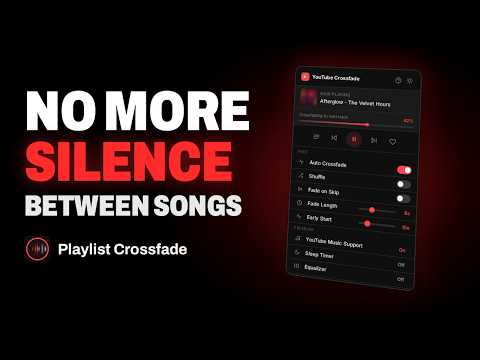
YouTube Playlist Crossfade — smooth, gapless transitions between every song Tired of the awkward silence between tracks on YouTube? This extension automatically crossfades one song into the next, so your playlists, mixes, and albums flow together like a real DJ set. No more dead air, no more jarring cut-offs — just seamless music. Just hit play on any YouTube playlist and let it run. As each song nears its end, the next one fades in right on cue. It works automatically in the background while you do your thing. What you get for free: 🎵 Automatic crossfade — songs blend smoothly before each track ends 🔀 Shuffle mode — play your playlist in a random order ⏮ ⏭ Skip controls — manually crossfade between tracks whenever you want 🎚 Adjustable fade length — set how long the blend lasts ⏱ Early start control — fine-tune exactly when the next song begins fading in Upgrade to Premium to unlock even more: 🎧 YouTube Music support — bring crossfade to your YouTube Music playlists, albums, and mixes 🎚 5-band equalizer — shape your sound with bass, mid, and treble control, plus ready-made presets like Bass Boost, Vocal, and Rock 😴 Sleep timer — drift off to music that gently fades out and pauses on its own Whether you're working, gaming, hosting, or winding down, your music just keeps flowing. A couple of quick notes: Crossfade works best with Chrome visible on screen — you can switch between apps and windows freely, just avoid fully minimizing or hiding Chrome, since browsers heavily limit background tabs. Got an ad blocker or YouTube Premium? Crossfade transitions will be even smoother without ad interruptions. Install it free, hit play, and enjoy music the way it was meant to flow.
2.6 out of 526 ratings
Details
- Version1.1.2
- UpdatedOctober 8, 2026
- FeaturesOffers in-app purchases
- Offered byYT Playlist Crossfade
- Size123KiB
- Languages7 languages
- Developer
Email
shopfrozo@gmail.com - Non-traderThis developer has not identified itself as a trader. For consumers in the European Union, please note that consumer rights do not apply to contracts between you and this developer.
Privacy

YouTube Playlist Crossfade has disclosed the following information regarding the collection and usage of your data. More detailed information can be found in the developer's privacy policy.
YouTube Playlist Crossfade handles the following:
This developer declares that your data is
- Not being sold to third parties, outside of the approved use cases
- Not being used or transferred for purposes that are unrelated to the item's core functionality
- Not being used or transferred to determine creditworthiness or for lending purposes