


Overview
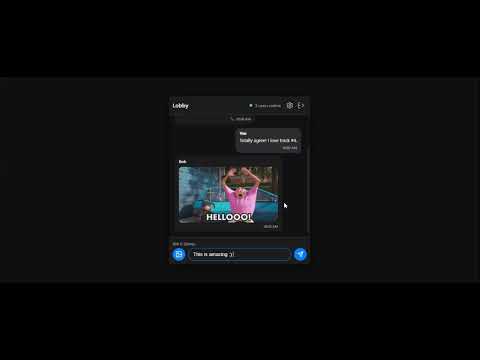
Chat in real-time with others watching the same YouTube or Rumble playlists.
Transform how you experience playlists with YouTube Playlist Chat. This extension seamlessly integrates a real-time side panel chat room whenever you watch a YouTube playlist, instantly connecting you with everyone else who is watching alongside you. Key Features: - Live Synchronized Chat: Instantly join a continuous community chat room tied specifically to the playlist you are watching. - Community Hub & Wall of Fame: Discover power users, top contributors, and community favorites on a customized 10x10 grid. - Rich Interactions & Media: Express yourself using integrated Giphy support, custom emojis, and an active notification system so you never miss a direct mention. - Earn & Tip: Participate in the local economy! Earn credits just by listening to and sharing your favorite playlists on social media. Use your earned credits to tip other users or purchase exclusive community perks. - Transparent Transactions: Keep track of it all—from top-ups and tips to commission earnings—in your personal real-time dashboard. Why Viewers Love It: YouTube Playlist Chat turns passive viewing into an active, social experience. You can easily find "your people" whether you're watching niche multi-part tutorials, deep-dive lore series, or hidden gem music playlists. Stuck on step 3 of a coding tutorial? Ask the side-panel chat and someone watching alongside you can answer immediately. Plus, the built-in reward economy means you actually earn credits for your attention and advocacy, unlocking a sense of status on the community Wall of Fame. Why Creators Love It (Especially Small Channels): For creators, the extension is a powerful tool for driving retention and algorithmic growth. Because users are chatting, engaging, and staying to earn rewards, they watch through entire series and playlists. This massive boost in session time signals high satisfaction to the YouTube algorithm, pushing the creator's content to more people. With viral sharing mechanics incentivizing viewers to post the playlist to WhatsApp and X, small creators get organic distribution and build that tight-knit "Discord community feel" directly natively over their videos. Stop listening alone. Install YouTube Playlist Chat and start listening together! UPDATES; v0.24 - The latest crazy update 🔥🔥
5 out of 52 ratings
Details
- Version0.39
- UpdatedJune 25, 2026
- FeaturesOffers in-app purchases
- Size10.8MiB
- LanguagesEnglish
- DeveloperWebsite
Email
beukzgroup@outlook.com - Non-traderThis developer has not identified itself as a trader. For consumers in the European Union, please note that consumer rights do not apply to contracts between you and this developer.
Privacy

This developer declares that your data is
- Not being sold to third parties, outside of the approved use cases
- Not being used or transferred for purposes that are unrelated to the item's core functionality
- Not being used or transferred to determine creditworthiness or for lending purposes
Support
For help with questions, suggestions, or problems, please open this page on your desktop browser