

YouTube Memos
2 ratings
)
Overview
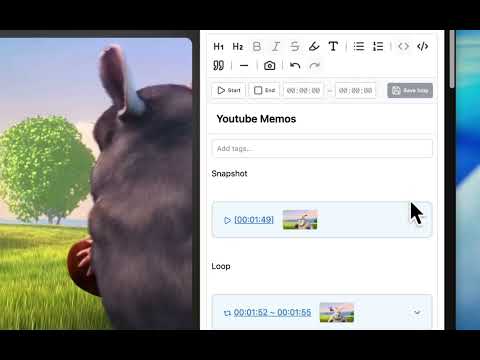
Write memos on YouTube videos. Memos are automatically restored when you play videos with saved memos.
===================================== 🎉 NEW IN VERSION 1.7.0 🛠️ Enhanced Snapshot & Loop UX We’ve significantly upgraded the playback and snapshot controls for a more seamless workflow. Manual Loop Adjustment: You can now manually edit loop timestamps for pixel-perfect precision. Smart Playback Switching: Clicking a snapshot while in loop mode now intelligently ends the loop and jumps to the specific moment. Visual Folders: When collapsing snapshots and loop times, a mini-thumbnail is now displayed to keep your workspace tidy yet visual. 🏷️ Improved Tagging & Search Organizing your memos is now more intuitive than ever. Tag Editing: Added the ability to edit existing tags directly. Search Highlights: Improved the search UI to make it crystal clear which memos match your tag search results. 💅 Polished UI & Stability One-Click Focus: Clicking any empty space in the editor now instantly focuses the cursor, making it faster to start typing. Visual Consistency: Refined the background colors and highlight effects for snapshots and loops to create a more unified, professional aesthetic. Critical Bug Fix: Resolved an issue where taking a new snapshot would occasionally overwrite existing data after closing the previous one. ✉️ Support & Feedback In-App Inquiry: Added a direct link to the inquiry form within the settings page for easier bug reporting and feedback. 👨💻 Message from Developer I'm actively updating this extension to make your YouTube learning more efficient! If you have any questions or feature requests, feel free to DM me on X (Twitter). 👉 X (Twitter): https://x.com/yutooo_m --- YouTube Memos is a Chrome extension that lets you write memos directly on YouTube videos. Capture important points and ideas while watching videos, making your learning and information organization more efficient. ===================================== 🔑 KEY FEATURES ===================================== 📝 Write Memos Directly on Videos A memo panel appears on YouTube video pages, allowing you to take notes while watching. Memos are automatically saved per video and restored when you return to the same video. ⏱️ Timestamp Feature Insert the current playback position as a timestamp with a single click. Mark important moments and easily reference them later. ✏️ Rich Text Editor Format your memos with bold, italic, headings, lists, and more. Create well-organized, easy-to-read notes. 💾 Auto-Save Functionality Your input is automatically saved with clear status indicators showing "Saving..." and "Saved". No manual saving required. 📋 Memo Management View all your memos in the extension popup, where you can browse, organize, and delete them as needed. 🎯 Per-Video Memo Storage Each video's memos are stored independently. When you switch videos, the correct memo automatically loads. --- ✅ PERFECT FOR ・ Students taking notes while watching educational videos ・ Learners following tutorial videos and documenting steps ・ Anyone wanting to mark important moments in videos ・ Users who want to use YouTube as a learning tool ===================================== 🚀 FUTURE DEVELOPMENT & ROADMAP ===================================== We are constantly improving YouTube Memos. Here is what we are currently planning for future updates: ・ Dedicated Web Portal: Preparation for a dedicated website to easily manage, search, and tag all your saved memos from outside of YouTube. ・ Increased Storage: Planning to increase the data capacity for memo storage, allowing you to handle extensive notes without worry. ・ Shareable Links: Development of functionality to generate shareable links (URLs) directly to specific memos. ===================================== 📞 SUPPORT & CONTACT ===================================== Got a bug report, feature request, or just want to share feedback? We appreciate your input! ・ Contact/Feedback Form: https://forms.gle/M6b6A1e3Y474ysUL8 ===================================== 📜 LEGAL & TRANSPARENCY ===================================== By using this extension, you agree to the following terms and policies: ・ Terms of Service (ToS): https://healthy-sundae-1df.notion.site/YouTube-Memo-2b05f893be5b80afa412dbcd8c3d6076?source=copy_link ・ Privacy Policy (PP): https://healthy-sundae-1df.notion.site/YouTube-Memo-Privacy-Policy-2b15f893be5b80d88da6feca35dadb01?source=copy_link Transform your YouTube viewing experience into a more productive and organized learning journey with YouTube Memos!
5 out of 52 ratings
Details
- Version1.7.0
- UpdatedFebruary 14, 2026
- Offered bymiya
- Size415KiB
- Languages2 languages
- Developer
Email
miyadev7@gmail.com - Non-traderThis developer has not identified itself as a trader. For consumers in the European Union, please note that consumer rights do not apply to contracts between you and this developer.
Privacy

This developer declares that your data is
- Not being sold to third parties, outside of the approved use cases
- Not being used or transferred for purposes that are unrelated to the item's core functionality
- Not being used or transferred to determine creditworthiness or for lending purposes
Support
For help with questions, suggestions, or problems, please open this page on your desktop browser