

YouTube Karaoke – Remove Vocals & Live Lyrics

Overview
Turn YouTube into Karaoke! Remove vocals from any music video and sing along with real-time synced lyrics.
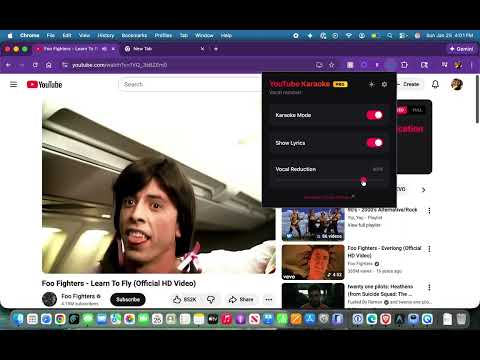
YouTube Karaoke: AI Vocal Removal & Live Lyrics 🎤✨ Transform any YouTube video into a professional karaoke track in seconds! YouTube Karaoke is the ultimate tool for singers, performers, and music lovers. Using state-of-the-art AI and real-time audio processing, you can strip vocals from almost any song on YouTube while following along with high-quality, synchronized lyrics. 🚀 Key Features 🤖 AI-Powered Vocal Removal (Studio Quality) Say goodbye to "muffled" audio. Our advanced Machine Learning (AI) model perfectly separates vocals from instrumentals, providing a studio-grade backing track for your rehearsals or parties. Smart Suitability Advice: The extension analyzes tracks in real-time to tell you if they are "Mono" tracks (requiring AI) or already "Instrumentals" (saving you credits). 🎤 Standard Mode (Always Free & Unlimited) Need a quick fix? Our real-time phase-cancellation engine is completely unlimited for all users. It works instantly without any cloud processing, allowing you to sing along to millions of songs for free. 📜 Live Synchronized Lyrics Never miss a beat. The extension automatically fetches and displays lyrics that scroll in time with the music. Dual View: Switch between "Synced" mode (following the song) or "Full" mode (to browse the entire song at once). 🛡️ Seamless Experience Ad-Aware: The AI button intelligently disables during YouTube ads to save your credits and prevent processing errors. Native Integration: Fits perfectly into the YouTube sidebar—no clunky popups or overlays required. 💎 Tiers & Pricing FREE: Unlimited Standard Mode vocal removal, synced status updates, and basic lyrics. PRO ($4.99/mo): Full scrollable lyrics, unlimited 100% vocal reduction in standard mode, and 25 AI Studio Vocal Removals per month. PREMIUM ($24.99/mo): Everything in Pro, plus 150 AI Studio Vocal Removals per month and priority processing. 🛠️ How to Use Install the extension. Open any music video on YouTube. Look for the "⚡ AI Vocal Removal" button and lyrics in the right-hand sidebar. Activate and start singing! Permissions & Privacy: We respect your privacy. YouTube Karaoke only accesses audio data on YouTube to provide its core functionality. We do not store your browsing history or personal data.
5 out of 51 rating
Details
- Version1.28
- UpdatedMarch 27, 2026
- FeaturesOffers in-app purchases
- Size44.85KiB
- LanguagesEnglish
- DeveloperWebsite
Email
admin@moonshots.biz - Non-traderThis developer has not identified itself as a trader. For consumers in the European Union, please note that consumer rights do not apply to contracts between you and this developer.
Privacy

This developer declares that your data is
- Not being sold to third parties, outside of the approved use cases
- Not being used or transferred for purposes that are unrelated to the item's core functionality
- Not being used or transferred to determine creditworthiness or for lending purposes
Support
For help with questions, suggestions, or problems, visit the developer's support site