


Overview
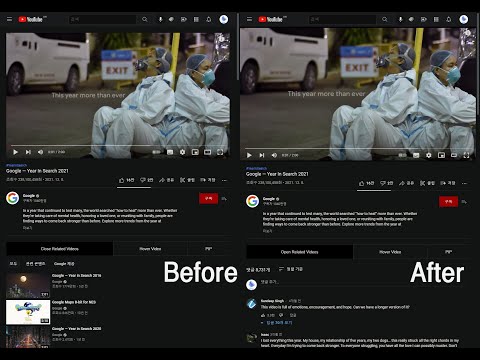
Sometimes you may want to remove or disable some related videos and see comments first. This does that.
Youtube Helper adds simple layout and player controls to YouTube. Features • Hide or show related videos and switch to a wider layout. • Keep watching with an automatic mini player when scrolling through comments. • Pin the player, drag it to another position, and resize it. • Adjust subtitle size for floating players from 50% to 200%. • Manage layout, player, subtitle, and Shorts settings from the extension popup. • Show or hide the floating tools button. The regular button row remains available when it is hidden. • Open Shorts in the regular video player. This option is enabled by default and can be turned off in the popup. • Use picture-in-picture (PIP) or jump back to the top of the page. • Click Popcat in the popup for a little sound. Settings are saved and changes apply to open YouTube tabs.
5 out of 54 ratings
Details
- Version2.0.2
- UpdatedOctober 22, 2026
- Offered by착한친구
- Size63.11KiB
- Languages2 languages
- Developer
Email
binieon@naver.com - Non-traderThis developer has not identified itself as a trader. For consumers in the European Union, please note that consumer rights do not apply to contracts between you and this developer.
Privacy

This developer declares that your data is
- Not being sold to third parties, outside of the approved use cases
- Not being used or transferred for purposes that are unrelated to the item's core functionality
- Not being used or transferred to determine creditworthiness or for lending purposes
Support
For help with questions, suggestions, or problems, visit the developer's support site