

YT Filter Pro: filter by views, duration, date, and more

Overview
Filter YouTube search results in real time by duration, views, publish date, channel, and more.
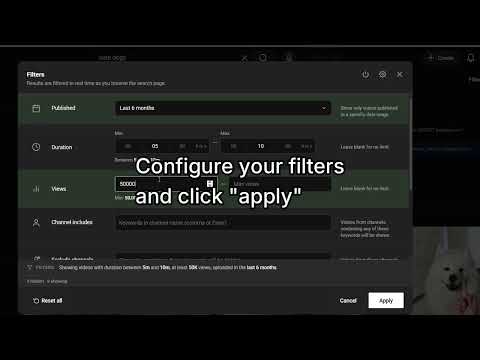
Have you ever wanted to filter youtube videos by length of time? Maybe show videos only between 2 minutes and 3 minutes? Perhaps by views? Only videos of channels with anywhere between 1000 to 5000 subscribers? Only videos between 10k-20k views? Or include exclusively videos that has a certain keyword in the title? Now you can! Youtube Filter Pro adds powerful, client-side filters to YouTube search, so you can narrow results without running a new search or clicking through YouTube’s limited built-in filters. HOW IT WORKS 1. On Youtube, search for anything. 2. Now on the search page, click on the "Filter" button, next to the search bar. 3. Select your filters and click on "Search", on the bottom right. 4. A popup with your results will show up. Please bear in mind that this filters YouTube videos in real time, so it may take a few seconds to a minute depending on how complex your filters are. FILTER BY 📅 Publish date — Quick presets from “last hour” up to “last 10 years,” or pick a custom date range. ⏱ Duration — Set minimum and maximum length (hours, minutes, seconds). Great for tutorials, podcasts, or short clips. 👁 View count — Show only videos within a view range (e.g. smaller channels or already-popular uploads). 📈 Views per day — Filter by min/max views per day (from total views and publish date). Spot fast-growing or consistently performing uploads. 👍 Likes — Set a minimum (and optional maximum) like count for stronger engagement. 📝 Title — Require keywords in the title, or exclude unwanted terms (e.g. “reaction,” “short,” “live”). 📄 Description — Require or exclude keywords in the video description. 🩳 Shorts — Include all videos, hide Shorts, or show Shorts only. 👥 Subscribers — Filter by channel subscriber count (min/max). Find smaller creators or established channels. 📹 Channel videos — Filter by how many videos a channel has uploaded (min/max). Spot new channels vs. long-running ones. 📊 Channel total views — Filter by a channel’s overall view count (min/max). 🌍 Channel country — Include or exclude channels by country (from the channel About page). 📅 Channel joined date — Filter by when the channel was created (presets or a custom range). 🔗 Social links — Require channels that list certain platforms (e.g. Instagram, Twitter/X, TikTok, Discord) on About or in descriptions. ✉️ Email — Prefer videos/channels that expose a contact email in About or description. 🏷 Channel tags / About text — Match keywords in channel About / tags when available. 🚫 Exclude channels — Hide videos from channels whose names contain specific keywords. ✓ Verified — Show only verified channels, hide verified channels, or leave unchanged. SEE CHANNEL INFO AT A GLANCE On search results (and in View Results), each matching video can show a compact channel data bar: 📊 Subscribers & video count 🌍 Country flag (or undeclared when the channel doesn’t set one) 📈 Channel total views 📅 Joined date (with a relative age tooltip, e.g. “5 years ago”) 🔗 Social icons / links from About and descriptions 👍 Likes and 📈 views/day on the video when enabled Turn each display option on or off anytime in Settings. FEATURES • View all matching results in a clean modal page • View Results mode — auto-scroll search, collect matches in a dedicated panel, pause/resume, and open filters without losing progress • Clean filter panel that fits YouTube’s layout • Video Filters and Channel Filters tabs — organize filters by what they apply to, with active-filter count badges • One-click enable/disable filtering without losing your settings • Optional active-filter summary in the panel • Live status chip while filtering — see active filter count, progress, and jump to View Results • Filter toasts — on-page notifications when filtering starts, with live counts (enable/disable in settings) • Sort filtered results — by date, views, views/day, likes, subscribers, duration, and more • Lightweight: only needs storage permission; no account required WHO IT’S FOR • Researchers and learners who need recent or in-depth videos • Creators scouting topics by duration or popularity • Anyone tired of scrolling past irrelevant channels, reuploads, or off-topic titles PRIVACY Youtube Filter Pro runs only on youtube.com. It uses Chrome storage to remember your filter preferences. It does not collect personal data or send your searches to external servers. Questions or feedback? CodedCitadel@Gmail.com
4.1 out of 522 ratings
Details
- Version2.0.170
- UpdatedOctober 7, 2026
- FeaturesOffers in-app purchases
- Size4.98MiB
- Languages8 languages
- DeveloperWebsite
Email
codedCitadel@gmail.com - Non-traderThis developer has not identified itself as a trader. For consumers in the European Union, please note that consumer rights do not apply to contracts between you and this developer.
Privacy

This developer declares that your data is
- Not being sold to third parties, outside of the approved use cases
- Not being used or transferred for purposes that are unrelated to the item's core functionality
- Not being used or transferred to determine creditworthiness or for lending purposes
Support
For help with questions, suggestions, or problems, please open this page on your desktop browser