


總覽
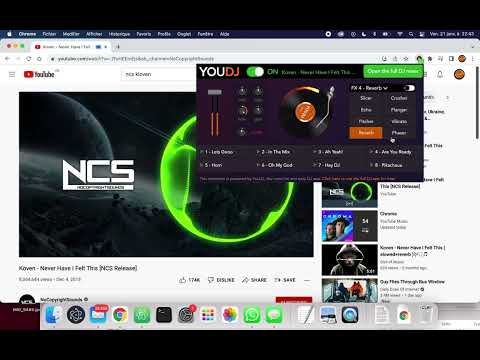
This extension brings DJ tools such Equalizer, Volume Booster, Sound Effects, to YouTube but also any other website!
Designed by audio engineers, this extension is powered by the technology of the popular YouDJ DJ software. You will hear the difference with other audio extensions... ;) Here is the audio tools you will get : - volume booster / bass booster on any website! - 8 audio DJ effects (echo, reverb, flanger...) - 3 bands equalizer with a -60dB cut - the popular hipass/lowpass DJ filter - volume limiter (to avoid distortion) - sound launchpad (are you readyyy...) - scratch and backspin effects - and finally a cool fire effect ;) Try it by yourself, it is all FREE, NO ADS, because I do this by passion, leave a 5* review to thank me :) PS : Chrome asks for the permission to "read" all your websites because the extension is capturing the audio from any website to process it. All audio extensions (equalizers, volume boosters...) will ask the same permission. No worries :)
4.2 分 (滿分 5 分)4350 個評分
詳細資料
隱私權

這位開發者就你的資料做出下列聲明:
- 除經核准的用途外,不會將你的資料販售給第三方
- 不會基於與商品核心功能無關的目的,使用或轉移資料
- 不會為了確認信用度或基於貸款目的,使用或轉移資料
支援
如有疑問或建議,請前往開發人員的支援網站