


Overview
Scrape and download YouTube comments to CSV. Extract up to 10,000 threaded comments from any video. One-time payment, no sub.
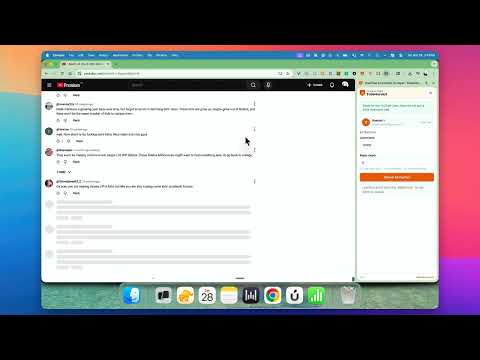
TubeHarvest is the fastest way to scrape YouTube comments and export them as structured CSV files — directly from the video page you're already watching. No API keys. No Python scripts. No quotas. Just click and extract. ━━━━━━━━━━━━━━━━━━━━━━━━━━━ WHAT YOU GET IN EVERY EXPORT - Author name (with optional anonymization) - Full comment text — emoji preserved - Like count per comment - Threaded replies with parent attribution - Video title, URL, and extraction timestamp ━━━━━━━━━━━━━━━━━━━━━━━━━━━ KEY FEATURES ⚡ Extract up to 10,000+ comments per video Scrape far beyond what YouTube shows on the page. TubeHarvest scrolls, loads, and captures comments automatically. 🧵 Threaded reply extraction Download YouTube comments with their full reply chains intact — nested replies, parent authors, and depth levels included. 📊 Clean CSV export Every extraction produces a structured CSV file ready for Excel, Google Sheets, or your data pipeline. Columns: Author, Comment, Likes, Type, ParentAuthor. ⏱ Three extraction speeds Choose Quick, Smart, or Steady depending on how many comments you need. Auto-adjusts delays if YouTube throttles. ⏸ Pause & resume Switch tabs or step away — TubeHarvest pauses automatically and picks up where you left off. 🔒 Built-in anonymization Author names are anonymized by default. Turn it off when you need real names for research. ━━━━━━━━━━━━━━━━━━━━━━━━━━━ WHO USES TUBEHARVEST - Content researchers — mine competitor videos for audience insights and recurring questions - Product teams — capture feature requests and user feedback buried in comment threads - Marketers — collect customer language, objections, and social proof - Data analysts — export YouTube comments for sentiment analysis and trend research - Creators — understand what viewers actually want to discuss ━━━━━━━━━━━━━━━━━━━━━━━━━━━ HOW IT WORKS 1. Navigate to any YouTube video 2. Open TubeHarvest from the side panel 3. Set your comment count, reply depth, and speed 4. Click "Extract" — watch comments populate in real time 5. Download your CSV when extraction completes ━━━━━━━━━━━━━━━━━━━━━━━━━━━ FREE TO TRY Start with up to 100 comments per video — no account required. Upgrade once for unlimited access. One-time payment, no subscription. Want to scrape more? Try the free cloud version at https://tubealfred.com/tools/youtube-comment-scraper — no extension needed, up to 250 comments per video. ━━━━━━━━━━━━━━━━━━━━━━━━━━━ WHY NOT JUST USE THE YOUTUBE API? The YouTube Data API v3 has daily quotas, requires OAuth setup, and still doesn't return deeply nested replies. TubeHarvest extracts comments the way a human would — by scrolling the page — so you get every comment YouTube actually displays, including replies the API often misses. ━━━━━━━━━━━━━━━━━━━━━━━━━━━ COMPARE ✅ YouTube comment scraper — no coding required ✅ YouTube comment extractor — structured CSV, not raw text ✅ YouTube comment downloader — threaded replies included ✅ YouTube data scraper — works on any public video ✅ YouTube research tool — built for content and market research ━━━━━━━━━━━━━━━━━━━━━━━━━━━ PERMISSIONS TubeHarvest only activates on youtube.com. It reads comment elements on the page to extract text, authors, and like counts. No data is sent to external servers. Your exports stay on your machine. ━━━━━━━━━━━━━━━━━━━━━━━━━━━ CHANGELOG Version 2.2.0 (20/04/2026) 🌍 Fixed - Reply extraction now works on YouTube in every language. Earlier versions only matched English button labels ("1 reply", "Show more replies", "View N replies"), so they missed every reply on Italian, Japanese, Spanish, French, German, and other localized YouTube interfaces. TubeHarvest now identifies the expand and load-more controls structurally — independent of locale — so reply trees export correctly no matter what language you've set YouTube to. Version 2.1.1 (18/04/2026) 🔧 Fixed - Nested replies missing from exports — YouTube changed how reply threads are rendered, so TubeHarvest was stopping at the first level of replies on many comments. It now captures every reply at every depth, including "Show more replies" pagination inside sub-threads. - Duplicate replies appearing in the YouTube page while extracting — some pagination buttons were being re-clicked unnecessarily. The CSV was already clean, but the on-page view is now clean too. 🆕 New - Extract all replies toggle — one switch to pull every reply under every comment, no depth or per-comment caps. Best for short videos or threads with few replies; can take a while on busy videos. - CSV rows now follow the natural page order, with each reply grouped directly under its parent comment. Version 2.1.0 (16/04/2026) 🔧 Fixed - Comment extraction failing due to YouTube DOM structure change, YouTube removed an internal wrapper element, causing the scraper to scroll through comments without capturing any text 🆕 New - "Already purchased? Sign in" link on the sign-in screen and free tier banner — so returning paid users can authenticate without confusion - "TubeHarvest Pro" branding in the header for paid users - Free tier increased from 50 to 100 comments per video Version 2.0.0 — Complete Rebuild 🆕 New - Side panel UI — extract comments without leaving the YouTube page - Threaded reply extraction with configurable depth and per-comment reply limits - Three extraction speeds: Quick (aggressive), Smart (balanced), Steady (conservative) - Built-in author anonymization (enabled by default) - CSV metadata header with video title, URL, timestamp, and export stats - Smart stall detection — auto-recovers when YouTube stops loading comments - Visibility-aware extraction — pauses when you switch tabs, resumes when you return - Real-time progress display with comment count, elapsed time, and cancel button - Emoji preservation — correctly captures YouTube's image-based emoji rendering - Comment deduplication — no duplicate rows in your export - "Read More" auto-expansion — captures full comment text, not truncated previews - Content script recovery — auto-reinjects if the script becomes unresponsive - Google account sign-in with secure device verification - One-time payment model — no subscription, no recurring charges ⚡ Improved over v1 - Extraction engine completely rewritten for speed and reliability - Handles YouTube SPA navigation (no more page-refresh requirement) - Smarter scroll loop with backoff and retry logic - Batch comment processing (3–8 comments per cycle depending on speed) - Configurable comment count — extract exactly the number you need - Clean CSV output with proper quote escaping and newline normalization Questions or feedback? Reach us at contact@tubealfred.com
5 out of 51 rating
Details
- Version2.2.0
- UpdatedApril 20, 2026
- FeaturesOffers in-app purchases
- Size36.02KiB
- LanguagesEnglish
- DeveloperWebsite
Email
rakesh.yelkoti@gmail.com - Non-traderThis developer has not identified itself as a trader. For consumers in the European Union, please note that consumer rights do not apply to contracts between you and this developer.
Privacy

YouTube Comment Scraper: TubeHarvest has disclosed the following information regarding the collection and usage of your data. More detailed information can be found in the developer's privacy policy.
YouTube Comment Scraper: TubeHarvest handles the following:
This developer declares that your data is
- Not being sold to third parties, outside of the approved use cases
- Not being used or transferred for purposes that are unrelated to the item's core functionality
- Not being used or transferred to determine creditworthiness or for lending purposes
Support
For help with questions, suggestions, or problems, visit the developer's support site