

YouTube AutoExplainer | Instant AI Summaries Straight from the Home Page
1 rating
)
Overview
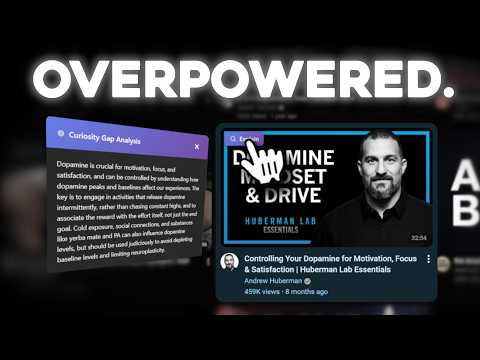
Instantly explains the 'answer' to YouTube videos by analyzing titles, and transcripts. BYOK OpenAI/Gemini, or Buy Credits.
AutoExplainer is an extension that adds "explain" buttons to all YouTube videos upon hover, which, when clicked, reveals the 'answer' to the question posed by the title and thumbnail. With YouTube AutoExplainer, you get clear, instant AI-powered explanations at the click of a button. Straight from the homepage, watch page, and anywhere on YouTube. It gives you the answer to the reason you would have watched the video to begin with. All for free with API keys (BYOK). We also have options to buy credits directly from us, if that's more your style. Features: - 🎯 Hover Detection: Automatically shows an "Explain" button when you hover over YouTube video thumbnails - 🖼️ Thumbnail Analysis: Optionally use AI vision to read text and analyze visual elements in thumbnails - 📝 Title Analysis: Examines the video title for curiosity-inducing language - 📄 Transcript Analysis: Fetches and analyzes the video transcript using TranscriptAPI. You must Bring your own Key for transcript API. - 🤖 AI-Powered: Bring Your Own key: OpenAI API or Google Gemini API. - More Providers coming soon. Your keys are only stored locally. For Gemini, we use 2.5 Flash Lite, and For OpenAI, GPT4o Mini. - 💨 Fast & Non-Intrusive: Lightweight extension that doesn't slow down YouTube ✅If you want to Buy Credits: - Go to the extension settings and sign up. 1 Credit is roughly worth 1 video-minutes analyzed. Minimum of 5 Credits per video to prevent abuse. - Credits never expire. No need to stress. 🔐 Privacy & Data Security AutoExplainer runs locally in your browser. Use it freely and securely. Account is only required if you want to buy credits with us. We don't share or sell any personal information. FAQ: Why TranscriptAPI? : Currently it's the most reliable solution that I have come up with for the transcripts. I am working on a way to grab the transcripts straight through YouTube so you wouldn't need TranscriptAPI. It can be very tricky. Stay tuned for updates. Which Languages are Supported? Only English is supported for now, but with enough users and installations, I will open it up to multi-language compatibility. Which countries is this available in? This is available in USA, Canada, Australia, New Zealand. We are working on opening it up to more countries in the future. Can I access the transcripts after generating them? Not yet but this is a feature I am working towards. Whether you're learning, researching, or just curious, this tool can save you many, many hours. Stop getting click-baited and wasting your time and attention on videos whose takeaways you can get in 3 seconds. Try Out AutoExplainer Today!
5 out of 51 rating
Details
- Version1.1.1
- UpdatedMay 2, 2026
- FeaturesOffers in-app purchases
- Offered byIQByte
- Size4.35MiB
- LanguagesEnglish
- DeveloperJohn Simson
446 Conradi St 326B Tallahassee, FL 32304-3454 USEmail
iqbyteofficial@gmail.com - Non-traderThis developer has not identified itself as a trader. For consumers in the European Union, please note that consumer rights do not apply to contracts between you and this developer.
Privacy

YouTube AutoExplainer | Instant AI Summaries Straight from the Home Page has disclosed the following information regarding the collection and usage of your data. More detailed information can be found in the developer's privacy policy.
YouTube AutoExplainer | Instant AI Summaries Straight from the Home Page handles the following:
This developer declares that your data is
- Not being sold to third parties, outside of the approved use cases
- Not being used or transferred for purposes that are unrelated to the item's core functionality
- Not being used or transferred to determine creditworthiness or for lending purposes
Support
For help with questions, suggestions, or problems, visit the developer's support site