

YouTube Auto Jump
11 ratings
)
Overview
Automatically jump to a specific time on YouTube videos.
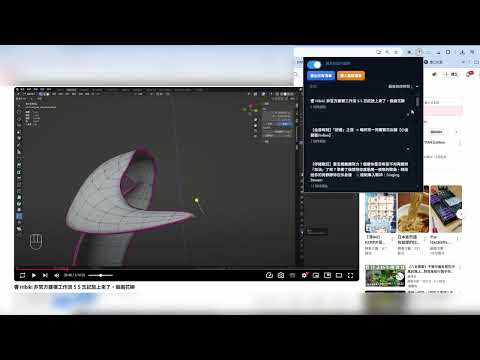
Important Notice We have noticed that some comments falsely claim that this extension contains malware or modifies Chrome’s internal code. These accusations are false and misleading. YouTube Timeline Jumper is a Chrome Extension that runs within the standard Chrome Extension permission system. It does not modify Chrome’s source code, browser binaries, or internal browser files. Extensions published on the Chrome Web Store must pass Google’s extension review process before becoming available to users. We strongly condemn fabricated claims and misinformation that may mislead users or damage trust in legitimate open extension development. Please review the listed permissions before installation and use the extension with confidence. 我們注意到,有些留言錯誤聲稱此擴充功能含有惡意軟體,或會修改 Chrome 的內部程式碼。這些指控皆為不實且具誤導性。 YouTube Timeline Jumper 是一個 Chrome 擴充功能,運作於標準的 Chrome 擴充功能權限系統之內。它不會修改 Chrome 的原始碼、瀏覽器二進位檔,或任何瀏覽器內部檔案。 發布於 Chrome 線上應用程式商店的擴充功能,必須先通過 Google 的擴充功能審查流程,才會提供給使用者安裝。我們強烈譴責捏造的指控與錯誤資訊,因其可能誤導使用者,並損害合法開源擴充功能開發的信任。 請在安裝前檢視所列權限,並安心使用此擴充功能。 YouTube Timeline Jumper – Enhanced Timeline Control for YouTube YouTube Timeline Jumper helps you manage, organize, and replay important moments in YouTube videos and livestreams. Create timestamped playlists directly on YouTube, jump between saved moments, reorder entries with drag-and-drop, and manage your timeline database across videos. Version 3.0 also introduces Playlist Studio, offline audio analysis, and tools for building cross-video playback queues. Key Features 1. In-Page Timeline Manager Add, edit, remove, and reorder timestamped entries directly inside YouTube. 2. Timestamped Playlists Save start and end times for songs, highlights, chapters, or any important moments. 3. Single-Entry Playback Play individual timeline entries using the built-in toggle or Ctrl + Left Click. 4. Playlist Studio Manage recorded songs and timeline data in a dedicated extension page. 5. Cross-Video Playback Queue Build playlists across multiple YouTube videos or livestreams. 6. Offline Audio Analysis Analyze downloaded audio files locally and generate song segments that can be saved back into the timeline database. 7. Import & Export Back up, restore, or share playlist data using JSON files. 8. Drag-and-Drop Editing Reorder playlist items and playback queues with intuitive drag gestures. 9. Persistent Local Storage Playlist data is saved through Chrome extension storage so your changes remain available after refreshing or reopening YouTube. 10. Theme Integration The in-page UI is designed to blend with YouTube’s light and dark themes. How to Use 1. Click the extension icon and enable the extension. 2. Open a YouTube video or livestream. 3. Use the on-screen timeline controls to add songs, highlights, or moments. 4. Drag playlist items to reorder them. 5. Open Playlist Studio to manage cross-video playlists, offline detection results, and your saved timeline database. 6. Export or import playlists when you want to back up or transfer your data. Privacy & Local Processing YouTube Timeline Jumper is designed to work locally inside the browser extension environment. Playlist data is stored locally through Chrome extension storage. Offline audio analysis is performed locally and does not require an external server, local daemon, or WebSocket service. Version 3.0.2 - Added Playlist Studio for cross-video and cross-stream playlist management. - Added local FireRed AED-based song segment detection. - Added offline audio analysis for local `.m4a` / `.mp4` files. - Added waveform and spectrogram editing for offline detection results. - Added batch offline analysis with pause, stop, delete, and per-file setup. - Added database editor for reviewing, renaming, reordering, adding, and deleting saved playlist entries. - Added global playlist playback tools with queue controls and optional pre-buffering. - Improved import/export tools with flexible timestamp parsing, delimiter options, numbering options, padding options, and whole-second rounding. - Added multi-language UI support and first-install / update feature notices. - Improved song detection post-processing, including medley split support and long music-only segment filtering. Version 3.0.0 Major update with significant improvements: - Added Playlist Studio. - Added cross-video playback queue support. - Added offline local audio analysis for song segment detection. - Added database editing tools. - Improved playlist search, sorting, and UI layout. - Improved popup controls and settings. - Improved timeline storage compatibility and migration handling. Previous Updates --- 2.0.0 Big update. Added import/export support. Added extension enable/disable toggle. Added all-playlists overview page. --- 1.2.4 & 1.2.5 Bug fixes. --- 1.2.3 Added default timestamp option when no end time is provided. Support If you would like to support the project, you are welcome to visit my Patreon: https://www.patreon.com/nekofoxball Image and tutorial video source: From: 【歌回】響到什麼唱什麼|響Hibiki Owner: @HibikiVtuber
1.7 out of 511 ratings
Details
- Version3.0.2
- UpdatedMay 20, 2026
- Offered byioio920430
- Size11.0MiB
- LanguagesEnglish
- Developer
Email
ioio920430@gmail.com - Non-traderThis developer has not identified itself as a trader. For consumers in the European Union, please note that consumer rights do not apply to contracts between you and this developer.
Privacy

This developer declares that your data is
- Not being sold to third parties, outside of the approved use cases
- Not being used or transferred for purposes that are unrelated to the item's core functionality
- Not being used or transferred to determine creditworthiness or for lending purposes
Support
For help with questions, suggestions, or problems, visit the developer's support site