


Overview
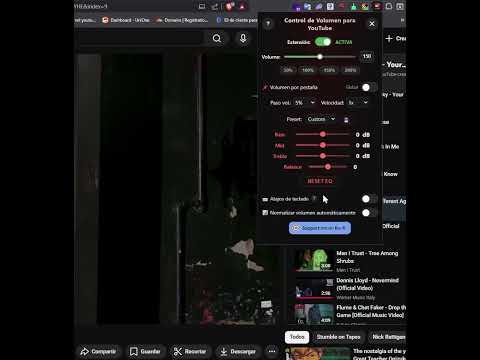
YouTube & YouTube Music volume booster with 3-band EQ, playback speed control, stereo balance, presets, and up to 300% volume boost.
🎵 YouTube Volume Booster & Equalizer (YouTube + YouTube Music) Boost volume up to 300%, control playback speed, and fine-tune audio with precision. 🚀 Overview Looking for a YouTube volume booster with true precision? YouTube Volume Control lets you raise volume up to 300%, adjust playback speed, and shape audio with a built-in 3-band equalizer. Set exact volume values (0–300%), fine-tune bass/mid/treble, adjust stereo balance, and keep your preferences saved across sessions. ✨ Key Features 🔢 Precise Numeric Volume Input: Set exact volume percentages (for example, 87% or 135%) instantly. 💥 Boost Up to 300%: Increase volume beyond YouTube’s default limit for low-volume content. 🎚️ 3-Band Equalizer: Adjust Bass, Mid, and Treble for a custom sound profile. 🎧 Stereo Balance Control: Shift audio to the left or right channel as needed. 📌 Presets + Custom Presets: Use built-in presets or save your own EQ settings. 🔁 Consistent Experience: Settings apply across YouTube tabs and videos. 🎵 YouTube + YouTube Music Support: Works on both platforms. 🌍 27 Languages: Localized for a global audience. 🎨 Designed for You Sleek UI: A clean, semi-transparent design that blends naturally with YouTube. User-Driven Updates: Typed volume values stay in the input field (no annoying resets). Reliable Experience: Stable behavior across videos, tabs, and long browser sessions. 🛠️ Version Highlights v1.0: Initial launch with core volume control. v1.2: Global settings persistence + automatic theme detection. v1.3: Fixed cross-video volume retention. v1.5: Added 300% max boost + 25 languages. v1.6–v1.7: A buggy update was published and then reverted quickly to fix issues (thanks for your patience ❤️). v1.8: Added YouTube Music support; removed extra button flow so updates apply instantly when changing the input value. v1.9: Added direct popup volume input, a full equalizer, stereo balance control, and custom preset saving. v2.1.0 - Improved architecture and performance. - Better long-session stability. - Smarter settings synchronization. - Per-tab / global volume mode improvements. - UI and UX refinements across the popup. What’s New in v2.2.0 -Added some fixes. What’s New in v2.4 - Separated global and per-tab modes for both volume and playback speed. - Added configurable inheritance for new tabs and video changes. - Refined popup and onboarding copy to reflect the new controls and workflows. - Updated extension texts and help content across the UI. - Fully localized the new changes into 27 languages. - Improved consistency between volume and speed handling across sessions. 🆕 What’s New in v2.4.1 - New fixed bugs. 🔒 Privacy This extension does not sell personal data. Core settings are stored in Chrome storage. 📥 Get It Now Upgrade your YouTube listening experience with precise volume control, equalizer tools, and seamless audio customization. 💬 Feature Requests For feature requests or improvements, feel free to contact me.
4.3 out of 554 ratings
Details
- Version2.4.1
- UpdatedJuly 10, 2026
- Size195KiB
- Languages26 languages
- DeveloperJoan TomásWebsite
12110 Calle pais valencia 24, Alcora Castellon 12110, ESP Alcora, Castellón 12110 ESEmail
joan.tomas.miralles@gmail.com - Non-traderThis developer has not identified itself as a trader. For consumers in the European Union, please note that consumer rights do not apply to contracts between you and this developer.
Privacy

This developer declares that your data is
- Not being sold to third parties, outside of the approved use cases
- Not being used or transferred for purposes that are unrelated to the item's core functionality
- Not being used or transferred to determine creditworthiness or for lending purposes