Item logo image for Xplain it

Xplain it

5.0(

1 rating

)
Item video thumbnail

Overview

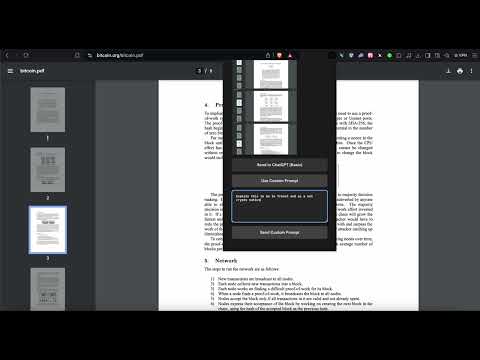
Take a screenshot and get a simple explanation from ChatGPT.

Screenshot to ChatGPT Capture, merge, and analyze browser screenshots using OpenAI's ChatGPT. Easily generate descriptions or responses with a default prompt or your own custom prompts. Perfect for quick image insights!

Details

  • Version
    1.0
  • Updated
    September 30, 2024
  • Offered by
    mkbourouiba
  • Size
    10.04KiB
  • Languages
    English (United States)
  • Developer
    Email
    kbourouiba@icloud.com
  • Non-trader
    This developer has not identified itself as a trader. For consumers in the European Union, please note that consumer rights do not apply to contracts between you and this developer.

Privacy

The developer has disclosed that it will not collect or use your data. To learn more, see the developer’s privacy policy.

This developer declares that your data is

  • Not being sold to third parties, outside of the approved use cases
  • Not being used or transferred for purposes that are unrelated to the item's core functionality
  • Not being used or transferred to determine creditworthiness or for lending purposes

Related

ChromeGPT for ChatGPT

5.0

The easiest way to use ChatGPT.

ChatGPT Visioner for Screenshot Reading and Analysis

5.0

ChatGPT Visioner captures webpage screenshots and inserts them into ChatGPT for AI-powered analysis and interaction.

Ask Screenshot for ChatGPT

5.0

Take a screenshot on any page and ask ChatGPT about it.

ChatGPT Prompt Navigator

5.0

List and navigate to user input prompts in ChatGPT chats.

ChatGPT Conversation Exporter

3.4

A simple extension to export ChatGPT conversation as an HTML file.

PromptGPT

0.0

Easily save and load templates into ChatGPT. Copy pasting is outdated

Explain with ChatGPT

0.0

Right-click highlighted text to get an explanation using ChatGPT.

Chat2GPT

5.0

Talk with ChatGPT as if you were talking to a real person. Simply talk to it and hear its responses spoken back to you.

H-Chat Assistant

4.6

Use H-Chat Assistant quickly and powerfully in Google Chrome.

ChatGPT-Simple

0.0

Simply call ChatGPT

chatGPT screenshot

2.4

Take a nice screenshot of the whole chat GPT conversation

ChatGPT Copier

3.0

Copy ChatGPT answers with ease. Click the sticky icon to quickly copy to your clipboard

ChromeGPT for ChatGPT

5.0

The easiest way to use ChatGPT.

ChatGPT Visioner for Screenshot Reading and Analysis

5.0

ChatGPT Visioner captures webpage screenshots and inserts them into ChatGPT for AI-powered analysis and interaction.

Ask Screenshot for ChatGPT

5.0

Take a screenshot on any page and ask ChatGPT about it.

ChatGPT Prompt Navigator

5.0

List and navigate to user input prompts in ChatGPT chats.

ChatGPT Conversation Exporter

3.4

A simple extension to export ChatGPT conversation as an HTML file.

PromptGPT

0.0

Easily save and load templates into ChatGPT. Copy pasting is outdated

Explain with ChatGPT

0.0

Right-click highlighted text to get an explanation using ChatGPT.

Chat2GPT

5.0

Talk with ChatGPT as if you were talking to a real person. Simply talk to it and hear its responses spoken back to you.

Google apps