


Overview
AI English dictionary for webpages, PDFs, YouTube and Netflix. Get definitions in context, pronunciation and vocabulary review.
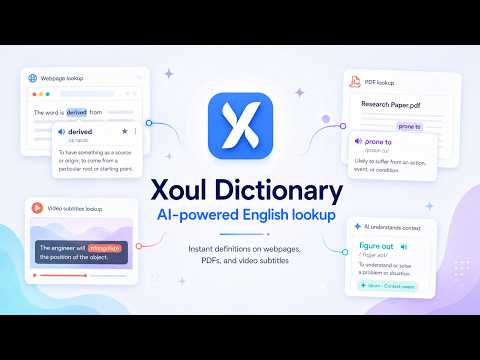
Xoul Dictionary: English Definitions in Context 📚✨ Xoul Dictionary is an AI English dictionary that explains words and phrases in context. Double-click an English word on a webpage to see its meaning, translation, and pronunciation without opening another tab. Read articles, academic papers, and ebooks with word lookup in webpages and the built-in PDF viewer. Look up English words in YouTube and Netflix subtitles, then revisit your saved vocabulary with review cards and quizzes in the Review & Test tab. 🌟 KEY FEATURES 👆 Instant Lookup Anywhere Double-click any English word on any webpage to see its definition instantly. Works seamlessly across regular web pages, complex web apps like Notion, and even PDF documents. No need to open a new tab or copy-paste. Need to explore another word in the result? Double-click words inside definitions or examples to open a follow-up lookup without losing your previous context. 📄 Built-in PDF Viewer Open PDF files directly in Xoul's integrated viewer with full dictionary lookup support. Simply click the "Xoul PDF Viewer" button when viewing a PDF to enable instant word lookups while reading academic papers, articles, or ebooks. 📺 YouTube & Netflix Subtitle Lookup Learn English while watching your favorite videos. Enable the interactive subtitle mode directly from the YouTube or Netflix video player to click any word in the subtitles and see its definition instantly. 🧠 AI-Powered Context Analysis Unlike traditional dictionaries, Xoul uses advanced AI to understand the surrounding text. It intelligently detects idioms, phrasal verbs, and collocations (e.g., recognizing "figure out" instead of just "figure") and provides the precise definition for that specific context. 🗣️ Audio Pronunciation Listen to the correct pronunciation of words with a single click. Perfect for improving your listening and speaking skills. 🌍 Multi-Language Translation Look up English words and get definitions with optional translations into Spanish, Chinese, Korean, Japanese, or Vietnamese. The entire interface is also fully localized: • 🇺🇸 English • 🇪🇸 Spanish (Español) • 🌎 Latin American Spanish (Español de América Latina) • 🇨🇳 Simplified Chinese (简体中文) • 🇹🇼 Traditional Chinese (繁體中文) • 🇸🇬 Singaporean Chinese (简体中文) • 🇭🇰 Hong Kong Chinese (繁體中文) • 🇰🇷 Korean (한국어) • 🇯🇵 Japanese (日本語) • 🇻🇳 Vietnamese (Tiếng Việt) ☁️ Cloud Sync & History Your vocabulary history follows you everywhere. Sign in to sync your looked-up words across all your devices. Never lose track of a new word again. 📝 Review & Test After signing in, turn saved lookups into real study sessions. Open the Review & Test tab to review one card at a time, hear pronunciation with IPA, and challenge yourself with multiple-choice quizzes. Filter by time range and category, choose session size, and build lasting retention from your saved words. 🔒 Privacy First We believe in your privacy. You have full control over your data, including a "Privacy Mode" setting that prevents saving sentence context while still tracking your vocabulary list. 💼 Subscription & Free Trial New users get immediate access to a 30-day Free Trial to experience the full power of Xoul Dictionary. The trial includes 1,000 dictionary lookups. Unlock unlimited potential for your language learning journey. --- 📥 How to get started: 1. Click "Add to Chrome" to install. 2. Tip: Pin the extension to your toolbar for easy access! 📌 3. Log in to start your Free Trial and sync your word history. 4. Double-click any English word on a webpage to look it up! 5. Open Settings > Review & Test to practice saved words with review cards and quizzes. 6. For PDFs: Open the Xoul popup and click "Choose PDF File" to open a PDF from your device. If you're already viewing a PDF in Chrome, click "Open This PDF". 7. On YouTube & Netflix: Click the Xoul toggle in the video player to enable interactive subtitles! Happy Learning! 🎓
5 out of 529 ratings
Details
- Version1.6.5
- UpdatedOctober 11, 2026
- FeaturesOffers in-app purchases
- Size3.35MiB
- Languages8 languages
- DeveloperWebsite
Email
support@xoul-dictionary.com - Non-traderThis developer has not identified itself as a trader. For consumers in the European Union, please note that consumer rights do not apply to contracts between you and this developer.
Privacy

Xoul Dictionary - AI Reading Companion has disclosed the following information regarding the collection and usage of your data. More detailed information can be found in the developer's privacy policy.
Xoul Dictionary - AI Reading Companion handles the following:
This developer declares that your data is
- Not being sold to third parties, outside of the approved use cases
- Not being used or transferred for purposes that are unrelated to the item's core functionality
- Not being used or transferred to determine creditworthiness or for lending purposes