

Xmoji

Overview
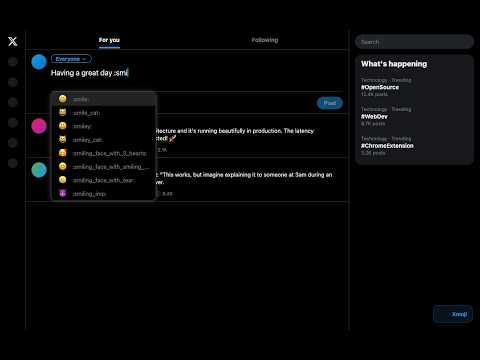
Type Slack-style :emoji_name: shortcodes in X posts and they auto-convert to real emoji. Autocomplete included.
If you use Slack, you already know how nice it is to type :smile: and get 😄 emoji instantly. Xmoji brings that same experience to X. Here's what you get: - Over 3,500 emoji shortcodes that match Slack's naming, so your muscle memory carries over - Smart autocomplete that learns which emoji you use most and puts them at the top - Works everywhere on X — new posts, replies, DMs, all of it - Matches X's theme automatically — looks right whether you're on dark, dim, or light mode - Add your own custom shortcodes if the built-in ones aren't enough - Lightweight and fast — no bloat, no tracking, no accounts How it works: 1. Type a colon and start spelling an emoji name (e.g. :rock) 2. Pick from the suggestions or finish the shortcode with a closing colon 3. That's it. The emoji appears in your text. Built by someone who got tired of the tiny emoji picker on X and just wanted to type :fire: and move on. If that sounds like you, give it a try.
0 out of 5No ratings
Details
- Version1.0.0
- UpdatedFebruary 20, 2026
- Offered byEshgin Guluzade
- Size52.36KiB
- LanguagesEnglish (United States)
- DeveloperEshgin Guluzade
Narva mnt 5 - 89 Tallinn, Harjumaa 10117 EEEmail
eshqin.quluzade2@gmail.comPhone
+372 5394 0441 - TraderThis developer has identified itself as a trader per the definition from the European Union and committed to only offer products or services that comply with EU laws.
Privacy

This developer declares that your data is
- Not being sold to third parties, outside of the approved use cases
- Not being used or transferred for purposes that are unrelated to the item's core functionality
- Not being used or transferred to determine creditworthiness or for lending purposes
Support
For help with questions, suggestions, or problems, visit the developer's support site