

Xero Reconcile Robot
Ringkasan
Automates Xero payments reconciliation
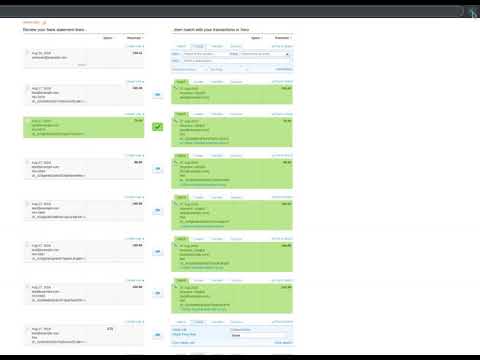
Xero Reconcile Robot automates the time-consuming process of reconciling Xero payments. It checks matches suggested by Xero and clicks the OK button for you for those that match perfectly. Simply press the Start button when you are on the Bank reconciliation page of your Xero account. The Xero Reconcile Robot will click those pesky "OK" buttons ONLY AND ONLY IF it confirms one of the two following cases: 1) the suggested match has a reference code that perfectly matches on both sides 2) Xero suggested to create a new transaction based on a matching Bank Rule The Xero Reconcile Robot was create to be used along with Stripe and Stripe Direct Feeds in Xero, to create a perfect accounting integration for businesses using Stripe or any automated payment processor. This way, you can automatically handle thousands of transactions each day and have your books in perfect shape. More information on Stripe Direct Feeds in Xero can be found on this page: https://central.xero.com/s/article/Stripe-direct-feeds If you need help using the Robot or you have any suggestions, please reach out, or read the post from our blog (click on "Support" link above or visit this page: https://www.yodeck.com/news/integrating-xero-and-stripe-with-our-saas ). Made with love by yodeck.com -- the top Digital Signage platform Note: You will need to refresh any already opened Xero reconciliation page after you have installed the extension.
5 dari 58 rating
Detail
- Versi0.200
- Diupdate10 September 2024
- Ukuran17.49KiB
- BahasaEnglish
- DeveloperFlipnode LLCSitus Web
315 Montgomery Street, 9th Floor San Francisco, CA 94104 United StatesEmail
info@yodeck.com - Non-pedagangDeveloper ini tidak mengidentifikasi diri sebagai pedagang. Bagi konsumen di Uni Eropa, perlu diperhatikan bahwa hak konsumen tidak berlaku untuk kontrak antara Anda dan developer ini.
Privasi

Developer ini menyatakan bahwa data Anda
- Tidak dijual ke pihak ketiga, di luar kasus penggunaan yang disetujui
- Tidak digunakan atau ditransfer untuk tujuan yang tidak terkait dengan fungsi inti item
- Tidak digunakan atau ditransfer untuk menentukan kelayakan kredit atau untuk tujuan pinjaman
Dukungan
Untuk mendapatkan bantuan terkait pertanyaan, saran, atau masalah, buka halaman ini di browser desktop Anda