


Overview
Xentree—The AI-powered skill portfolio. Turn your activity on AI platforms (ChatGPT, Gemini, etc.) into verified proof of skills.
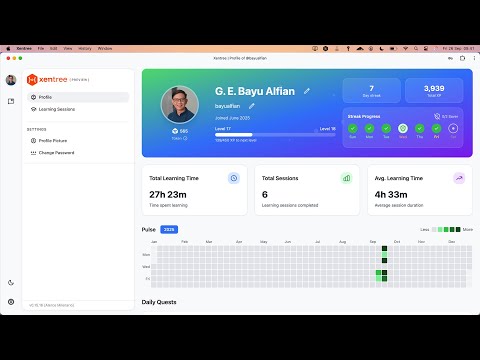
Xentree: Build Your Verified AI Skill Portfolio From Solving to Learning: Capture the Intellectual Value of Your AI Journey. Today, almost everyone uses AI platforms to solve problems, brainstorm ideas, and accelerate their work. Whether you are using ChatGPT, Claude, or Gemini, every interaction contains valuable insights. However, this growth is often scattered—lost in endless chat histories or forgotten once a task is complete. Xentree for Chrome is the professional bridge that connects your daily problem-solving with long-term skill acquisition. We don't replace your favorite AI tools; we act as the System of Record that captures your experiential learning, transforming your scattered activity into a structured, verifiable portfolio of expertise. 🧠 TRANSFORM SCATTERED INSIGHTS INTO PROOF-OF-SKILL In the AI era, the process is just as important as the result. Xentree helps you move from solving to learning by documenting the "how" behind your solutions. It turns your daily workflow into "Proof-of-Skill"—concrete evidence of your proficiency that you can own and showcase. ✨ KEY FEATURES 1. Instant Insight with the "Explain" Button Deepen your understanding without leaving your flow. Xentree adds an "Explain" button directly to YouTube videos and PDF files. Instantly summarize complex tutorials or research papers and save the core knowledge directly to your Xentree workspace. 2. Seamless "Send to Xentree" Capture Found a critical piece of code, a strategic insight, or a unique data point while browsing? Simply highlight any text, right-click, and select "Send to Xentree." Your captures are saved with their original context, building a rich library of your professional interests. 3. Verified AI Workflow Documentation As you use major AI platforms (ChatGPT, Gemini, Claude, Copilot, and more) to solve problems, Xentree quietly documents your "meaningful activity time." This provides a data-backed record of your experience in prompt engineering and AI-assisted problem-solving. 4. Integrated Skill Dashboard The extension feeds directly into your Xentree OS. All your captured insights, YouTube summaries, and AI sessions are organized into a personal ecosystem of analytics, streaks, and XP, visualizing your evolution from a user to a master. 🛠️ HOW IT WORKS 1. Solve: Use your preferred AI tools to tackle your daily challenges. 2. Capture: Use the "Explain" button or Right-Click menu to save critical learning moments. 3. Verify: Watch as Xentree organizes your scattered insights into a professional "Proof-of-Skill" portfolio. 🛡️ PRIVACY & TRUST Xentree is built on the principle that you own your learning data. - Purposeful Documentation: We only track activity on authorized AI platforms to help build your professional profile. - User Agency: You choose what insights to save and what to keep private. - Enterprise-Grade Security: Your data is encrypted and handled with the highest privacy standards. By installing this extension, you agree to Xentree’s: - Terms of Service: https://www.xentree.com/terms - Privacy Policy: https://www.xentree.com/privacy - Usage Policy: https://www.xentree.com/usage-policy - Responsible AI Policy: https://www.xentree.com/responsible-ai Don’t just solve problems—capture the expertise behind them. Join the community of AI-native professionals moving from solving to learning with Xentree. Note: An active Xentree account is required. Sign up for free at xentree.com.
0 out of 5No ratings
Details
- Version0.2.4
- UpdatedMay 26, 2026
- Size80.4KiB
- LanguagesEnglish
- DeveloperPT Global Otomat DigitalWebsite
The City Tower, Jl. M.H. Thamrin No.81 Lt. 12 Unit 1N Jakarta Pusat, DKI Jakarta 10310 IDEmail
hey@xentree.comPhone
+62 857-2408-0691 - TraderThis developer has identified itself as a trader per the definition from the European Union and committed to only offer products or services that comply with EU laws.
Privacy

Xentree has disclosed the following information regarding the collection and usage of your data. More detailed information can be found in the developer's privacy policy.
Xentree handles the following:
This developer declares that your data is
- Not being sold to third parties, outside of the approved use cases
- Not being used or transferred for purposes that are unrelated to the item's core functionality
- Not being used or transferred to determine creditworthiness or for lending purposes
Support
For help with questions, suggestions, or problems, visit the developer's support site