

Grandma's Guardian

Overview
Protect a loved one from online scams: only allowed websites, only safe file types, and scam phrases hidden.
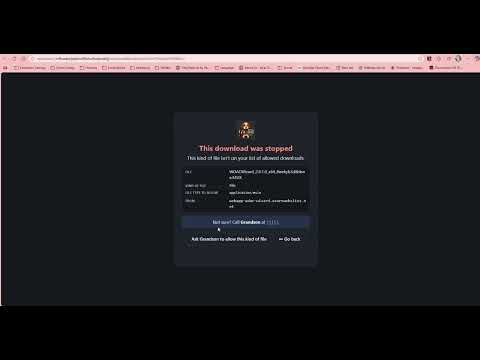
A extension to protect your grandma, grandpa, or anyone! Introducing "Grandma's Guardian", a security tool you can setup for yourself or a loved one to reduce the likelihood they become victims of an online scam. Simply Install, add your top 20, delete any domains you know the user or yourself won't need, and safely browse! This is not intended as an Ad blocker, as advertisements will load on the web page. Best of all: Absolutely no data is collected on you by the developers. We just want you to empower family to be as safe as possible online. This extension will work on any Chromium based browser. Firefox support coming soon (and mobile Firefox supports extensions well). Features: Manifest V3 Domain Allow Listing: Only allow navigation to websites explicitly permitted! You no longer have to fear popups or clicking a malicious link. Always-Block List: Remote-control tools (AnyDesk, TeamViewer, etc.) and abused hosting stay blocked, even under an allowed domain such as sites.google.com. MIME Type Allow Listing: Only allow specific file types to be downloaded from any platform Semantic Filtering: Hide scam wording from your user so they are less likely to engage with the scammer, with a "Show anyway" button. Remote Lists: Subscribe to lists from the open source community for domains, blocked domains, MIME types, and scam phrases. Lists refresh daily; you can also import a local .txt file. Helper Contact and Requests: Blocked pages show who to call, and let the user ask you to allow a site. Approve requests with one click. Activity Logs: Blocked sites, stopped downloads, scam text (hidden or shown anyway) and setting changes. Export to CSV/JSON, or forward to a log collector or SIEM. Disguise-resistant Scam Filtering: Catches spaced-out letters, look-alike characters, numbers for letters, invisible characters and phrases split across formatting. Setup Guide: A step-by-step guide opens on first install. Top Sites quick add: Quickly add the websites a user visits most to the allow list. See CHANGELOG.md for what changed in 2.x. Supported Platforms: Windows MacOS ChromeOS Linux Mobile (On Browsers that support the full Chrome Extension Store, such as Vivaldi) Supported Browsers: Chrome Edge Brave Opera Vivaldi Disclaimer: This browser extension is developed by someone who is active in the defensive cyber security community and based in North Carolina, United States. This tool's source code is open source, however contributions are not being added at this time. Several quality-of-life updates are expected in the future, as well as other enhancements to core features (block log exports, etc). Community Asks: Please creates lists that work for your community. Whether this be industry specific, other countries, or localities, and share them on GitHub! Grandma's Guardian GitHub: https://github.com/Tsora-Pop/Grandmas-Guardian Published Lists by Developer: https://github.com/Tsora-Pop/Tsora-Pop.github.io/tree/main/lists Collecting activity logs One computer: Activity tab → Export CSV or Export JSON. Many computers: Settings → Send logs to a collector. Every event is POSTed to your HTTPS endpoint as a JSON array, NDJSON, or Splunk HEC events, with an optional Authorization header. Undelivered events are kept and retried. This works with: Splunk HEC; Logstash and Fluent Bit HTTP inputs; Azure Logic Apps (to Sentinel or Log Analytics); n8n or Power Automate. Deploying to computers you manage These are optional browser policies for computers you administer. They are not required for the extension to work. Policy Value Why ExtensionInstallForcelist plmkmnjiplhldamhmfdbkemhlkcpikmp;https://clients2.google.com/service/update2/crx Installs the extension automatically and stops it being removed or switched off IncognitoModeAvailability 1 Disables Incognito windows, where extensions are off by default BrowserGuestModeEnabled false Guest windows have no extensions BrowserAddPersonEnabled false A new profile would have no extensions Microsoft Edge uses the same names, except InPrivateModeAvailability instead of IncognitoModeAvailability. Where policies go: Windows: Group Policy with the Chrome ADMX templates, or registry keys under HKLM\Software\Policies\Google\Chrome. macOS: a configuration profile for the com.google.Chrome domain. Linux: a JSON file in /etc/opt/chrome/policies/managed/, for example: { "ExtensionInstallForcelist": ["plmkmnjiplhldamhmfdbkemhlkcpikmp;https://clients2.google.com/service/update2/crx"], "IncognitoModeAvailability": 1, "BrowserGuestModeEnabled": false, "BrowserAddPersonEnabled": false } Configuring the extension by policy All settings except the lists themselves can be pushed through chrome.storage.managed (schema: managed_schema.json). Settings set this way are locked in the extension's settings page. The available keys: personName, helperName, helperPhone; forceProtectionsOn (true keeps all four protections on); forwardEnabled, forwardUrl, forwardAuth, forwardFormat; subscriptions: extra online lists that users can't remove. Where the policy goes: Windows: registry keys under HKLM\Software\Policies\Google\Chrome\3rdparty\extensions\plmkmnjiplhldamhmfdbkemhlkcpikmp\policy. Edge uses ...\Microsoft\Edge\3rdparty\extensions\<id>\policy. macOS: a configuration profile for the domain com.google.Chrome.extensions.plmkmnjiplhldamhmfdbkemhlkcpikmp. Linux: a JSON file in /etc/opt/chrome/policies/managed/, for example: { "3rdparty": { "extensions": { "plmkmnjiplhldamhmfdbkemhlkcpikmp": { "personName": "Front desk PC", "forceProtectionsOn": true, "forwardEnabled": true, "forwardUrl": "https://siem.example.org:8088/services/collector", "forwardAuth": "Splunk 00000000-0000-0000-0000-000000000000", "forwardFormat": "splunk", "subscriptions": [ { "kind": "deny", "url": "https://intranet.example.org/blocklist.txt", "name": "County blocklist" } ] } } } } The extension protects Chromium browsers only. If other browsers are installed, a scammer can simply ask the user to open one of them; application control on the computer closes that gap.
0 out of 5No ratings
Details
- Version2.4.0
- UpdatedOctober 29, 2026
- Offered byTsora_Pop
- Size90.18KiB
- LanguagesEnglish (United States)
- Developer
Email
gormantg@gmail.com - Non-traderThis developer has not identified itself as a trader. For consumers in the European Union, please note that consumer rights do not apply to contracts between you and this developer.
Privacy

This developer declares that your data is
- Not being sold to third parties, outside of the approved use cases
- Not being used or transferred for purposes that are unrelated to the item's core functionality
- Not being used or transferred to determine creditworthiness or for lending purposes
Support
For help with questions, suggestions, or problems, visit the developer's support site