


Overview
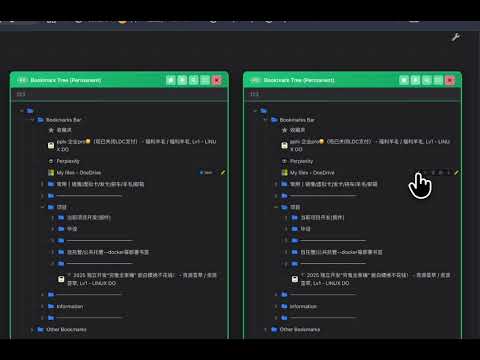
Bookmark Canvas: a bookmark manager with sandboxing, JSON Canvas, card-chain splits, and Git sync.
GitHub(Issue/PR): https://github.com/Browser-bookmark-hub/Bookmark-Canvas Bookmark Ecosystem: 1. Bookmark Backup https://chromewebstore.google.com/detail/dbdpgedioldmeooemjanbjlhgpocafbc 2. Bookmark Record and Recommend https://chromewebstore.google.com/detail/ehodmhbidnoegdodnceiepdekgeoggck ────────────────────────── `Bookmark-Canvas` is a Manifest V3 bookmark manager for Chrome / Edge. It combines browser bookmarks with a visual workspace built on JSON Canvas: browser-backed **Permanent Sections**, independent **Temporary Sections**, **Blank Sections**, **Card Groups**, and directional connections can live together on one canvas. Use the canvas to keep bookmark trees spatially organized without turning it into a second file manager. Canvas packages (sample data packages are available from selected [Releases](https://github.com/Browser-bookmark-hub/Bookmark-Canvas/releases)) can be imported and exported locally, or **Push**ed to and **Pull**ed from a GitHub repository. The exported package includes [AGENTS_template](https://github.com/Browser-bookmark-hub/Bookmark-Canvas/tree/main/Bookmark-Canvas-main/history_html/transfer_AI_sync/AGENTS_template) so compatible AI clients can understand the data boundary before working with it. ────────────────────────── Changelog [More details]: https://github.com/Browser-bookmark-hub/Bookmark-Canvas/releases The newest: v1.0.4 - Bookmark tree drag-and-drop placement improvements - Bookmarks and folders can now be dropped above, inside folders, or below. - Improved drop indicators and hover expansion behavior for expanded folders. - Batch action improvements - Added right-click paste in batch mode, with options to paste above, into folders, or below. - Improved batch selection, moving, and dragging order. - Temporary section creation dates - Bookmark and folder info panels in temporary sections can now infer creation dates from IDs. - Search experience improvements - Improved the search box, search-mode panel, and keyword highlighting. - Theme mode upgrade - Added Dark, Light, and System theme modes, with Dark as the default. - Improved theme synchronization and initial rendering across related interfaces, including the side panel and tab marker. - Bug fixes - Fixed duplicate parent-child processing during batch selection, mixed-section moves, and permanent bookmark storage updates. - Fixed some floating toolbar buttons becoming unresponsive after page restoration. - Fixed new-tab placement when opening bookmarks or hyperlinks within tab groups.
0 out of 5No ratings
Details
- Version1.0.4
- UpdatedSeptember 2, 2026
- Size1.74MiB
- Languages2 languages
- DeveloperWebsite
Email
xukw123123@gmail.com - Non-traderThis developer has not identified itself as a trader. For consumers in the European Union, please note that consumer rights do not apply to contracts between you and this developer.
Privacy

This developer declares that your data is
- Not being sold to third parties, outside of the approved use cases
- Not being used or transferred for purposes that are unrelated to the item's core functionality
- Not being used or transferred to determine creditworthiness or for lending purposes
Support
For help with questions, suggestions, or problems, please open this page on your desktop browser