

FilePaster

Overview
Copy files from Google Drive, Dropbox, OneDrive, SharePoint, Gmail or any website. Paste into any site or a folder on your computer.
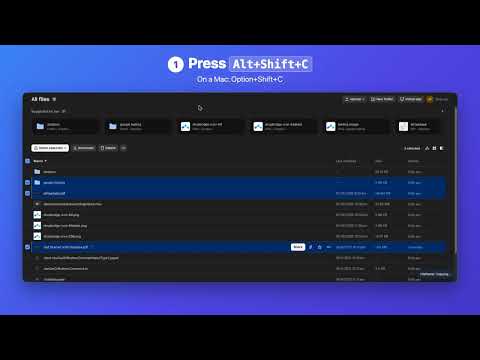
Copy files from Google Drive, Dropbox, OneDrive, SharePoint, Gmail or any website, and paste them straight into any upload box or a folder on your computer. No more downloading just to upload again. HOW IT WORKS 1. Copy: select files or folders in your drive, emails in Gmail, or files on a website, and press Alt+Shift+C (Option+Shift+C on a Mac). 2. Paste into a website: click the upload box or the field you type in, and press Alt+Shift+V. Folders arrive as a .zip. 3. Paste into a folder: press Cmd+V in Finder or Ctrl+V in File Explorer. Folders keep their structure. (Needs the free FilePaster Helper from filepaster.com.) WORKS WITH • Google Drive: files and folders; Google Docs, Sheets and Slides arrive as Word, Excel and PowerPoint files. • Dropbox, OneDrive and SharePoint (personal, work and school accounts): files and whole folders. • Gmail: tick emails or open one, and copy all their attachments, including photos in the email. • Any website that lists files with download links: client portals, school and course sites, file-sharing pages. NEW IN 1.2 • Make videos smaller when pasting, so they fit upload limits like Gmail's 25 MB or Discord's 10 MB. Videos become MP4 (H.264 video, AAC sound), which plays and uploads everywhere. A 150 MB iPhone video arrives as an MP4 of about 20 MB. • Reads MP4, MOV (including iPhone, HDR and ProRes video), MKV, WebM and AVI (DivX, Xvid, MJPEG, DV). • Choose a size to fit under, the quality and a maximum size. Works when you paste into websites, and when you paste into folders on your computer if you turn that on too. • It all happens on your computer with Chrome's own video encoder. Videos are never uploaded anywhere to be processed. If a video wouldn't get smaller, the original is pasted. Off until you turn it on in Options. • Security: FilePaster now acts only on real key presses and drags, so a website can't trigger a paste or a download by itself, and files copied from a website's links are downloaded with your sign-in only when they're on that same website. IMAGES • Make images smaller when pasting: choose JPEG, WebP, PNG or Auto, the quality and a maximum size. A 4 MB phone photo arrives as about 0.8 MB. It all happens on your computer, and the original is pasted whenever a smaller file wouldn't help. Off until you turn it on in Options. MORE • Drag files out of your drive onto another tab's upload box, or onto an email you're writing. • Drag images from any website into Canva, a chat or a form as real image files. SAFE AND PRIVATE BY DESIGN • No FilePaster servers: files go straight from where they are to your computer and the place you paste them. • No sign-in and no passwords: it uses the accounts you're already signed in to in Chrome, like each site's own Download button. • Stays idle until you press its shortcut or drag a file, and only touches the files you pick. It never changes, moves or deletes anything in your drives or email, and never sends anything on your behalf. • No analytics, no ads, no selling of data. The only outside service it contacts is Lemon Squeezy, to check your licence key. • Chrome says it can "read and change all your data on all websites" because FilePaster works on every site so you can paste into any upload box you choose. PRICING 7-day free trial, no credit card needed. Then $29 a year for unlimited copies and pastes, in up to 3 browsers. Cancel anytime; full refund within 14 days of your first payment. Privacy policy: https://www.filepaster.com/privacy.html Support: support@filepaster.com
0 out of 5No ratings
Details
- Version1.2.0
- UpdatedNovember 10, 2026
- FeaturesOffers in-app purchases
- Offered byparinjoed@gmail.com
- Size1.07MiB
- LanguagesEnglish
- DeveloperJoed Zara Parin
BLK 33 LOT 47 PALOMA STREET GRAND OAKRIDGE ANTEL VILLAGE General Trias, Cavite 4107 PHEmail
ezalorsara@gmail.comPhone
+63 915 607 0154 - TraderThis developer has identified itself as a trader per the definition from the European Union and committed to only offer products or services that comply with EU laws.
Privacy

FilePaster has disclosed the following information regarding the collection and usage of your data. More detailed information can be found in the developer's privacy policy.
FilePaster handles the following:
This developer declares that your data is
- Not being sold to third parties, outside of the approved use cases
- Not being used or transferred for purposes that are unrelated to the item's core functionality
- Not being used or transferred to determine creditworthiness or for lending purposes
Support
For help with questions, suggestions, or problems, visit the developer's support site