

BatchFlow AI - Auto Veo 3, Nano Banana & Bulk Generator for Google Flow
3 ratings
)
Overview
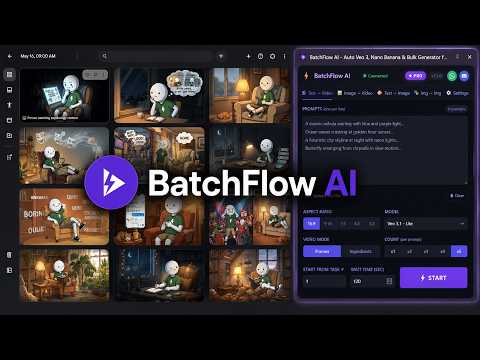
Batch generate AI videos & images on Google Flow. Auto Veo 3.1, Nano Banana Pro, bulk download. Free tier included.
**BatchFlow AI turns Google Flow into a batch generator. Paste a list of prompts, press START, and walk away — it enters every prompt, waits for each result, and downloads everything in order.** Generate AI video with **Veo 3.1** and AI images with **Nano Banana Pro** without submitting prompts one at a time or saving files by hand. **Free — 30 prompts per day, every feature unlocked, no credit card.** **Pro — $6/month for unlimited prompts.** --- ### 🎬 BULK AI VIDEO — VEO 3.1 & OMNI Queue a whole prompt list and let it run. * **Text → Video** — one prompt per line, each becomes its own generation * **Image → Video** — attach your own images so the same character or product appears every time * **Models**: Veo 3.1 Quality, Veo 3.1 Fast, Veo 3.1 Lite, Veo 3.1 Lite (Lower Priority) and Omni 1.1 Flash * **Lower Priority mode** generates without spending premium credits (longer queue waits) * **Resolution and duration control** where the model supports it — 360p/720p and 4s–10s on Omni * **1 to 4 videos per prompt** * **16:9 landscape or 9:16 vertical** * **Frames or Ingredients** sub-modes ### 🖼 BULK AI IMAGES — NANO BANANA PRO * **Text → Image** and **Image → Image** * **Models**: Nano Banana Pro, Nano Banana 2, Nano Banana 2 Lite * **1 to 4 variants per prompt** * **1:1, 4:3, 16:9 and 9:16** aspect ratios * Attach reference images so a character stays consistent across an entire batch ### ⚡ RUN BATCHES YOUR WAY * **Parallel prompts** — run several prompts at once for maximum speed, or keep it slow and steady * **Wait time per result** — tune how long to wait before moving on * **Delay between groups** — pace the batch so Flow keeps up * **Settings remembered per mode** — each tab keeps its own model, ratio and count * **Stop anytime** — STOP halts the run, even mid-download ### ⬇️ DOWNLOADS THAT ORGANISE THEMSELVES * **Automatic downloads** — every result saved as it finishes * **Numbered in prompt order** — `0001`, `0002`, `0003`… so output matches your list * **Your own download folder** * **Download All** — grab everything currently on the Flow canvas in one click * **Higher quality on supported plans** — save images at 2K or 4K and video at 1080p or 4K. BatchFlow upscales through Google's own engine and falls back automatically when a tier is not available on your plan, so a batch never stalls ### 📊 SEE WHAT IS HAPPENING * **Live log** of every prompt as it runs * **Progress bar** with task counts * **Failed Prompts list** — any prompt that did not generate is collected with its number and text, so you can copy it back and run it again * **Connection indicator** — tells you at a glance whether Google Flow is reachable ### 🧭 EASY TO START * **Guided tour on first run** — a short walkthrough of every control, replayable anytime from Settings * **Sign in with Google** — no key to copy or store * **Side panel UI** — sits beside Google Flow instead of covering it --- ### 🎯 WHO IT IS FOR * **Faceless YouTube channels** — scenes, B-roll and thumbnails in bulk * **YouTube automation** — produce AI video at volume * **AI artists** — iterate on large image batches * **Content agencies** — turn client briefs into assets faster * **TikTok, Reels and Shorts creators** — short-form video at scale * **Anyone** tired of pasting prompts one at a time --- ### 🔧 HOW IT WORKS 1. Open **Google Flow** and sign in 2. Click **BatchFlow AI** to open the side panel 3. Pick your mode, model and settings 4. Paste your prompts — **one per line** — or upload a `.txt` file 5. Press **START** 6. BatchFlow enters each prompt, waits for the result and downloads it **Requires a Google account with access to Google Flow.** Keep the Flow tab open while a batch runs. --- ### 🔒 PRIVACY BatchFlow AI does not sell or share your content, and shows you no ads. To run a batch in order, your prompts are sent to the BatchFlow server, which coordinates the queue and the download ordering. Reference images you add are kept in your browser's local storage; in Image → Video they are sent with the prompt so Flow can use them. Generated files download straight from Google to your computer. Sign-in uses your Google email to identify your licence. Nothing else is collected. --- ### 🚀 GET STARTED **Free:** 30 prompts a day • every feature unlocked • no credit card **Pro:** $6/month • unlimited prompts Join the BatchFlow AI community on Discord for updates and support: https://discord.gg/wSTJsuCj8
3.7 out of 53 ratings
Details
- Version1.8.6
- UpdatedSeptember 29, 2026
- FeaturesOffers in-app purchases
- Offered bykhalid.bin.wali
- Size1.52MiB
- LanguagesEnglish
- DeveloperWebnexagency
gulistan e johar Karachi 75290 PKEmail
khalid.bin.waliullah@outlook.com - Non-traderThis developer has not identified itself as a trader. For consumers in the European Union, please note that consumer rights do not apply to contracts between you and this developer.
Privacy

This developer declares that your data is
- Not being sold to third parties, outside of the approved use cases
- Not being used or transferred for purposes that are unrelated to the item's core functionality
- Not being used or transferred to determine creditworthiness or for lending purposes
Support
For help with questions, suggestions, or problems, please open this page on your desktop browser