


Overview
Save web pages as PDF, then merge, split, rotate, compress or draw on PDFs right in Chrome. Plus Meesho Low Shipping tools.
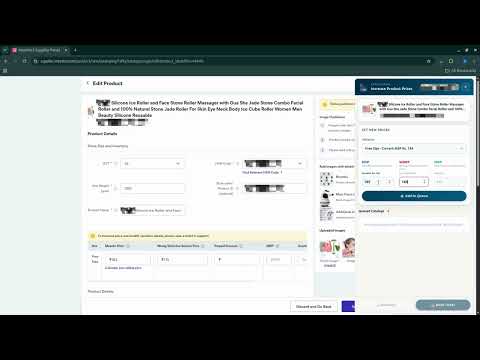
Save any web page as a clean PDF and edit PDFs right in Chrome: merge, split, rotate, compress, make label sheets and draw on pages. Your pages and PDFs are processed on your computer and never uploaded. For Meesho sellers, PDFCroppers also finds lower shipping charges from the Low Shipping workspace. WEB PAGE TO PDF Click the PDFCroppers icon on any website and choose how to save it: • Full Page: saves the page exactly as you see it on screen, as one long page, with nothing moved or resized • Page Element: click only the parts you want, such as a product table or an order summary, then press Save PDF • Article: keeps just the story, title and main image in a clean reading layout on A4 pages • Remove Elements: click ads, banners or anything else to hide it before saving Text stays selectable and links stay clickable in every PDF. Clean up the page in one click by hiding headers and menus, footers, sidebars, ads and pop-ups, or sticky bars. Each mode has its own settings, and nothing changes unless you change it: • 21 paper sizes including A4, Letter, Legal and A3, plus custom sizes, or keep the page's own screen width • Portrait or landscape, one long page or normal page breaks • Margins, scale from 50% to 200%, and background colours • Page numbers, date, title and web address in the header or footer • Page ranges, PDF bookmarks, and loading of lazy images before saving • Your own file-name pattern using the title, website, date or time PDF TOOLS When you open a PDF in Chrome, a small "Quick PDF edit" tile appears at the bottom-left corner. Click it to open a large editing window with a preview of your pages and all tools in one place: • Merge several PDFs into one, in any order • Split into one file per page, every few pages, or custom ranges • Delete pages by ticking them • Rotate and reorder pages by dragging them • Print label sheets: place 2 to 12 labels on one A4, Letter or A5 sheet, with cut lines • PDF to images: save pages as PNG or JPG, from 96 to 300 DPI • Compress: a light mode that keeps text selectable, or a strong mode for the smallest file • Draw on PDF: pen, highlighter, text and eraser Quick one-click actions are also in the toolbar popup when a PDF is open: split every page, compress, save as images, and rotate all pages. Results go straight to your Downloads folder. You can switch the tile off from the popup at any time. LOW SHIPPING FOR MEESHO SELLERS • Generate multiple image variations from one product image • Compare the shipping estimate of the original image with the generated ones • Automatically identify the lowest available estimate • Save completed results to your PDFCroppers history • Keep using your existing signed-in browser sessions • View credit usage and previous results in your PDFCroppers account Low Shipping needs an active PDFCroppers account, available Low Shipping credits, and a signed-in account on the supplier portal. PRIVACY • Web page to PDF and all PDF tools run on your computer. Your pages and files are never uploaded. • PDFCroppers never stores your supplier portal password. • The extension sends basic usage events, such as which tool was used, to improve PDFCroppers. It never sends page addresses, file names or file contents. GOOD TO KNOW • While a web page is being saved as a PDF, Chrome briefly shows "PDFCroppers started debugging this browser". This is how Chrome's own print engine creates the PDF, and the message disappears when the file is saved. • To edit PDFs opened from your computer, such as label files in your Downloads folder, turn on "Allow access to file URLs" once: open chrome://extensions, click Details on PDFCroppers, and switch it on. PDFCroppers shows a button that takes you there. • Chrome does not allow saving its own pages, the Chrome Web Store or other extensions. • Available in English and Hindi. SUPPORT Need help? Create a support ticket at pdfcroppers.com/support or message us on WhatsApp at +91-76002-54544.
0 out of 5No ratings
Details
- Version2.0.10
- UpdatedSeptember 26, 2026
- Size939KiB
- Languages2 languages
- DeveloperMICRONSTARSWebsite
25, Kalapi society 1, Near hathi mandir Surat, Gujarat 395004 INEmail
support@micronstars.comPhone
+91 63545 40630 - TraderThis developer has identified itself as a trader per the definition from the European Union and committed to only offer products or services that comply with EU laws.
- D-U-N-S304144246
Privacy

PDFCroppers has disclosed the following information regarding the collection and usage of your data. More detailed information can be found in the developer's privacy policy.
PDFCroppers handles the following:
This developer declares that your data is
- Not being sold to third parties, outside of the approved use cases
- Not being used or transferred for purposes that are unrelated to the item's core functionality
- Not being used or transferred to determine creditworthiness or for lending purposes
Support
For help with questions, suggestions, or problems, please open this page on your desktop browser