


Overview
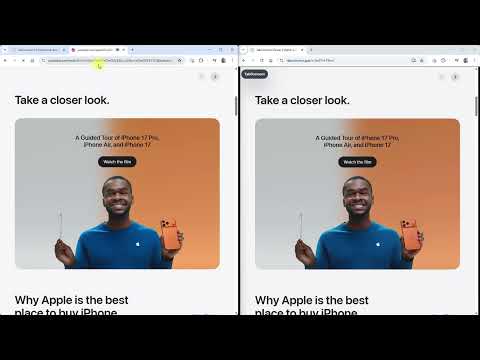
Share your current browser tab with viewer links, live room controls, diagnostics, and chat.
Share a browser tab, a window, or your entire screen. TabConnect makes screen sharing and remote support simple, whether you are presenting your own content or asking a customer to show theirs. Create a viewer link or downloadable QR code and send it to anyone. Viewers join in their browser on desktop, tablet, or mobile — no installation or account required. Built for product demos, sales walkthroughs, online presentations, customer support, guided troubleshooting, training, onboarding, and team collaboration. Request your customer's screen: • Send a private screen-sharing invitation directly from the extension • Customers choose a tab, window, or entire screen in desktop Chrome or Edge • No customer account, extension, or download required • Sharing starts with the customer's approval, and they can stop at any time Customer invitations are view only. The interaction and presentation tools below are available when you share from the extension. Make your shared sessions interactive: • Viewers can request remote control of a supported browser tab — you approve each request • Collaborate with multiple laser pointers on supported tab shares • Use built-in chat and share files up to 25 MB • Share your webcam and microphone alongside your content Tools for presenting and viewing: • Choose balanced or text-clarity presentation modes • Give viewers zoom, pan, fullscreen, Fit Screen, and Actual Size controls • Support pinch-to-zoom and panning on touch devices • Share just one tab when you want to keep the rest of your desktop private Stay in control of your session: • Switch shared tabs during a current-tab session without restarting • Freeze and resume the stream for all viewers • Lock the room, set viewer limits, and remove viewers • Reuse previous sessions with built-in history Built for reliable browser sharing: WebRTC streaming supports direct connections and relay fallback for difficult networks. Live connection diagnostics, bandwidth statistics, and an exportable session event log help you understand and troubleshoot your sessions. Free to use. Share what you choose. See what your customer needs help with.
0 out of 5No ratings
Details
- Version1.0.50
- UpdatedOctober 27, 2026
- Size342KiB
- LanguagesEnglish
- DeveloperWebsite
Email
support@fixquotes.com - Non-traderThis developer has not identified itself as a trader. For consumers in the European Union, please note that consumer rights do not apply to contracts between you and this developer.
Privacy

TabConnect: Browser Tab Screen Sharing has disclosed the following information regarding the collection and usage of your data. More detailed information can be found in the developer's privacy policy.
TabConnect: Browser Tab Screen Sharing handles the following:
This developer declares that your data is
- Not being sold to third parties, outside of the approved use cases
- Not being used or transferred for purposes that are unrelated to the item's core functionality
- Not being used or transferred to determine creditworthiness or for lending purposes
Support
For help with questions, suggestions, or problems, visit the developer's support site