


Overview
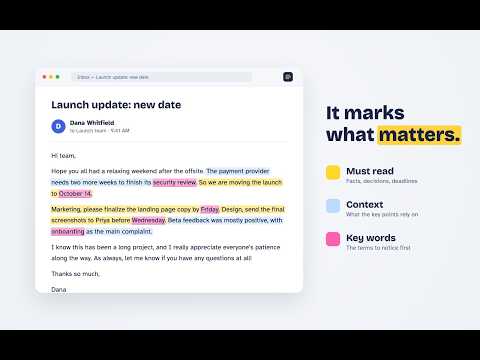
Read emails and articles faster. CloseRead highlights the sentences that matter, right on the page, without rewriting a word.
CloseRead marks the sentences you need to read in emails and articles, right on the page. It doesn't summarize or rewrite anything: you still read the original text, just the parts that carry information. What it marks • Must read (yellow): main points, facts, numbers, decisions, requests and deadlines. • Context (blue): sentences the key points depend on. • Key words (pink): the terms to notice first. • Focus mode fades the sentences you can skip. Read critically CloseRead can underline sentences worth questioning: unsupported claims, overstatement, opinion written as fact, pressure tactics and promotional content. It describes how a sentence is written; it can't check whether a claim is true. It can also suggest up to 3 questions to help you form your own view. How it works Click the toolbar button or press Alt+Shift+H on an email in Gmail or Outlook, or on any article. CloseRead reads that one tab only when you ask. A welcome page opens once after installation, shows a live demo and connects your browser in one click. You can also pick sites such as your inbox to highlight automatically. Page button Add a floating CloseRead button to your pages and choose where it shows: on every site, on every site except the ones you hide, or only on the sites you pick. Right-click any page and choose "Show CloseRead button on this site" to turn it on or off there. It stays that way until you change it, and your choices follow you to every browser you sign in to. Account and pricing Sign in with Google or email. The free plan includes 150 credits every month, about 40 pages, with no card needed. Each highlight costs a few credits depending on page length. Paid plans add more credits and are managed on the CloseRead website. Invite a friend and you both get 75 credits. Privacy When you ask for highlights, the page text, title and site name are sent to CloseRead Cloud, which uses Claude by Anthropic (OpenAI as a fallback) to choose the sentences. CloseRead doesn't keep the page text. It stores usage records (site name, page type, word counts, credits) for billing. CloseRead never sells your data or uses it for ads. Full details: https://closeread.obdal.com/privacy
5 out of 54 ratings
Details
- Version1.2.0
- UpdatedNovember 19, 2026
- FeaturesOffers in-app purchases
- Size635KiB
- Languages20 languages
- DeveloperWebsite
Email
mraimalamiri@gmail.com - Non-traderThis developer has not identified itself as a trader. For consumers in the European Union, please note that consumer rights do not apply to contracts between you and this developer.
Privacy

CloseRead has disclosed the following information regarding the collection and usage of your data. More detailed information can be found in the developer's privacy policy.
CloseRead handles the following:
This developer declares that your data is
- Not being sold to third parties, outside of the approved use cases
- Not being used or transferred for purposes that are unrelated to the item's core functionality
- Not being used or transferred to determine creditworthiness or for lending purposes
Support
For help with questions, suggestions, or problems, please open this page on your desktop browser