

ViralDNA Auto Flow - Bulk Prompts for Google Flow, Veo & Nano Banana

Overview
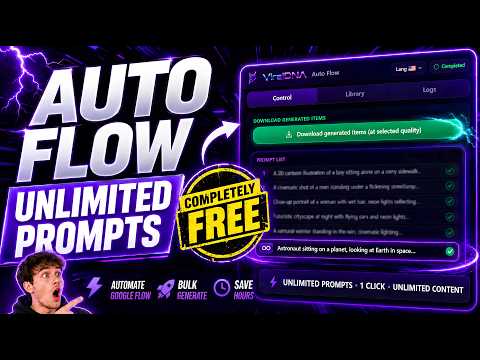
Run hundreds of Google Flow prompts in a row: Veo videos, Nano Banana images, image to video, reference images, ordered downloads.
ViralDNA Auto Flow runs your prompts in Google Flow one after another, so you can generate hundreds of Veo videos and Nano Banana images without clicking through each one. Paste a list, press Start, and every result downloads in order. BULK PROMPTING FOR GOOGLE FLOW - Queue a list of prompts (paste them or upload a .txt file) and send them to Google Flow automatically, one after another, with the delay you choose. - Works with the model you pick in Flow: Veo and Gemini Omni Flash for video (including 10-second clips) and Nano Banana for images. - Image to Video in bulk: one video per image, Chain (each image closes one clip and opens the next) or Pairs. - Reference image library with Auto-Tag: tag images like @hero and the right reference is attached to every prompt automatically. - Ordered downloads at the quality you choose (1K, 2K or 4K images, video up to 4K), named by number, timestamp or prompt. If one generation fails, its number is left as a gap instead of shifting everything after it. - Pause, resume and retry failed prompts; long runs keep going while the Flow tab is in the background. AUDIO TO VIDEO (VIRALDNA PRO) Turn a voice-over or podcast into a finished video: upload the audio, get a word-timed transcript, let the AI write one visual prompt per scene, generate the scenes in Google Flow, and export an MP4 that keeps your original audio in sync. - Transcription runs in your browser with Whisper (Base or the more accurate Small model); your audio never leaves your computer. - 10 visual styles (cinematic, anime, watercolor, 3D, stick figure, chalkboard, phone photo and more), 16:9, 9:16, 3:4 and 1:1 framing. - Turn any scene into a Veo video clip with one click; clips are fitted to the scene length automatically. - Effects you can combine: floating particles, film grain, old film, vignette, black and white, light leak. - Word-timed captions in five CapCut-style templates: Classic, Boxed, Karaoke, Highlight and Word by word. - Transition sounds at every scene cut: six built-in whooshes or your own sound file. - MP4 export happens in your browser at 720p or 1080p, plus SRT subtitles and a prompt list. SIX LANGUAGES English, Turkish, French, German, Italian and Spanish. The extension follows your browser language when supported. IS IT FREE? Yes. Batch prompting, Image to Video, references and ordered downloads are free. Your images and videos use your own Google Flow plan's credits as usual. Only Audio to Video is part of ViralDNA Pro (1 script token per 5 minutes of audio). PRIVACY AND PERMISSIONS Auto Flow only runs on Google Flow (labs.google and flow.google.com). The debugger permission is used for one thing: pressing Flow's Send button with a real mouse click, because Flow ignores clicks that a script fakes. While it does this, Chrome shows a yellow "debugging" bar; that is expected. Your prompts and settings stay in your browser and your results download straight to your computer. Every permission explained: https://www.viraldna.io/auto-flow#faq TIPS Start each run in a fresh, empty Flow project and keep the Flow tab visible while prompts are being sent. Website: https://www.viraldna.io/auto-flow Support: support@viraldna.io ViralDNA Auto Flow is an independent extension by viraldna.io. It is not affiliated with, endorsed or sponsored by Google. Google, Google Flow, Veo and Nano Banana are trademarks of Google LLC. ------------------------------------------------------------ WHAT'S NEW IN 1.5.13 Effects in Audio to Video Pick as many as you like and combine them: floating particles, film grain, old film, vignette, black and white and light leak. The preview shows exactly what the MP4 will look like. Captions in Audio to Video Word-timed captions straight from the transcript, in five CapCut-style templates: Classic, Boxed, Karaoke (the spoken word lights up), Highlight (the spoken word gets a box) and Word by word. Turkish, accented and right-to-left text are handled. Transition sounds A sound at every scene cut, kept under the narration: choose one of six built-in whooshes or upload your own file, pick the level, and hear it in the preview before exporting. Better transcription New "Most accurate" Whisper Small model, Base is now the default, several parts of the audio are transcribed in parallel, and a bad segment no longer fails the whole transcript. Fix "Send ready prompts to Flow" no longer fails with a 64 MiB message error in large projects.
4.4 out of 5172 ratings
Details
- Version1.5.13
- UpdatedOctober 22, 2026
- Size5.27MiB
- LanguagesEnglish
- DeveloperGörkem UysalWebsite
İhsaniye Mah. 13085 Sok. Özergun Apt. No:42/4 Bandırma, Balıkesir 10200 TREmail
support@viraldna.ioPhone
+90 531 372 12 82 - TraderThis developer has identified itself as a trader per the definition from the European Union and committed to only offer products or services that comply with EU laws.
Privacy

This developer declares that your data is
- Not being sold to third parties, outside of the approved use cases
- Not being used or transferred for purposes that are unrelated to the item's core functionality
- Not being used or transferred to determine creditworthiness or for lending purposes
Support
For help with questions, suggestions, or problems, visit the developer's support site