

Live Meeting Transcript - Rahul Bindal

Overview
Saves live captions from Meet, Teams, Zoom and Webex as transcripts with AI summary, translation, tasks, history and Zoho CRM sync.
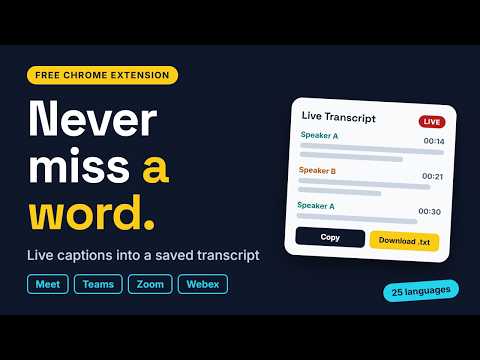
📝 Never take meeting notes again. Capture every word, then let AI do the rest. Live Meeting Transcript turns your meeting’s live captions into a clean, searchable transcript. It then adds AI-powered summaries, action items, speaker insights, a ready-to-send follow-up email, and optional Zoho CRM sync. It works right in your browser, with no bots joining your call. 🎥 WORKS WITH YOUR FAVORITE PLATFORMS Google Meet Microsoft Teams Zoom (web client) Webex Just join your meeting, turn on captions (CC), and the transcript builds itself. ✨ KEY FEATURES 📄 Live Transcript Capture Every caption line is saved automatically with the speaker’s name. Copy it with one click or download it as a .txt file. 🌍 Instant Translation Translate the transcript into your language, so language barriers don’t slow you down. 🤖 AI Meeting Summary Get a structured summary of key points and decisions in seconds. Copy it or download it as Markdown. ⭐ Smart Highlights Surface the moments that matter: decisions, deadlines, questions and important points, without re-reading the whole transcript. ✅ Task Extraction Automatically pull out action items and who owns them, so nothing falls through the cracks. 📊 Speaker Analytics See who spoke and for how long, and get a clear picture of participation in each meeting. 💬 Ask the Meeting Chat with your meeting. Ask “What did we decide about the budget?” or “What did Priya commit to?” and get answers grounded in the transcript. You can pick which past meeting to ask about. ✉️ Follow-Up Email Generator Turn any meeting into a polished follow-up email with summary and next steps. Edit it, then copy and send. 🔍 Searchable Meeting History Every meeting is saved locally. Search across all past transcripts with matching terms highlighted, and find that one comment from three weeks ago in seconds. 🤝 Zoho CRM Sync (NEW) Match meeting participants to your Zoho CRM contacts, and let AI pull out the customer requirements, objections, deal discussion, decisions and next steps. Review and edit everything, then click Save to push it to Zoho CRM: A note on each selected contact and on the open deal Customer requirements added to a contact field Tasks for action items, plus a follow-up task on the suggested date Nothing is written until you press Save, and deal stage and amount are never changed automatically. Supports all Zoho data centres (US, EU, India, Australia, Japan, Canada, Saudi Arabia, UK, China). It requires a one-time setup with your own Zoho API Console client. 💡 Show Captions on Call Optionally display the transcript right over your meeting window. 🎨 COMPACT, EASY-TO-USE INTERFACE All tools sit in one slim tab bar, so the popup stays short and your transcript gets the room. 🔐 YOU CHOOSE YOUR AI. YOU KEEP CONTROL. Bring your own API key and pick the provider you prefer: Anthropic (Claude) OpenAI (ChatGPT) Google Gemini Any custom OpenAI-compatible endpoint You can also set the AI output language, or leave it on Auto to match the meeting. 🔒 PRIVACY FIRST Transcripts, meeting history and settings are stored locally in your browser No account or sign-up required Transcript text is sent to an AI provider only when you click an AI feature, and only to the provider you chose, using your own key Translation sends the text being translated to Google’s translation service Zoho CRM data is sent to Zoho only when you connect your account and click Save to Zoho CRM The extension does not run its own server and does not collect your data 🚀 HOW TO USE Install the extension Join a meeting on Meet, Teams, Zoom or Webex Turn on live captions (CC) Open the extension to watch the transcript appear (Optional) Open AI Setup and add your AI key to unlock summaries, highlights, tasks, chat and email (Optional) Open the CRM tab and connect Zoho to save notes and tasks to your CRM 👥 WHO IT’S FOR Anyone who wants to focus on the conversation instead of typing notes, including sales and customer-facing teams who need meeting details in their CRM. 📌 NOTE Transcript quality depends on the platform’s live captions, so captions must be turned on in the meeting. AI features require your own API key from a supported provider, and usage costs are billed by that provider. Zoho CRM sync requires your own Zoho account and API client. This extension is independent and is not affiliated with or endorsed by Zoho, Google, Microsoft, Zoom, Cisco Webex, Anthropic or OpenAI.
5 out of 56 ratings
Details
- Version1.7.1
- UpdatedNovember 19, 2026
- Size109KiB
- LanguagesEnglish (United States)
- DeveloperWebsite
Email
rbindal2811@gmail.com - Non-traderThis developer has not identified itself as a trader. For consumers in the European Union, please note that consumer rights do not apply to contracts between you and this developer.
Privacy

This developer declares that your data is
- Not being sold to third parties, outside of the approved use cases
- Not being used or transferred for purposes that are unrelated to the item's core functionality
- Not being used or transferred to determine creditworthiness or for lending purposes
Support
For help with questions, suggestions, or problems, please open this page on your desktop browser