

Sim

Overview
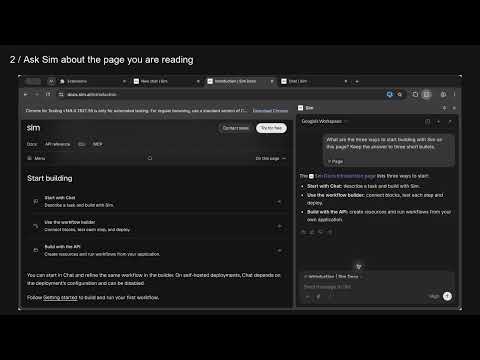
Ask Sim about the page you are reading, and open your organization's go/ and sim/ links from the address bar.
Ask Sim about the page you’re reading. Summarize an article, compare sources, dictate a question, or open your organization’s links from the address bar. • Click Sim in the toolbar to open chat and attach the page. Preview or remove its chip before sending. Add another page with + → Current page, or select a passage and choose Ask Sim about selection from the right-click menu. • Turn on Reference current page to include the active page when you send. It starts off, remembers your choice, and gives priority to pages you attach yourself. • Choose + → Page access → Allow across websites and approve Chrome’s prompt once for repeat use across sites. Access alone does not start background reading. Change or revoke access in Chrome’s extension settings. • Use the microphone beside Send to dictate into your editable draft. Sim streams microphone audio to ElevenLabs for transcription after browser permission. Stop ends recording; Send or changing conversations cancels unfinished transcription. No tab audio is recorded. • Drop a screenshot file into chat to ask about it. • Type go/name or sim/name in the address bar to open your organization’s links. For suggestions, type sim, press Space, and enter a link name. Right-click a web link and choose Create link in Sim to review a draft before saving it. Once you are signed in and Links is enabled for your organization, Sim briefly opens the go/ and sim/ home pages in background tabs that close themselves. This happens about once a week to help Chrome recognize the shortcuts. These visits appear in browser history; the extension does not read your browsing history. If Chrome searches for a shortcut, open Sim and sign in, or use an explicit address such as http://go/docs. Ordinary search text and your default search engine remain unchanged. If another extension handles go/ or sim/ links, disable its shortcut handling to use Sim consistently. This extension is unsuitable for profiles that need an existing intranet host named go or sim. Attaching a page transfers its readable text or selected passage, title, and sanitized address to the Sim composer. Page addresses omit credentials, query parameters, and fragments. Sending saves the snapshot with your conversation. Link suggestions send the entered link name to Sim; opening a shortcut sends its path and query to resolve the destination. Captured pages can contain personal or sensitive information; review attachments before sending. A Sim account and internet connection are required. Chat requires a paid Sim plan or available prepaid credits. Model, tool, workspace, and usage availability follow your Sim account and organization settings. Guide: https://docs.sim.ai/browser-extension Privacy: https://www.sim.ai/privacy#browser-extension
0 out of 5No ratings
Details
- Version0.1.5
- UpdatedNovember 5, 2026
- FeaturesOffers in-app purchases
- Offered bySim
- Size480KiB
- LanguagesEnglish
- Developer
Email
waleed@sim.ai - Non-traderThis developer has not identified itself as a trader. For consumers in the European Union, please note that consumer rights do not apply to contracts between you and this developer.
Privacy

Sim has disclosed the following information regarding the collection and usage of your data. More detailed information can be found in the developer's privacy policy.
Sim handles the following:
This developer declares that your data is
- Not being sold to third parties, outside of the approved use cases
- Not being used or transferred for purposes that are unrelated to the item's core functionality
- Not being used or transferred to determine creditworthiness or for lending purposes
Support
For help with questions, suggestions, or problems, visit the developer's support site