


Overview
See YouTube, Facebook, Instagram, TikTok BETA and WordPress blog analytics for the page you're on, then compare and repurpose it.
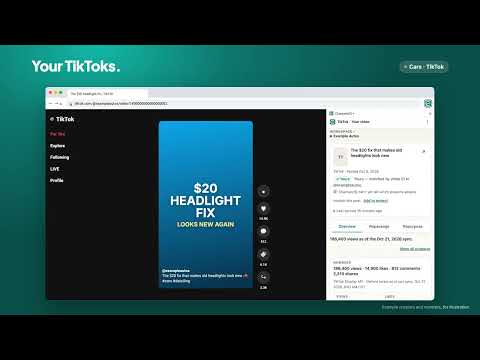
ChannelzIQ puts your YouTube, Facebook, Instagram, TikTok and WordPress blog analytics in Chrome's side panel, right beside the video, post or article you're looking at. No switching tabs and no digging through dashboards. Open one of your YouTube videos, Shorts or channels, a Facebook or Instagram post or Reel, a TikTok video, or an article on your own WordPress site, and ChannelzIQ shows its numbers from the workspace you choose: • Overview — counts, the last 28 days, how it compares with your past videos at the same age, and views since it went public. • Analyze — YouTube analytics for the video: how people found it, the searches that brought them, how much they watch, and what stands out (rules-based, no AI cost). • Repackage — ChannelzIQ’s Packaging Health verdict for the video, what to try on the thumbnail, and the videos it was compared against. • Repurpose — turn the item into drafts for your other platforms, reviewed before anything is posted. • Projects — link the item to one of your ChannelzIQ projects in one press, with Undo. • Another creator’s YouTube video — compare its public numbers with yours at the same age, add the channel as a peer, or save your own idea. • Your blog post — for an article on your own WordPress site: the searches your own Search Console reports for that exact page, and Repurpose to turn it into posts for your other platforms. What the panel handles: it reads the address and title of the active tab — never the page’s text, forms or images, and it runs no scripts on pages. For YouTube, Facebook, Instagram and TikTok pages, including other creators’, it sends the item’s ID or handle to ChannelzIQ; for an article on your own connected site it sends the address without tracking tags or anything after #. Other websites’ addresses stay in your browser. Chrome keeps the panel’s sign-in, your workspace, preferences and up to five recently viewed items per workspace. YouTube thumbnails load from Google’s i.ytimg.com, which receives the video ID and your IP address. The panel shows all of this, with a link to our privacy policy, before you press Connect. Nothing spends Cue tokens unless you press Run, and every Run shows ChannelzIQ’s estimate and your balance first. Changing a Facebook thumbnail or starting a YouTube thumbnail test always asks you to confirm. Requires a ChannelzIQ account (channelziq.com). Press Connect in the panel and confirm on the ChannelzIQ page (if you aren’t signed in there, sign in first, then press Connect again). The panel’s sign-in lasts up to 30 days; signing out of the panel or of ChannelzIQ ends it. Privacy policy: https://channelziq.com/privacy.html
0 out of 5No ratings
Details
- Version6.728.0
- UpdatedNovember 1, 2026
- FeaturesOffers in-app purchases
- Size93.54KiB
- LanguagesEnglish (United States)
- DeveloperChannelzIQ LLCWebsite
211 East Burr Oak Drive Arlington Heights, IL 60004 USEmail
support@channelziq.comPhone
+1 847-323-6750 - TraderThis developer has identified itself as a trader per the definition from the European Union and committed to only offer products or services that comply with EU laws.
- D-U-N-S147443680
Privacy

ChannelzIQ has disclosed the following information regarding the collection and usage of your data. More detailed information can be found in the developer's privacy policy.
ChannelzIQ handles the following:
This developer declares that your data is
- Not being sold to third parties, outside of the approved use cases
- Not being used or transferred for purposes that are unrelated to the item's core functionality
- Not being used or transferred to determine creditworthiness or for lending purposes
Support
For help with questions, suggestions, or problems, visit the developer's support site