


Overview
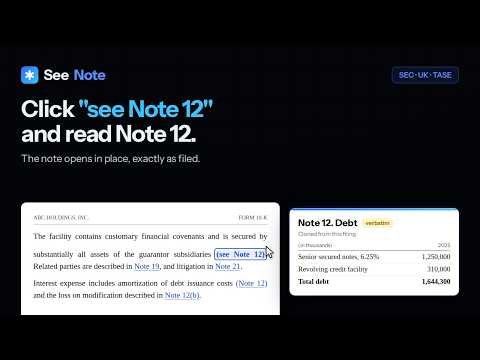
Make 'see Note 12' clickable in SEC 10-K, TASE & UK filings — the note opens verbatim, no AI. Highlight, annotate, compare.
Your first 3 filings are free — no card, no expiry. Free detection mode forever. Every annual report says "see Note 12" — and makes you scroll to find it. SeeNote makes those references clickable. Click, and the note appears in a popup, verbatim: the exact text and tables the company filed. No AI rewriting, no summaries, nothing added or removed. WHAT IT COSTS SeeNote is a paid extension with a free trial, and here is exactly what that means, because a store listing is a bad place to be vague about it: - Your first 3 filings are completely free. Every note in them opens, as many times as you like. No credit card, and no expiry date — the trial is spent by reading, not by waiting, so it is still there months later if that is when you next open a 10-K. The bundled demo filing is free forever and counts towards nothing. - After those 3 filings, SeeNote keeps finding, underlining and counting every cross-reference in every filing, free, for as long as you use it. Clicking one shows the upgrade prompt instead of opening the note. There are no daily or monthly limits — there are no meters at all. - A subscription opens the notes again everywhere: $15/month or $129/year. WORKS ON - SEC EDGAR: 10-K and 10-Q filings on sec.gov, in both the classic HTML view and the inline XBRL viewer - Tel Aviv Stock Exchange: Hebrew PDF filings opened from Maya, and the iXBRL filings Maya renders - UK: annual reports from the FCA National Storage Mechanism - Any filing PDF you open in the SeeNote Reader, whatever site it came from UK annual reports work the same way: references become clickable, and the note that opens is the note the report prints. They are designed documents rather than filled-in filing templates, so their note headings vary far more than EDGAR's — and where SeeNote cannot work out which note a reference means, it says so instead of guessing. - Open any filing PDF in the SeeNote Reader (toolbar button, right-click a PDF link, or drag-and-drop) - In the Reader, the referenced note pops up as the actual page image — tables and typography intact - Text-layer PDFs only; scanned PDFs are detected and reported. Chrome only. - References become dotted-underline links as you scroll - Notes open in place — tables preserved exactly as filed - Notes open in a movable, resizable window — zoom 70–200%, pin up to three for side-by-side comparison - A collapsible sidebar lists every note; filter, click to open, double-click to jump - Hover any reference for a three-line preview; copy any note verbatim (tables paste into spreadsheets) - Every reference is resolved from the filing's own structure, with confidence signaling - References to other filings are named as such, and opened in the right register - If SeeNote can't resolve a reference, it says so - No account. No tracking by default. Anonymous usage counts are strictly opt-in.
0 out of 5No ratings
Details
- Version1.1.0
- UpdatedSeptember 18, 2026
- FeaturesOffers in-app purchases
- Size776KiB
- Languages2 languages
- DeveloperWebsite
Email
hello@seenote.co - Non-traderThis developer has not identified itself as a trader. For consumers in the European Union, please note that consumer rights do not apply to contracts between you and this developer.
Privacy

SeeNote: 10-K Footnotes & SEC Filing Reader has disclosed the following information regarding the collection and usage of your data. More detailed information can be found in the developer's privacy policy.
SeeNote: 10-K Footnotes & SEC Filing Reader handles the following:
This developer declares that your data is
- Not being sold to third parties, outside of the approved use cases
- Not being used or transferred for purposes that are unrelated to the item's core functionality
- Not being used or transferred to determine creditworthiness or for lending purposes