


Overview
Whippet Notes is an AI-powered veterinary scribe, providing you with accurate and consistent notes instantly.
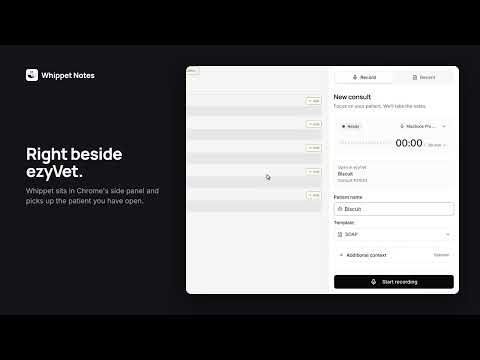
Whippet Notes is an AI scribe for veterinary teams. The Chrome extension puts it in a side panel next to your practice management system, so you record the consult, review the notes and file them without switching tabs. RECORD NEXT TO THE PATIENT RECORD • Open a patient in ezyVet and the panel shows who is on screen and fills in their name for you. • Pick a template and click Start recording. Pause and resume as you need. • Keep working while you record. Switching tabs, changing patients or closing the panel doesn't stop the recording. • Click Stop & review, then Upload & draft note. The consult opens in the panel while Whippet drafts the notes. NOTES YOU CAN EDIT IN PLACE • SOAP notes and your own templates, written as the consult is processed. • Edit any section right in the panel, or start another note from a different template. • A client summary and dental chart for the same consult, one tab away. PUSH INTO EZYVET • Push to ezyVet shows exactly which ezyVet field each part of the note goes into, such as History, Physical Exam, Assessments and Plan, before anything is written. • Click Push and Whippet fills and saves each field. It adds to what is already there and never deletes it. • Whippet checks the note belongs to the patient and visit on screen, and won't write into the wrong record. ALSO • Recent lists your consults from the last 7 days. • Upload an audio file instead of recording live. • Ascend practices: the panel recognises the open consult, and once your practice's Ascend integration is set up, notes reach Ascend through Whippet's automatic transfer. GETTING STARTED Whippet Notes needs a Whippet Notes account. Start a free trial at whippetnotes.com, then click Connect to Whippet in the panel and sign in once. The first time you record, the panel asks for microphone access. Help: https://intercom.help/whippet-notes/en Privacy: https://www.whippetnotes.com/privacy-policy
0 out of 5No ratings
Details
- Version2.0.1
- UpdatedNovember 14, 2026
- Size1.29MiB
- LanguagesEnglish
- DeveloperCIARAN MCCAUGHEYWebsite
10509 16 Edmondstone St South Brisbane, QLD 4101 AUEmail
ciaran@whippetnotes.comPhone
+61 424 795 782 - TraderThis developer has identified itself as a trader per the definition from the European Union and committed to only offer products or services that comply with EU laws.
Privacy

Whippet Notes has disclosed the following information regarding the collection and usage of your data. More detailed information can be found in the developer's privacy policy.
Whippet Notes handles the following:
This developer declares that your data is
- Not being sold to third parties, outside of the approved use cases
- Not being used or transferred for purposes that are unrelated to the item's core functionality
- Not being used or transferred to determine creditworthiness or for lending purposes
Support
For help with questions, suggestions, or problems, visit the developer's support site