

BridgeX - TradingView to MT5/MT4 Bridge
2 ratings
)
Overview
Execute trades directly from TradingView to MetaTrader 5 and 4
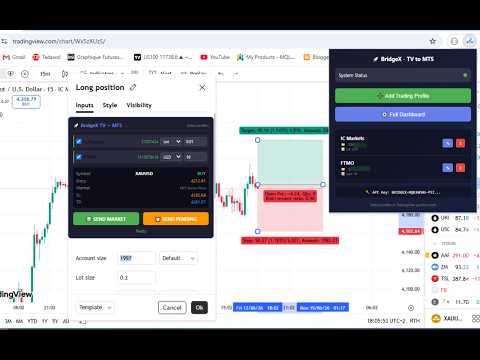
BridgeX is a Chrome extension that connects TradingView directly to MetaTrader 5 and 4. Draw your Long or Short position on any TradingView chart, click one button, and your order executes instantly in MT5/MT4. Or go fully automatic: let your TradingView strategies and indicators trade for you through alerts — no clicking, 24/7. Works with most MT5/MT4 brokers and supports multiple accounts. Manual trading is free — no TradingView Pro required. Website : https://bridgex.trader-rentable.com 🎁 Ask us for a 7-Day Free Trial of BridgeX 🔰 Features: Universal broker support Multi-account trading – send one trade to multiple accounts 🤖 Auto-Signals – TradingView alerts become MT5/MT4 trades automatically Risk management: % balance, fixed lot, fixed USD, or signal Market orders and pending orders (Stop/Limit) Real-time position detection (entry, SL, TP, symbol, direction) Complete dashboard with live trade history, signal feed and activity logs ✔ How it works (Manual): 1- Install BridgeX Chrome Extension (free download) 2- Install BridgeX MT5/MT4 utility (free download for clients) 3- Create trading profiles with your MT5/MT4 account numbers 4- Copy your API key into the MT5/MT4 EA 5- Draw a Long or Short position on TradingView 6- Open position settings → BridgeX panel appears 7- Select profiles and click SEND MARKET or SEND PENDING 8- Order executes in MT5/MT4 instantly ✔ How it works (Auto-Signals): 1- Open the dashboard → Auto-Signals → Create Channel 2- Select the accounts that should receive the alerts 3- Copy your personal webhook URL + the ready-made alert template 4- Paste them into a TradingView alert on your strategy or indicator 5- Watch the signal feed — then flip the channel to LIVE 6- Every alert now opens, manages and closes trades automatically Full documentation, setup guide, Updates and video tutorial available on our YouTube channel. 🌟 Lifetime plan: one-time $99 payment — full EA unlocked, unlimited MT5/MT4 ✅ Update to v2.5 — Auto-Signals: TradingView Alerts → MT5/MT4, Fully Automatic **🤖 Alert Trading (the headline feature)** - Connect ANY TradingView strategy or indicator: when your alert fires, BridgeX translates it and opens the trade on MT5/MT4 in milliseconds - One channel per strategy, with its own secret webhook URL — create it in 4 clicks from the dashboard - Ready-made alert templates with copy buttons (strategy, indicator, event alerts) - Works on multi-chart layouts: each chart's utility executes only its own symbol — no double orders, ever **🗣️ Understands ANY Alert Language** - Built-in dictionary: "Strong Buy", "Up Arrow", "Crossing Up", bullish/bearish terms in English, French, Spanish, German, Italian, Arabic, Chinese, Japanese and more - Emoji signals: ▲ ▼ 🟢 🔴 → BUY / SELL - Custom Words: teach BridgeX your indicator's own vocabulary (e.g. "DEMAND signal = BUY") — no code, one line per word - Symbol mapping: TradingView's XTIUSD automatically becomes your broker's USOIL **🛡️ Safety First, Then Speed** - DRY mode: new channels log and translate every alert but place NO trades — watch it work, then flip to LIVE when confident - Master kill switch: the 🤖 toggle on your chart stops auto-trading instantly - SL/TP your way: from the alert itself, from your channel's distances, or from the utility's Relative mode (real fill price) - Stale-order protection: a signal expires in seconds if your terminal is offline — no surprise trades when it reconnects - Broker-verified history: real MT5/MT4 tickets, actual fill prices and applied SL/TP are written back to your dashboard **📡 Live Signal Feed** - Watch every alert arrive: the raw message, the translated action, which word matched, and what BridgeX did (trade opened / duplicate blocked / ignored) - Complete audit trail of your automated trading **⚡ Everything from v2.4 — still included** - Relative SL/TP Mode based on real execution prices - Reverse Trade (Hedging) Mode - Fast Scalping Console with Shift+B / Shift+S hotkeys and per-account TP/SL - Multi-account, multi-platform (MT5 + MT4) one-click execution - VPS-ready: TradingView stays local, MT5/MT4 runs anywhere ℹ️ Note: manual trading works on a free TradingView account. Auto-Signals use TradingView alerts (webhooks), available on any paid TradingView plan. **What this means for you** ✅ Your strategy trades while you sleep — alerts in, trades out, milliseconds ✅ Any indicator becomes an auto-trading system — even third-party ones, via Custom Words ✅ Safe by design — DRY mode, kill switch, expiry protection, full audit log ✅ Multi-account — one alert, every account, MT5 and MT4 ✅ Multi-chart — trade many symbols from one TradingView, no doubled orders The extension updates automatically. You can also manually update by going to chrome://extensions/ and clicking "Update".
3 out of 52 ratings
Details
- Version2.5.0
- UpdatedSeptember 24, 2026
- Size56.58KiB
- LanguagesEnglish
- Developer
Email
traderrentable1@gmail.com - Non-traderThis developer has not identified itself as a trader. For consumers in the European Union, please note that consumer rights do not apply to contracts between you and this developer.
Privacy

BridgeX - TradingView to MT5/MT4 Bridge has disclosed the following information regarding the collection and usage of your data. More detailed information can be found in the developer's privacy policy.
BridgeX - TradingView to MT5/MT4 Bridge handles the following:
This developer declares that your data is
- Not being sold to third parties, outside of the approved use cases
- Not being used or transferred for purposes that are unrelated to the item's core functionality
- Not being used or transferred to determine creditworthiness or for lending purposes
Support
For help with questions, suggestions, or problems, visit the developer's support site