


Overview
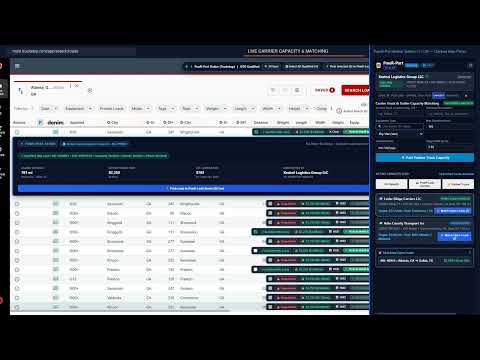
Synchronize freight loads from your TMS and load boards to PowR-Load in one click with live capacity matching and bidding.
PowR-Port Broker Edition — Chrome Side Panel & Dispatch Cockpit PowR-Port Broker Edition is a free Chrome Side Panel extension and multi-monitor dispatch cockpit built for freight brokers, 3PLs, and shippers. It connects your web-based Transportation Management System (TMS), freight load portals, and dispatch schedules directly to the PowR-Load Freight Marketplace so you can publish, price, negotiate, and track shipments in real time without leaving your active browser tab. Whether you already hold a PowR-Load Broker account or operate as an external FMCSA-licensed freight broker on your existing TMS, the cockpit runs alongside your daily workflow as a persistent Chrome Side Panel or a detached pop-out window on a second monitor. Why Freight Brokers and Shippers Use It 1. Eliminate Double Data Entry Stop re-typing shipment details across multiple browser tabs. With 1-Click Page Capture and inline action buttons, you can extract individual orders or batch-select multiple shipments directly from your open TMS screen and publish them to PowR-Load in seconds. 2. Free for Verified Freight Brokers ($0 Fees) PowR-Port Broker Edition is free for verified brokers and shippers with $0 monthly subscription fees, $0 load posting fees, and $0 synchronization fees. 3. Built-In FMCSA Carrier Compliance Verification Every external broker onboarding and incoming carrier bid is checked in real time against federal FMCSA authority and insurance records. Before awarding a load, you can review the carrier's live Operating Authority status, Safety Rating, and verified Auto Liability ($1,000,000 minimum) and Cargo ($100,000 minimum) coverage right inside the bid drawer. 4. Autonomous AI-CASSI Carrier Inquiry Triage Instead of fielding repetitive phone calls and emails regarding load details or rate counter-offers, AI-CASSI answers routine carrier questions using your attached Booking Criteria Profile and logs complete negotiation transcripts for 1-click broker approval or counter-offer. 5. Automated Branded Rate Confirmations & 30-Day Live Shipment Portal Upload a sample of your brokerage's existing Rate Confirmation once, and the template engine replicates your layout, logo, brand colors, and legal terms into a reusable dynamic template. When you accept a carrier bid, your custom Rate Confirmation is issued automatically alongside an encrypted 30-day Broker Load Portal featuring milestone tracking, live GPS telemetry, two-way messaging, and signed delivery document downloads. Main Features & 7-Tab Broker Cockpit 1. Capture — 1-Click Active-Tab Order Extraction • Instant DOM Order Extraction: Click "Scan Current Page for Loads" on your open TMS or freight portal tab to extract route details, schedule dates, trailer requirements, weight, offered rate, and reference numbers. • Inline Action Badges & Batch Selection: Adds non-intrusive posting badges and multi-select checkboxes to supported dispatch tables so you can publish a single shipment or a batch of orders at once. • Automatic Deduplication: Server-side reference ID and lane fingerprinting prevent duplicate postings when re-scanning updated dispatch boards. 2. Post Load — Single, Round-Trip & Multi-Leg Publishing • Flexible Trip Structures: Publish Single Trip, Round-Trip (with synchronized return leg), or Multi-Leg loads with automatic cumulative mileage and blended rate-per-mile calculation. • Comprehensive Equipment Selector: Search across 97 standard commercial trailer configurations and 11 equipment categories, complete with refrigerated temperature range and operating mode controls. • Accessorials & HOS Validation: Specify special handling or driver endorsement requirements, calculate commercial highway mileage via Google Routes, and verify FMCSA Hours-of-Service transit feasibility. • Lane Pricing & Booking Criteria Profiles: View real-time corridor rate benchmarks and attach reusable Booking Criteria Profiles (target rate, auto-book floor, insurance minimums, and dispatch instructions) to guide automated negotiations. 3. Bulk Post — Excel & CSV Spreadsheet Importer • Drag-and-Drop Batch Upload: Drop any .xlsx, .xls, or .csv dispatch schedule (up to 100 loads per batch) directly into the Side Panel. • Smart Column Mapping & Validation: Automatically maps custom spreadsheet headers to required load fields, validates locations and rates in an interactive preview grid, attaches your Booking Criteria Profile, and publishes the batch in one click. 4. Loads — Active Pipeline, Carrier Bid Drawer & 30-Day Portal • Real-Time Pipeline Management: Filter active postings by Today or a Custom Date Range across every shipment lifecycle stage from open posting through final delivery. • Slide-Over Carrier Bid Drawer: Inspect incoming carrier offers with live authority and insurance verification badges, negotiation transcripts, and 1-click Accept, Counter, or Reject controls. • 30-Day Encrypted Broker Load Portal: Every booked shipment includes a tokenized portal link (valid for 30 days) with a 5-stage progress tracker, live GPS map telemetry, two-way carrier and driver chat, and 1-click downloads for signed Rate Confirmations and Proofs of Delivery. 5. Capacity — Live Carrier Truck Finder • Real-Time Truck & Trailer Search: Filter available carrier equipment by origin, destination, and trailer type across verified fleet trucks with live GPS coordinates and partner capacity. • Matching Open Loads Drawer & 1-Click Pitch: Click "Matching Loads" on any available truck to immediately pitch one of your open shipments to that carrier. • Partner Capacity Publishing: Post available partner carrier trucks directly to the marketplace from the Capacity tab. 6. Analytics — Brokerage KPIs & Conversational Insights • Executive Performance Metrics: Track active loads, carrier bids received, booking conversion rate, estimated broker margin, and top corridor volume across 7-day, 30-day, and 90-day windows. • Conversational Analytics Bar: Ask natural-language questions to receive instant corridor margin, carrier response, and lane pricing insights from your live brokerage data. 7. Settings — Dispatch Preferences & Rate-Con Template Editor • Alert & Triage Controls: Configure email and SMS bid alerts, autonomous inquiry triage, default posting equipment, and live sync refresh intervals. • Rate Confirmation Template Replicator: Upload an existing Rate Confirmation document or generate a starter template, customize styling and legal terms in a two-tab live editor, and set it as your active template for automatic issuance on awarded loads. Onboarding & Account Sync • Registered PowR-Load Brokers & Shippers: Click "1-Click Sync from Open PowR-Load Tab" or sign in with your existing credentials for immediate access. • External Brokers & Shippers: Complete a 60-second onboarding using your MC or USDOT number. The extension verifies active FMCSA Broker Authority and $75,000 BMC-84/BMC-85 Surety Bond status in real time and sends a 6-digit verification code to your corporate dispatch email, with a 1-click option to upgrade to a full PowR-Load Broker account for free.
0 out of 5No ratings
Details
- Version1.0.50
- UpdatedNovember 9, 2026
- Size197KiB
- LanguagesEnglish (United States)
- DeveloperPowRShip Logistic Services LLCWebsite
4465 Commerce Dr SW Atlanta, GA 30336-1911 USEmail
Support@powrship.com - Non-traderThis developer has not identified itself as a trader. For consumers in the European Union, please note that consumer rights do not apply to contracts between you and this developer.
Privacy

PowR-Port Broker Edition - 1-Click TMS & Load Board Sync has disclosed the following information regarding the collection and usage of your data. More detailed information can be found in the developer's privacy policy.
PowR-Port Broker Edition - 1-Click TMS & Load Board Sync handles the following:
This developer declares that your data is
- Not being sold to third parties, outside of the approved use cases
- Not being used or transferred for purposes that are unrelated to the item's core functionality
- Not being used or transferred to determine creditworthiness or for lending purposes
Support
For help with questions, suggestions, or problems, visit the developer's support site