

Highlighten: Highlight Multiple Words & Multi Find

Overview
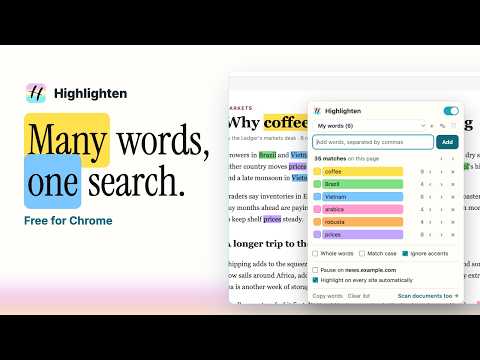
Highlight many words at once, each in its own color, with counts and jump-to-match. Saved word lists sync; pages are never changed.
Highlighten finds many words at once and paints each in its own color, so you can see at a glance where every word appears on a page. Type or paste your words, or select text and choose Highlight from the right-click menu. Each word gets a count, and you can jump through its matches one by one or step through every match on the page in order. WHAT IT DOES • Highlights any number of words and phrases, each in its own color • Counts matches per word and in total; the total shows on the toolbar icon • Jumps to the next or previous match, per word or across all words • Marks every match on the scrollbar so you can see where they cluster • Whole words, match case and ignore accents (café matches cafe) • Phrases match across bold, italic and links • Saved word lists: keep one for a job ad, one for research, one for proofreading, and switch in one click • Lists sync across your computers through your Chrome account • Pause on any site with one click • Optional: highlight automatically on every site • Keyboard shortcuts: Alt+Shift+H on or off, Alt+Shift+. next match, Alt+Shift+, previous match PAGES STAY INTACT Highlighten never edits the page. It uses Chrome's built-in highlight layer, so pages, forms and web apps keep working exactly as before, and large pages stay fast. PRIVATE BY DESIGN No account, no tracking, no analytics. Your words stay in your Chrome storage, and pages are read only on your computer. At install Highlighten asks only for the tab you're using; access to all sites is requested only if you turn on automatic highlighting. NEED IT FOR DOCUMENTS? Highlighten for Mac and Windows searches whole folders of PDFs, Word files and scanned documents with the same word lists: https://highlighten.com
0 out of 5No ratings
Details
- Version0.1.0
- UpdatedNovember 10, 2026
- FeaturesOffers in-app purchases
- Size42.71KiB
- LanguagesEnglish (United States)
- DeveloperAMIPLAY COMPANY LIMITEDWebsite
339/177 Choet Wutthakat Road DON MUEANG 10210 THEmail
info@amiplay.comPhone
+66 81 833 3737 - TraderThis developer has identified itself as a trader per the definition from the European Union and committed to only offer products or services that comply with EU laws.
- D-U-N-S660137407
Privacy

This developer declares that your data is
- Not being sold to third parties, outside of the approved use cases
- Not being used or transferred for purposes that are unrelated to the item's core functionality
- Not being used or transferred to determine creditworthiness or for lending purposes
Support
For help with questions, suggestions, or problems, visit the developer's support site