

Accessible Find in Page
5 ratings
)
Overview
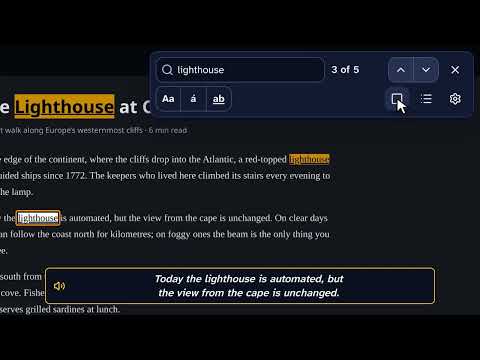
Find in page (Ctrl+F) for low vision: big, high-contrast highlights, a spotlight and magnifier on the match, and read aloud.
Accessible Find replaces the browser's find in page (Ctrl+F) with one made for people with low vision. Matches are big, bright and easy to tell apart, and the one you're on is easy to find on the screen. I made it because I have retinitis pigmentosa, which narrows my field of view. I kept losing the browser's own pale highlights, so I built the find I needed. HIGHLIGHTS YOU CAN SEE • Your own colors for every match and for the current one, with an underline and a border, so color isn't the only cue. • Profiles for your eyes: cataracts, light sensitivity, and red-green, blue-yellow or no color vision. Or make your own; a contrast check tells you when text would be hard to read. • Automatic style: matches on a dark background, on a dark website or in a code block, switch to colors made for dark backgrounds. FIND THE CURRENT MATCH QUICKLY • Matches blink briefly and a ring closes in on the current one, as slowly and as thick as you like. Both can be turned off, and they follow your system's reduce motion setting. • Turn on a spotlight that dims the rest of the page, guide lines that reach a narrow field of view, or a magnifier that repeats the match in large text right beside it, for when the middle of your sight is missing. • The find bar steps aside if it would cover the match. READ, DON'T HUNT • A list of every match with the words around it, in large text. Move through it with the arrow keys and the page follows. • Read aloud: hear the sentence around the match, or have each match read as you move to it. Paste any text into the find bar to hear it too. Select text on any page and press your read aloud shortcut to hear it, even with the find bar closed. Set it once on Chrome's extension shortcuts page (the settings take you there). A FIND BAR BUILT FOR LOW VISION • Text size from 100% to 300%, light and dark themes, and six places on the screen. • Set in Atkinson Hyperlegible Next, a typeface designed for low-vision readers. • Match case, match accents and whole words, and your recent searches on the arrow keys. • Every action has a keyboard shortcut, and you can change them. Screen readers hear the match count and the words around the match. WORKS THE WAY YOU EXPECT • Opens with Ctrl+F on every website (if you allow it), or with Alt+Shift+F or the toolbar button. • Finds text across links and formatting, and ignores accents unless you ask: "acao" finds "Ação". • Opens collapsed sections that contain a match, like the browser's own find. • Highlights are drawn by the browser without changing the page, so web apps and editors keep working. • A practice page to try everything safely. PRIVATE BY DESIGN Accessible Find reads a page only when you search it, on your device. There are no accounts, ads or analytics, and nothing is sent to the developer. Recent searches stay on this device, and you can turn them off. Read aloud uses your browser's voices; the settings point out the online ones, which send what's read to the browser's speech service. WHERE IT CAN'T RUN Browsers don't let any extension run on their own pages (settings, the new tab page), on the Chrome Web Store, or in the built-in PDF viewer. With Ctrl+F on every website turned on, those pages get the browser's own find instead; otherwise Accessible Find tells you why, and how to open the browser's own find. Text inside embedded frames and form fields isn't searched yet. Free and open source. Ideas and bug reports are welcome on GitHub: https://github.com/bearkillerPT/AccessibleFind-in-page
4.2 out of 55 ratings
Details
- Version2.0.0
- UpdatedOctober 18, 2026
- Offered byBearkillerPT
- Size282KiB
- LanguagesEnglish
- Developer
Email
gil-teixeira.violin@hotmail.com - Non-traderThis developer has not identified itself as a trader. For consumers in the European Union, please note that consumer rights do not apply to contracts between you and this developer.
Privacy

This developer declares that your data is
- Not being sold to third parties, outside of the approved use cases
- Not being used or transferred for purposes that are unrelated to the item's core functionality
- Not being used or transferred to determine creditworthiness or for lending purposes
Support
For help with questions, suggestions, or problems, visit the developer's support site