

Streamkatcher Video Downloader - Download any video from anywhere

Overview
Detect and analyze media streams in the current tab.
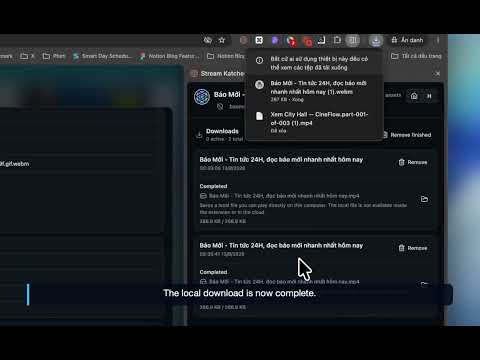
StreamKatcher is a powerful, ultra-fast, and 100% FREE video downloader extension that allows you to download videos from almost any website in high quality—up to 4K+ resolution (matching original video sources). Experience a seamless downloading experience with zero ads, no hidden paywalls, and unlimited downloads. 🚀 Key Features: ● ⚡ Ultra-Fast Download Speed: Capture and download videos at maximum speed without bandwidth throttling. ● 🎬 Original High Quality (Up to 4K+): Save videos in their best available quality, from SD and HD to Full HD, 2K, and 4K+ (HLS, M3U8, DASH, MP4, and more). ● 🚫 100% Free & No Ads: Enjoy a clean, distraction-free tool without pop-ups, subscriptions, or sponsored ads. ● 🌐 Universal Web Support: Easily stream, detect, and download video and audio content from almost any site across the web. ● 🔍 Smart Media Detection: Automatically detects available video streams in your current tab with a single click. ● 🔒 Safe & Privacy-Focused: No user tracking, no data collection, and minimal permission requirements. 📖 How to Use StreamKatcher: 1. Install StreamKatcher and pin it to your browser toolbar. 2. Visit any website and start playing the video you want to save. 3. Click the StreamKatcher icon to view detected media streams. 4. Select your preferred resolution (4K, HD, etc.) and hit Download! ⚠️ Important Notice / Disclaimer: Due to Google Chrome Web Store guidelines and policy restrictions, StreamKatcher does NOT support downloading content from YouTube. StreamKatcher operates smoothly across all other non-restricted websites.
5 out of 54 ratings
Details
- Version10.0.11
- UpdatedNovember 4, 2026
- FeaturesOffers in-app purchases
- Size36.94MiB
- Languages12 languages
- Developer
- Non-traderThis developer has not identified itself as a trader. For consumers in the European Union, please note that consumer rights do not apply to contracts between you and this developer.
Privacy

Streamkatcher Video Downloader - Download any video from anywhere has disclosed the following information regarding the collection and usage of your data. More detailed information can be found in the developer's privacy policy.
Streamkatcher Video Downloader - Download any video from anywhere handles the following:
This developer declares that your data is
- Not being sold to third parties, outside of the approved use cases
- Not being used or transferred for purposes that are unrelated to the item's core functionality
- Not being used or transferred to determine creditworthiness or for lending purposes
Support
For help with questions, suggestions, or problems, visit the developer's support site