


Overview
Intercept browser downloads and send to FluxDown app for high-speed downloading
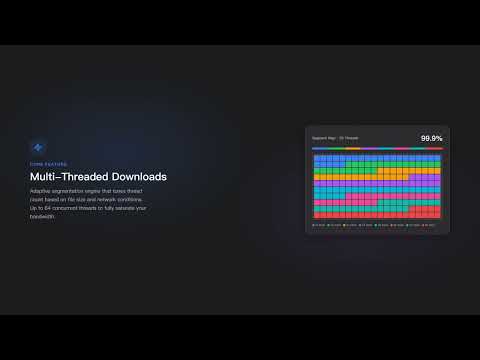
FluxDown hands your browser downloads to the FluxDown desktop app, which downloads each file over multiple parallel connections. It also finds the videos, audio and files on the page you're viewing, so you can save them with one click. The free, open-source FluxDown desktop app (Windows, macOS, Linux) is required. Get it at https://fluxdown.com/download ━━ What it does ━━ ▸ Automatic download takeover • Click download links as usual. FluxDown takes over matching downloads and opens the desktop confirm dialog. • The site's cookies, headers and referrer are sent along, so downloads that need a login keep working. • Smart mode decides by file name, type and size. "Intercept All" takes over every download. • Set a minimum file size, file types to include or exclude, and sites to skip. • Optional: take over magnet links, or fall back to the browser when you cancel. ▸ Video and resource sniffing • Detects videos, audio, subtitles, documents, archives and HLS/DASH streams as the page loads and plays. • A download button appears on the video you're watching, with quality labels such as 1080P or 720P. • Pick a quality, or the separate video and audio tracks, before downloading. • The in-page panel lists resources by type, with search, preview and batch download. • Hand a page to the desktop app's resolver plugins when the extension can't read the stream itself. ▸ Right-click menu and toolbar • Right-click a link, image, video, selected text or the whole page and choose "Download with FluxDown". • The toolbar popup shows live progress and lets you pause, resume, open the file or show it in its folder. • Paste any URL into the popup to start a download. • The side panel has a link grabber that collects every link on the page, grouped by type, for batch sending. ▸ Make it yours • Per-site settings for interception, sniffing, the floating button and the save folder. • Sniffing rules: built-in, official and community packs, plus rules you write and test yourself. • Send downloads to your own FluxDown server or NAS instead of, or as a fallback to, this computer. • Keyboard shortcuts: Alt+Shift+D toggles interception, Alt+Shift+V downloads the playing media, Alt+Shift+S opens the side panel. • Light, dark or system theme. English, 简体中文 and 繁體中文 interface. • Back up and restore all settings as a single file. ━━ Privacy ━━ • No analytics, no ads, no tracking. • Download details (link, cookies, referrer) go only to the FluxDown app on this computer, through Chrome Native Messaging, or to a FluxDown server you set up yourself. • Sniffing rule packs are fetched and signature-checked by the desktop app. The extension contacts no other server. • Settings are stored locally in your browser. Connection logs never leave your computer unless you export them. • Desktop plugins can add scripts that run on web pages. Each plugin stays off until you approve it, and you see the sites it runs on first. ━━ Getting started ━━ 1. Install the FluxDown desktop app from https://fluxdown.com/download and open it once. 2. Install this extension. The popup shows "Connected" when the two are linked. 3. Download as usual, or click the FluxDown button on any video. Feedback and help: https://fluxdown.com/feedback Source code: https://github.com/zerx-lab/FluxDown
4.2 out of 514 ratings
Details
- Version0.6.3
- UpdatedOctober 24, 2026
- Size434KiB
- Languages3 languages
- DeveloperWebsite
Email
1603852@qq.com - Non-traderThis developer has not identified itself as a trader. For consumers in the European Union, please note that consumer rights do not apply to contracts between you and this developer.
Privacy

This developer declares that your data is
- Not being sold to third parties, outside of the approved use cases
- Not being used or transferred for purposes that are unrelated to the item's core functionality
- Not being used or transferred to determine creditworthiness or for lending purposes
Support
For help with questions, suggestions, or problems, visit the developer's support site