


Overview
On-device classification, regression and time series forecasting in Google Sheets.
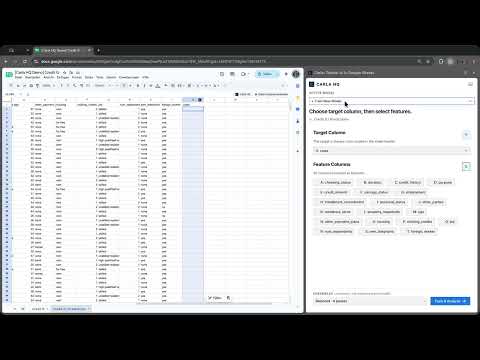
Run classification, regression, and time series forecasting directly in Google Sheets. Carla runs TabICLv2 and Timestral-123M locally in your browser through WebGPU. Select columns in your sheet, evaluate a tabular model, make predictions, or forecast a time series. Carla writes results back to spreadsheet cells. 📊 Why run models in your spreadsheet? Machine learning workflows often start by exporting a sheet to Python and end by pasting predictions back into cells. Carla keeps model inference in the browser and places the results where you already work. Tabular classification and regression with TabICLv2 Select a target column and feature columns. TabICLv2 handles categorical values, missing cells, dates, and numerical columns without a separate encoding or scaling pipeline. Time series forecasting with Timestral-123M Select a chronological date column and a numeric series, then choose how far ahead to forecast. Timestral-123M runs on your device through WebGPU. Carla writes the median forecast and prediction intervals, such as the 10th and 90th percentiles, into forecast cells. You can also map optional past-only or known-future covariates. 🧪 Train and test split evaluation For classification and regression, Carla splits data into training and test sets so you can inspect model quality before running predictions: • Classification metrics: Accuracy, ROC-AUC, F1-Score, Precision, Recall, and confusion matrices. • Regression metrics: Root Mean Squared Error (RMSE), Mean Absolute Error (MAE), and R² coefficient of determination. 🎲 Synthetic data generation Generate synthetic rows from existing columns for testing, development, and scenario modeling. 🔍 Local explainability (SHAP) For tabular predictions, Carla generates local SHAP waterfall charts that show how column values affected an individual result. Local model inference Carla does not send spreadsheet values to a separate model-inference API. Model preprocessing and inference run on your device. Google Sheets still syncs spreadsheet content through Google's services. ✨ Key capabilities: • Classification and regression: Use TabICLv2 on spreadsheet columns. • Time series forecasting: Use Timestral-123M to generate a median forecast and prediction intervals. • Test split evaluation: Computes Accuracy, ROC-AUC, F1, Precision, Recall, RMSE, MAE, and R² out-of-sample. • Synthetic data generation: Creates realistic sample rows matching your column distributions. • Local SHAP charts: Explains individual predictions with visual feature attribution. • On-device inference: Run models through WebGPU without a separate model-inference API. 🚀 How to get started: 1. Open a sheet in Google Sheets and open the Carla sidebar. 2. For classification or regression, select a target and feature columns, then inspect evaluation metrics and run predictions. 3. For forecasting, select a date column and numeric series, choose a forecast horizon, and write predictions back to the sheet. Data and privacy: If you choose to connect Google Sheets, Carla accesses your Google name, email, available profile photo, a Google OAuth token, and the spreadsheet you use with the extension. Carla processes sheet cells locally for analysis and writes results to Google Sheets when you request it. Sheet selections, analysis results, and model data may be stored in your browser to resume work. This release does not send your Google profile, raw sheet rows, or local models to Carla's servers. See https://carlahq.eu/privacy for collection, storage, sharing, and deletion details.
0 out of 5No ratings
Details
- Version1.2.2
- UpdatedNovember 5, 2026
- Size428MiB
- LanguagesEnglish
- DeveloperWebsite
Email
dani.munch@gmail.com - Non-traderThis developer has not identified itself as a trader. For consumers in the European Union, please note that consumer rights do not apply to contracts between you and this developer.
Privacy

This developer declares that your data is
- Not being sold to third parties, outside of the approved use cases
- Not being used or transferred for purposes that are unrelated to the item's core functionality
- Not being used or transferred to determine creditworthiness or for lending purposes