

ScreenKit — Free Screen Recorder & Capture

Overview
Free, unlimited screen recorder & screenshot tool. Record screen/tab/camera, annotate, export video/PNG/PDF — 100% local.
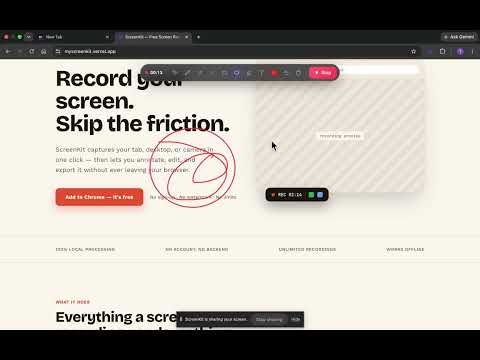
ScreenKit is a free, unlimited screen recorder and screenshot tool for Chrome. Record your screen, capture screenshots, annotate instantly, and share or export in one click. No account, no subscription, no upload queues, and no recording time limits. Everything runs locally in your browser. Your recordings and screenshots stay on your device until you choose to download or share them. RECORD — FREE & UNLIMITED • Record your entire screen, a window, a browser tab, or webcam only • Capture system audio and/or microphone • Overlay a draggable camera bubble on recordings • Draw on screen while recording (annotations are baked into the video) • Pause and resume anytime • Choose recording quality: Low, Standard, High, or Ultra (up to 4K) • No recording time limits SCREENSHOT • Capture the visible viewport instantly • Select and capture any region • Capture full scrolling pages in one click ANNOTATE • Powerful editor opens automatically after every screenshot • Draw with pen, arrows, shapes, highlighter, and text • Move, resize, rotate, undo, and redo annotations • Export annotated images as PNG, JPEG, or PDF • Copy annotated images directly to your clipboard SHARE • Upload recordings directly to YouTube • Upload recordings to Google Drive • Upload screenshots to Google Drive for instant shareable links • One-click sharing with no upload limits LIBRARY • View all uploaded screenshots and recordings in one place • Copy links instantly • Open shared files anytime • Remove uploads from your library whenever you want - Organize screenshots and recordings in folder system PRIVATE BY DESIGN • 100% local processing by default • Nothing is uploaded unless you choose to share it • No analytics, ads, or third-party tracking • No sign-in required Click the ScreenKit icon in your toolbar to start recording or capturing screenshots. Open Settings to customize recording quality, appearance, shortcuts, camera bubble, and more. Visit: myscreenkit.vercel.app Reach us at: contact.topext@gmail.com
0 out of 5No ratings
Details
- Version1.5.0
- UpdatedJuly 31, 2026
- Offered byTanzim
- Size774KiB
- LanguagesEnglish
- Developer
Email
tanzim1463@gmail.com - Non-traderThis developer has not identified itself as a trader. For consumers in the European Union, please note that consumer rights do not apply to contracts between you and this developer.
Privacy

This developer declares that your data is
- Not being sold to third parties, outside of the approved use cases
- Not being used or transferred for purposes that are unrelated to the item's core functionality
- Not being used or transferred to determine creditworthiness or for lending purposes