

Voltura Reel Player

Overview
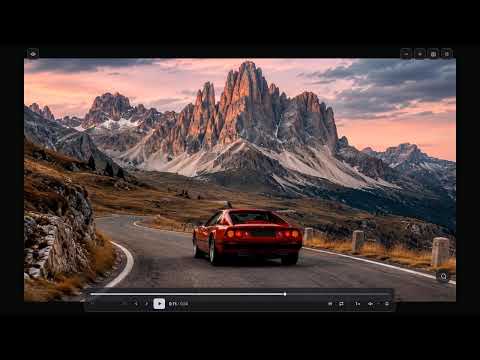
Watch Facebook Reels and Stories, and YouTube videos and Shorts fullscreen with precise playback controls.
Step through a clip, loop a segment, or zoom in to see a detail. • Scrub the timeline, step by 0.1 seconds, skip by 5 seconds, and choose 0.10× to 4× playback speed. Loop a whole video or mark a segment. Zoom up to 10× and save a paused video frame when available. • On Facebook, open a Reel or a photo or video Story and press F or select the themed Voltura Reel Player icon. Move between Reels or Story cards, pause Story auto-advance, play a linked Reel, and save a Story photo or cropped preview. • On YouTube, select Enable YouTube in the extension popup and approve access once. Open a regular video or Short and press F or select the themed Voltura Reel Player icon. Move between Shorts in fullscreen and use YouTube’s Like, Dislike, Comments, Share, and Subscribe controls when available. Comments, Share, and Subscribe open on the YouTube page. You can turn off YouTube access from the popup. • Choose from 10 themes and 16 languages, set the control bar width, and choose whether it fades when idle. Press F again or Esc to exit Voltura Reel Player fullscreen. Voltura Reel Player processes playback in Chrome. Voltura AB receives no video content, browsing history, account information, or extension telemetry.
0 out of 5No ratings
Details
- Version1.2.0
- UpdatedNovember 25, 2026
- Offered byJoakim Skoglund
- Size175KiB
- LanguagesEnglish
- DeveloperJOAKIM SKOGLUND
Hästholmsvägen 33 Nacka 13171 SEEmail
joakim@voltura.sePhone
+46 76 709 94 73 - TraderThis developer has identified itself as a trader per the definition from the European Union and committed to only offer products or services that comply with EU laws.
Privacy

This developer declares that your data is
- Not being sold to third parties, outside of the approved use cases
- Not being used or transferred for purposes that are unrelated to the item's core functionality
- Not being used or transferred to determine creditworthiness or for lending purposes
Support
For help with questions, suggestions, or problems, visit the developer's support site