

Copart Plus
2 ratings
)
Overview
Enhance Copart and CrashedToys for better usability and features
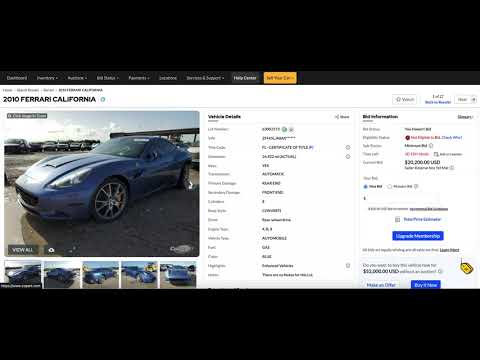
Copart Plus makes Copart faster to browse and easier to bid on. See what a lot will really cost, get a proper look at the photos, and pick up your search where you left off. ESTIMATED TOTAL COST • The lot page's bid panel shows what the lot would really cost with Copart's fees, updating as you type your max bid, with a full fee breakdown • Search results show an estimated total under every current bid • Uses Copart's published fees for non-licensed buyers, for secured or unsecured payment • On copart.co.uk, copart.de, copart.es and copart.fi, uses that site's buyer, online bid and handling fees plus VAT, in pounds or euros, including Copart UK's Fee A or Fee B • Excludes sales tax, title shipping, storage and transport. Canadian lots aren't covered yet FULLSCREEN PHOTO VIEWER • Click the main lot photo to open it in HD, full screen, instead of Copart's small in-place zoom • Scroll to zoom in at the cursor, drag to move around, click to toggle zoom • Arrow keys change photos, and thumbnails appear at the bottom edge • Brightness and contrast controls for reading dashboard lights in dark photos • Or maximize the photo gallery on the lot page so it fills the page SEARCH RESULTS THAT REMEMBER • Come back to a search and return to the page and lot you were on, instead of starting again at page 1 • Lots you've opened are tagged Viewed, and can be hidden with one switch • Hide any lot you're not interested in, and bring hidden lots back whenever you like EXPECTED SALE DATES • For lots Copart only shows as "Future", see Copart's own estimated sale date, in your time zone, on the lot page and in search results DARK MODE • A dark theme for Copart, switched on from the header or the settings popup SETTINGS IN ONE PLACE • Click the Copart Plus toolbar icon to turn dark mode and the photo viewer on or off, choose your payment method or UK buyer fee, and manage your viewed and hidden lots • Changes apply to your open Copart tabs straight away PRIVACY • Copart Plus only runs on Copart's sites and asks for no permissions beyond saving its settings • Your settings, viewed lots and hidden lots are saved in your own browser (settings sync through your Chrome account if you've turned sync on). Nothing is sent anywhere else Works on all Copart websites including European versions. The photo viewer and maximize button need Copart's newer lot page, which copart.de doesn't have yet. Fee estimates are a guide: Copart can change its fees at any time. Copart Plus is an independent extension and isn't affiliated with Copart or Crashed Toys.
1 out of 52 ratings
Details
- Version0.0.18
- UpdatedSeptember 29, 2026
- Offered bynhenjes
- Size57.89KiB
- LanguagesEnglish (United States)
- Developer
Email
chrome-developer@obsidianproject.xyz - Non-traderThis developer has not identified itself as a trader. For consumers in the European Union, please note that consumer rights do not apply to contracts between you and this developer.
Privacy

This developer declares that your data is
- Not being sold to third parties, outside of the approved use cases
- Not being used or transferred for purposes that are unrelated to the item's core functionality
- Not being used or transferred to determine creditworthiness or for lending purposes