


Overview
Collect Google's People Also Ask questions for a list of searches, with the real parent of every question. Export to CSV or JSON.
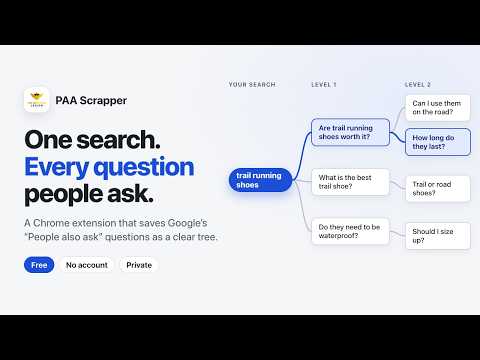
PAA Scrapper collects the "People also ask" questions Google shows for your searches, and records which question each one came from. Paste a list of Google searches, press Start, and PAA Scrapper opens each search in its own window and opens the questions one level at a time. You get a tree you can browse and export, so you can see which question led to which. ▶︎ What you can do • Paste a whole list, or a column copied from Google Sheets, Excel, Ahrefs or Semrush. One search per line. • Choose how many levels deep to go (1 to 5) and how many questions to collect per search. • Choose the country and language Google should use, so you see the results your audience sees. • Watch the tree grow while it runs. Pause, stop, or export what you have at any time. • Export to CSV (opens correctly in Excel, including Arabic, German, Japanese and other languages), copy straight into Google Sheets, or save a Markdown outline or JSON. • Copy one question and everything under it as an outline for a content brief. • See every answer and its source link next to the question. • Come back later: finished runs are kept in History so you can open, export or rerun them. ▶︎ How to use it › Click the PAA Scrapper icon to open the side panel. › Paste your Google searches, one per line. › Pick the country, language, depth and limit, then press "Start collecting". › A small Google window opens and works through your list. Please don't click inside it. You can keep working in other windows. › When it finishes, press Export, or browse the tree. ▶︎ The exported data includes: • PAA Questions • Parent PAA Relationships • Snippet Text • Source URLs • URL Titles ▶︎ Perfect for: ✓ SEO keyword research ✓ Content idea generation ✓ Topic clustering ✓ FAQ discovery ✓ Search intent analysis ▶︎ Features: • Bulk keyword processing • Automatic Google PAA extraction • CSV export support • Lightweight and fast • Privacy-focused • No sign-up required • Completely free ▶︎ Your data stays with you Everything runs in your browser. Your searches and results are saved on your computer only. You can delete all saved data from the settings page at any time. Good to know • Results depend on what Google shows for your country, language and connection. Google also uses your internet connection to guess your location. • They changes its pages from time to time. If a page looks different from what PAA Scrapper expects, it stops instead of collecting wrong data, and your results so far are kept. • Long lists take time, because the extension waits a few seconds between clicks on purpose. Whether you are building SEO content strategies, researching niche topics, or analyzing search intent, PAA Scrapper makes collecting Google PAA data fast and efficient. Developed by: Tanzim Mahtab Owned by: Romain Pirotte FOLLOW: 👉 www.youtube.com/@RomainPirotte
4.5 out of 52 ratings
Details
- Version2.0.0
- UpdatedOctober 26, 2026
- Offered byTanzim
- Size429KiB
- Languages50 languages
- Developer
Email
tanzim1463@gmail.com - Non-traderThis developer has not identified itself as a trader. For consumers in the European Union, please note that consumer rights do not apply to contracts between you and this developer.
Privacy

This developer declares that your data is
- Not being sold to third parties, outside of the approved use cases
- Not being used or transferred for purposes that are unrelated to the item's core functionality
- Not being used or transferred to determine creditworthiness or for lending purposes