

DevBoost
3 ratings
)
Overview
All-in-one developer toolkit for web testing, debugging, and optimization.
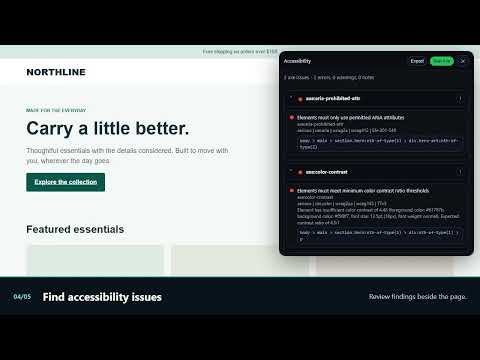
DevBoost brings everyday web development and QA tools together in Chrome. Inspect the page you are working on, test an endpoint, review an audit, and capture what you found without switching between separate extensions. Key tools: - Inspect and edit live CSS with property suggestions, color controls, and declaration toggles. - Test APIs with custom headers and bodies, saved requests, environments, variables, response formatting, and JSON Schema validation. Start from a captured network request when you need to reproduce it. - Review SEO, heading hierarchy, structured data, accessibility, performance, assets, and site technologies on the current page. - Capture a viewport or full page, then add and edit annotations before exporting the image. - Preview responsive layouts, inspect fonts and colors, and use the eyedropper. - Debug network activity and event listeners, create request rules, and inspect response bodies. - Beautify code and compare editable files with highlighted differences and per-change merging. DevBoost works on the page you choose. Audits and saved workspace data run in your browser; API Tester and request rules can send or modify requests to the endpoints you select. Some browser or site restrictions may limit individual tools.
5 out of 53 ratings
Details
- Version1.0.7
- UpdatedOctober 1, 2026
- Offered byraymond210498
- Size2.23MiB
- LanguagesEnglish
- Developer
Email
raymond210498@gmail.com - Non-traderThis developer has not identified itself as a trader. For consumers in the European Union, please note that consumer rights do not apply to contracts between you and this developer.
Privacy

This developer declares that your data is
- Not being sold to third parties, outside of the approved use cases
- Not being used or transferred for purposes that are unrelated to the item's core functionality
- Not being used or transferred to determine creditworthiness or for lending purposes
Support
For help with questions, suggestions, or problems, please open this page on your desktop browser