

Salesforce ColorSync
1 rating
)
Overview
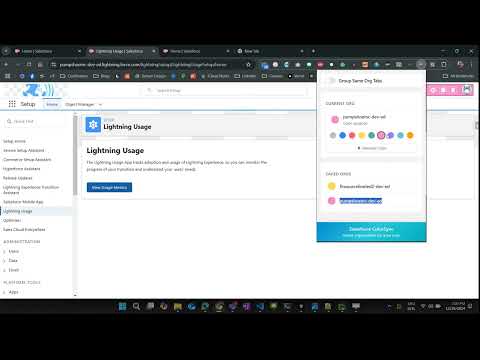
Give every Salesforce org its own colour, so you always know which org you are in.
If you work across several Salesforce orgs, every tab looks the same. Production and a UAT sandbox are visually identical — same layout, same icons, same favicon — and it is genuinely easy to make a change in the wrong one. ColorSync gives each org its own colour and shows it where you will actually see it: in the tab's favicon, in the Salesforce header bar, and in the Chrome tab group. A glance is enough to know where you are. WHAT IT DOES • Color-code each org from a palette of nine colours. • Colored favicon — your org's own favicon, tinted, so the tab strip stays readable even when tabs are narrow. • Tinted Salesforce header — the colour is visible inside the page, not just in the tab strip. • Tab grouping (optional) — Chrome tab groups per org, in that org's colour. Rename a group and ColorSync leaves your name alone. • Org aliases — rename any org to something friendlier than its subdomain. The colour stays keyed to the real org underneath. • A pet (optional) — a monkey, a chicken, or a snake that lives in the header bar. Chosen per org, like the colour, so it is one more way to tell one org from another. It is a toy, and it can be turned off. SANDBOXES ARE SEPARATE ORGS This is the whole point. "acme" and "acme--uat" are different orgs and get different colours. ColorSync recognises the same org across every surface Salesforce serves it on, so one colour covers all of them: acme.my.salesforce.com → acme acme.lightning.force.com → acme acme.my.salesforce-setup.com → acme acme--c.vf.force.com (Visualforce) → acme acme--uat.sandbox.my.salesforce.com → acme--uat acme--uat.sandbox.lightning.force.com → acme--uat login.salesforce.com and test.salesforce.com name no particular org, so they are left alone. PRIVACY ColorSync sends nothing anywhere. There is no server, no analytics, and no network request of any kind — not even for fonts or icons. The only thing it stores is a colour per org name, in Chrome's own synced extension storage, so your colours follow you to any Chrome you are signed in to. PERMISSIONS storage Remembers your colour per org. tabs Finds the other tabs open on the same org so they get the same colour. tabGroups Creates the per-org tab group, when grouping is turned on. scripting Colours a Salesforce tab that was already open before the extension loaded. Host access is limited to salesforce.com, force.com, salesforce-setup.com and visualforce.com. The extension does not run on any other site. OPEN SOURCE MIT licensed.
5 out of 51 rating
Details
- Version2.1
- UpdatedJuly 17, 2026
- Offered bynoor.alam.shuvo
- Size55.92KiB
- LanguagesEnglish (United States)
- Developer
Email
noor.alam.shuvo@gmail.com - Non-traderThis developer has not identified itself as a trader. For consumers in the European Union, please note that consumer rights do not apply to contracts between you and this developer.
Privacy

This developer declares that your data is
- Not being sold to third parties, outside of the approved use cases
- Not being used or transferred for purposes that are unrelated to the item's core functionality
- Not being used or transferred to determine creditworthiness or for lending purposes