

Rabbit Tab

Overview
A sidebar extension for managing all windows and tabs
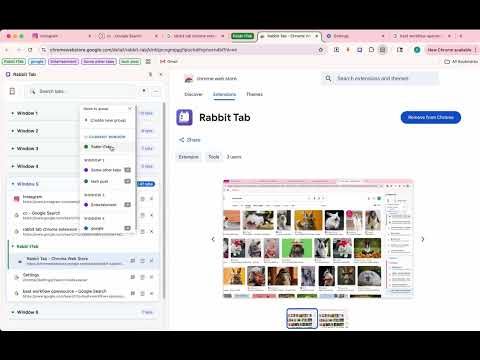
===================================== Chrome Web Store Listing Content ===================================== 【Short Description】(132 characters max) Manage all your windows and tabs in a sidebar: rename, organize by memory/time, group, search, and batch operations. 【Detailed Description】 Rabbit Tab - Your Ultimate Tab Manager Tired of drowning in browser tabs? Rabbit Tab brings order to chaos with a powerful sidebar that puts all your windows, tabs, and groups at your fingertips. KEY FEATURES: ✏️ Custom Tab Names • Rename any tab to something you'll actually recognize • Reset back to the original title anytime • Names stick to the right tab even after a browser restart 📐 Display Density • Switch between Large, Medium, and Compact layouts • Compact mode fits more tabs on screen at once • Applies instantly across the whole sidebar 🗂️ Organize View — know what to close • Flip from the window-by-window list into one sorted timeline • Sort by open time, last visited, title, or domain • See an estimated memory footprint per tab (by category, not a precise measurement) • Get a "close suggestion" score that factors in how long a tab has sat idle, how long it's been open, whether it's a duplicate, and its estimated memory — while automatically protecting pinned tabs, tabs playing audio, and the tab you're currently viewing • Every suggestion comes with a plain-language reason, never a mystery number 📂 Tree Structure View • See all windows, groups, and tabs in a clear hierarchy • Click any tab to instantly jump to it across windows • Real-time sync - always up to date 🔍 Smart Search • Multi-keyword search (separate with spaces) • Matches both title and URL • Highlighted search results 📁 Tab Groups • Create groups with custom names and 9 color options • Edit, reorganize, or ungroup anytime • Move entire groups between windows 🪟 Multi-Window Management • Windows overview for quick navigation • Move tabs and groups across windows • Close windows with one click ✅ Batch Operations • Multi-select mode for bulk actions • Select all tabs in a window • Move multiple tabs to groups at once 🗑️ Smart Cleanup • Delete duplicate tabs instantly • Keep current tab, remove duplicates • Clean URL copying KEYBOARD SHORTCUTS: • Ctrl+Shift+O (Cmd+Shift+O on Mac): Toggle sidebar • Ctrl+Shift+G (Cmd+Shift+G on Mac): Group all tabs LANGUAGES: • English • Simplified Chinese (简体中文) PRIVACY: Rabbit Tab only accesses tab information to provide its functionality — including the signals used for memory estimates and close suggestions (last-visited time, pinned/audio/discarded state). No data is collected, stored externally, or shared. All settings and calculations stay entirely on your device. PERMISSIONS EXPLAINED: • tabs: Read and manage tab information • tabGroups: Create and manage tab groups • sidePanel: Display the sidebar interface • storage: Save your preferences locally (language, density, custom tab names, sort order, tab metadata) Made with ❤️ for tab hoarders everywhere. ===================================== 【Category】 Productivity 【Language】 English, Chinese (Simplified) ===================================== 【What's New — v1.1.0】(paste into the "release notes" field when submitting the update) • Rename tabs to something you'll actually recognize, with one-click reset • New Display Density setting: Large / Medium / Compact • New Organize view: sort all your tabs by open time, last visited, title, or domain • Estimated memory footprint per tab, and a close-suggestion score that tells you which tabs are safe to close (and why) — pinned, playing-audio, and active tabs are automatically protected =====================================
0 out of 5No ratings
Details
- Version1.1.0
- UpdatedAugust 24, 2026
- Offered byndsjrrr
- Size68.66KiB
- Languages2 languages
- Developer
Email
ndsjrrr@gmail.com - Non-traderThis developer has not identified itself as a trader. For consumers in the European Union, please note that consumer rights do not apply to contracts between you and this developer.
Privacy

This developer declares that your data is
- Not being sold to third parties, outside of the approved use cases
- Not being used or transferred for purposes that are unrelated to the item's core functionality
- Not being used or transferred to determine creditworthiness or for lending purposes