

TTD Ticket Booking Assistant

Overview
Stores pilgrim profiles for faster TTD ticket form filling.
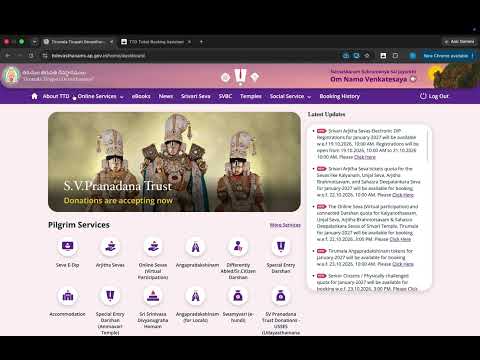
Streamline and speed up your Tirumala Tirupati Devasthanams (TTD) quota booking experience! During high-rush TTD ticket drops (such as ₹300 Special Entry Darshan, Angapradakshinam, Arjitha Seva, and Accommodation quotas), slots fill up within minutes or even seconds. Manually entering names, ages, ID proof numbers, and contact details for multiple family members often causes timeouts and missed bookings. TTD Ticket Booking Assistant allows you to pre-save pilgrim and family profiles securely on your browser, enabling instant, 1-click form autofill when the booking window opens. ━━━━━━━━━━━━━━━━━━━━━━━━━━ ✨ KEY FEATURES ━━━━━━━━━━━━━━━━━━━━━━━━━━ ⚡ Instant 1-Click Autofill: • Automatically fills all pilgrim details: Full Name, Age, Gender, and ID Type. • Supports Indian resident IDs (Aadhaar Card) and International/NRI devotees (Passport, Visa Type, Visa Number, and Validity). • Fills General Contact Information: Email, Mobile Number, State, City, Country, and Pincode. • Automatically selects your requested number of Laddus. 👥 Multi-Profile Devotee Management: • Save multiple pilgrim profiles for family and group bookings. • Select and reorder profiles with checkboxes to choose who travels on each trip. 🚀 Smart Booking & Click Automation: • Auto-close Passport & Visa pop-ups once NRI details are entered. • Optional Auto-click "Continue / Proceed" button once fields are filled. • Optional Auto-click "Pay Now" button when the payment gateway review screen loads. • Optional Auto-click "Generate" button for immediate UPI QR Code display. 🔒 Privacy-First & 100% Secure: • Zero Tracking. Zero Data Selling. • All devotee names and ID proof numbers are saved strictly inside your local browser storage (chrome.storage.local). • Your personal information never leaves your device. 💾 Backup & Restore: • Export your saved profiles to a JSON file and import them back anytime or transfer them to another device in seconds. ━━━━━━━━━━━━━━━━━━━━━━━━━━ 📌 HOW TO USE ━━━━━━━━━━━━━━━━━━━━━━━━━━ 1. Click on the extension icon to open the configuration dashboard. 2. In Step 1, enter and save your General Details (Mobile, Email, Address, Laddus). 3. In Step 2, add your pilgrim profiles (Name, Age, Gender, Aadhaar/Passport). 4. In Step 3, choose your preferred click-automation settings. 5. When the TTD quota opens on the official portal (ttdevasthanams.ap.gov.in), log in with your mobile OTP. 6. The assistant will instantly populate your saved devotee information as soon as the form appears! ━━━━━━━━━━━━━━━━━━━━━━━━━━ ⚠️ DISCLAIMER & COMPLIANCE ━━━━━━━━━━━━━━━━━━━━━━━━━━ • This extension is an independent productivity utility designed solely to assist devotees with browser form autofill. • It is NOT affiliated with, authorized by, endorsed by, or in any way officially connected to Tirumala Tirupati Devasthanams (TTD) or the Government of Andhra Pradesh. • This tool does NOT bypass CAPTCHA, bypass OTP verification, hack server queues, or guarantee ticket allocations. Users must manually log in, solve official CAPTCHAs, and complete their own payment transactions.
0 out of 5No ratings
Details
- Version1.0
- UpdatedNovember 7, 2026
- FeaturesOffers in-app purchases
- Offered bydevkraft.studio
- Size1.01MiB
- LanguagesEnglish (United Kingdom)
- Developer
Email
ttdticketbookingassistant@gmail.com - Non-traderThis developer has not identified itself as a trader. For consumers in the European Union, please note that consumer rights do not apply to contracts between you and this developer.
Privacy

TTD Ticket Booking Assistant has disclosed the following information regarding the collection and usage of your data. More detailed information can be found in the developer's privacy policy.
TTD Ticket Booking Assistant handles the following:
This developer declares that your data is
- Not being sold to third parties, outside of the approved use cases
- Not being used or transferred for purposes that are unrelated to the item's core functionality
- Not being used or transferred to determine creditworthiness or for lending purposes
Support
For help with questions, suggestions, or problems, visit the developer's support site