


Overview
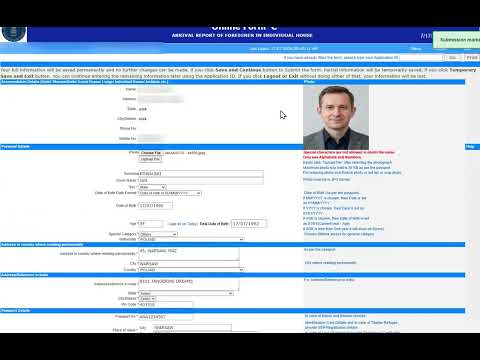
Fills the FRRO Form C on indianfrro.gov.in from your C Form Plus check-in data, including the guest photo. You review and submit.
C Form Plus Autofill fills the FRRO Form C on indianfrro.gov.in from details your foreign guests typed themselves, including the guest photo. You review the form and press Submit; the extension never files anything on your behalf, and it never asks for your FRRO login. TRY IT BEFORE A GUEST ARRIVES Press "Continue with Google" in the panel and your account is ready, with a sample guest already in it. Open the Form C page on indianfrro.gov.in, press Fill, and watch every field fill itself. Nothing about the sample is real and nothing gets filed. Then share your check-in link with your next guest. HOW IT WORKS 1. Your property gets its own check-in link and a printable QR standee. Put the link in your booking confirmation; walk-ins scan the QR. 2. Guests fill their own details on their phone, in English, French, German or Japanese: passport, visa, dates, addresses, and photos of their passport, visa and face. Passport details are read from the passport photo where possible. 3. At your desk, open the Form C page on indianfrro.gov.in and sign in as you always do. Open the panel, pick the guest, press Fill. The form fills in seconds and the photo is attached. 4. Check the guest's passport scan against what was typed, then submit. Record the acknowledgement number in one click. WHAT ELSE IT DOES - Shows each check-in's 24-hour filing window and puts overdue ones first - Works across several properties and staff logins - Warns you before you fill a guest into the wrong property's FRRO account - Keeps guest names and photos out of browser storage WHO NEEDS A FORM C Every foreign national staying with you. Indian citizens are exempt; OCI and PIO cardholders are not. PRIVACY AND SECURITY - Talks only to cformplus.in and indianfrro.gov.in, over HTTPS - Guest documents are served through your signed-in session and never stored in the browser - No data is sold or shared with third parties - Privacy policy: https://cformplus.in/privacy-policy REQUIREMENTS - Chrome on a desktop or laptop (the FRRO portal is a desktop site) - Your own indianfrro.gov.in login - A C Form Plus account: create one from the panel with Google, or at https://cformplus.in. Your first check-ins are free. SUPPORT Email support@cformplus.in, or call or WhatsApp +91 89991 65129. C Form Plus is the self check-in platform for hotels, homestays, guest houses and rented rooms in India.
5 out of 51 rating
Details
- Version1.9.4
- UpdatedSeptember 27, 2026
- Size199KiB
- LanguagesEnglish
- DeveloperJustin Joel McMahonWebsite
B201 Happy Enclave Verla Canca Bardez, Goa 403510 INEmail
justinmcm@gmail.comPhone
+91 89991 65129 - TraderThis developer has identified itself as a trader per the definition from the European Union and committed to only offer products or services that comply with EU laws.
Privacy

C Form Plus Autofill has disclosed the following information regarding the collection and usage of your data. More detailed information can be found in the developer's privacy policy.
C Form Plus Autofill handles the following:
This developer declares that your data is
- Not being sold to third parties, outside of the approved use cases
- Not being used or transferred for purposes that are unrelated to the item's core functionality
- Not being used or transferred to determine creditworthiness or for lending purposes
Support
For help with questions, suggestions, or problems, visit the developer's support site