

Bulk Delete Google Photos - Safe & Resumable

Overview
Bulk delete Google Photos - safely. Dry run first, date & type filters, pause & resume. Free up Google storage. 100% on-device.
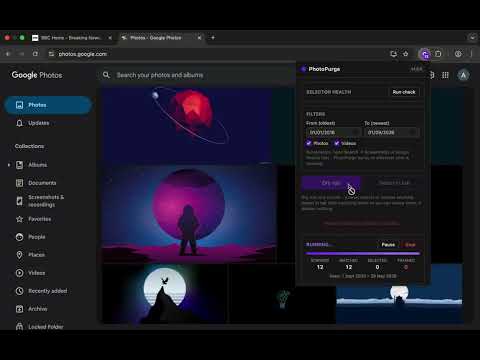
Google doesn't let you delete all your photos at once - so you're stuck clicking one at a time. PhotoPurge bulk deletes Google Photos safely. It works right inside your own Google Photos tab: scan, preview, then move thousands of photos and videos to the trash in one run. Free up Google storage shared across Gmail, Drive, and Photos - without the fear. WHY PHOTOPURGE IS THE SAFE ONE - DRY RUN FIRST. See exactly how many items match - with a date span and preview - before anything is touched. Zero changes, guaranteed. - TRASH, NEVER PURGE. Deletions use Google's own "Move to trash" flow. Everything stays recoverable in Google Photos for about 60 days. - PAUSE AND RESUME. Big libraries take time. Pause anytime; even if the tab closes or the browser restarts mid-run, PhotoPurge offers to resume exactly where it left off. No item is ever processed twice. - A REAL STOP BUTTON. Abort within seconds, always, with an accurate report of what was already moved. - FILTERS. Delete by date range (for example, everything from 2015-2018), photos only, or videos only. For screenshots, open Google Photos' own Screenshots search and run PhotoPurge on that view. - FAILS SAFE. If Google changes its page layout, PhotoPurge stops and tells you instead of guessing with your photos. PRIVATE BY DESIGN No server. No account. No analytics. Your photos, names, and dates never leave your device - PhotoPurge automates your own logged-in tab, and that's it. It never asks for your Google password and uses no Google account APIs. HONEST FREE TIER 500 deletions free - a lifetime allowance, not a daily throttle designed to frustrate you. Dry runs and selecting are free forever. One one-time purchase unlocks unlimited deletions for life. No subscription. GREAT FOR - "Google storage full" warnings from the shared Gmail / Drive / Photos quota - Clearing years of old backups before switching phones or accounts - Deleting all Google Photos to start fresh - Removing thousands of screenshots and videos in one pass HOW TO USE 1. Open photos.google.com 2. Click PhotoPurge and run the health check 3. Set filters and run a Dry run to preview 4. Confirm, then let it run - pause or stop anytime Privacy policy: https://mac10a.github.io/photopurge/privacy-policy.html Support: abba.maitala@yahoo.com
0 out of 5No ratings
Details
- Version1.0.1
- UpdatedSeptember 4, 2026
- FeaturesOffers in-app purchases
- Size41.94KiB
- LanguagesEnglish (United States)
- Developer
Email
abbadauda10@gmail.com - Non-traderThis developer has not identified itself as a trader. For consumers in the European Union, please note that consumer rights do not apply to contracts between you and this developer.
Privacy

This developer declares that your data is
- Not being sold to third parties, outside of the approved use cases
- Not being used or transferred for purposes that are unrelated to the item's core functionality
- Not being used or transferred to determine creditworthiness or for lending purposes