

ClickCaptions
3 ratings
)
Overview
Learn languages from Netflix, YouTube, Stan and HBO Max subtitles: click any word or phrase for an explanation in your language.
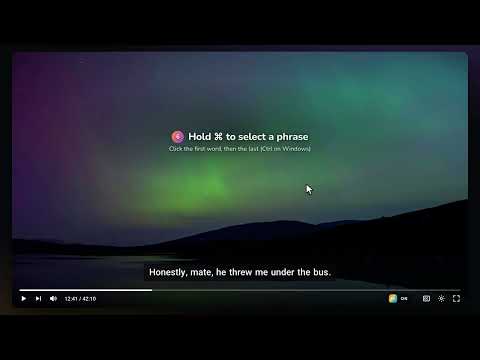
ClickCaptions turns the subtitles on YouTube, Netflix, Stan and HBO Max into a language-learning tool. Click any word in the captions and get a short, plain explanation of what it means in that sentence, written in your own language. Whether you're learning English, Spanish, Japanese, Korean, Chinese or another language, you can learn from the shows and videos you already watch instead of stopping to look things up in a dictionary. CLICK ANY WORD OR PHRASE 👆 Click a word and the video pauses while an explanation appears, matched to how the word is used in that exact sentence. Slang and idioms include a "Show origin" follow-up. 💬 Ask a follow-up: press Ask and type any question about the word, its origin or an earlier answer, like "Can I call my boss 'mate'?". The answer appears right in the tooltip, in your language. 🔗 ⌘-click (Ctrl-click on Windows) two words to select a whole phrase, even across the previous sentence. 🔍 Words inside an explanation are clickable too, so you can dig into anything you don't know. 🔊 Press the pronounce button to hear natural speech for any word or phrase. WORKS IN ANY CAPTION LANGUAGE 🌐 Pick the caption language you're learning in ClickCaptions and the video's subtitles switch to it, even mid-video. ✂️ Languages written without spaces, like Chinese, Japanese and Thai, are split into words so each one is clickable. EXPLANATIONS IN YOUR LANGUAGE 🗣️ Choose from 16 explanation languages in the popup, including Simplified and Traditional Chinese, or pick "Same as captions" to get explanations in the language you're watching. BUILT FOR STUDYING ⌨️ Keyboard shortcuts: A or ← for the previous sentence, D or → for the next, S or ↓ to repeat, W or ↑ to pause. ⭐ Star any lookup to save it to your word list, synced to your account. 🕘 Recent lookups stay in the popup. On YouTube and Netflix they link back to the exact moment in the video. PRIVACY ClickCaptions only runs on YouTube, Netflix, Stan and HBO Max. Only the words you click or save, with their sentence, are sent to ClickCaptions' servers. No ads, and your data is never sold. PRICING A free account comes with a free allowance of AI explanations. ClickCaptions Pro adds a monthly allowance for regular use.
5 out of 53 ratings
Details
- Version1.30
- UpdatedNovember 11, 2026
- FeaturesOffers in-app purchases
- Offered byClickCaptions
- Size127KiB
- Languages7 languages
- Developer
Email
clickcaptions@gmail.com - Non-traderThis developer has not identified itself as a trader. For consumers in the European Union, please note that consumer rights do not apply to contracts between you and this developer.
Privacy

This developer declares that your data is
- Not being sold to third parties, outside of the approved use cases
- Not being used or transferred for purposes that are unrelated to the item's core functionality
- Not being used or transferred to determine creditworthiness or for lending purposes