


Overview
Billable hours timer that reminds you to start on a client's site and catches idle time. One-click invoices. No account.
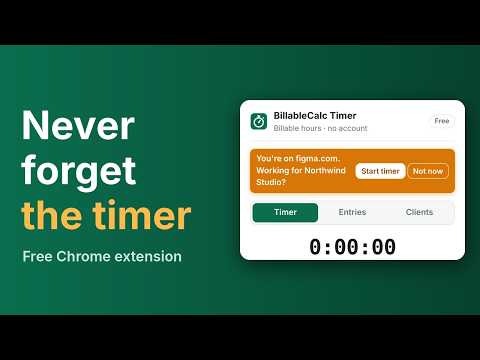
Stop losing billable hours to a timer you forgot to start. BillableCalc Timer tracks your hours per client, reminds you to start when you open a client's Figma, Jira or website, and asks what to do with the time you were away. No account: it runs in your browser and keeps your hours on your computer. NEVER FORGET TO START • Add a client's sites (figma.com, acme.atlassian.net, their domain) • Open one with the timer off and get a reminder: "Working for Acme? Start timer" • Timer running for another client? It offers to switch, so hours never land on the wrong client (can be turned off in Settings) • The extension gets access only to the sites you list, nothing else NEVER BILL IDLE TIME • Step away while the timer runs and it asks: keep that time or remove it? • Timer running for hours? It asks if you're still working • Every question also shows in the popup with an orange badge, so nothing is lost when macOS hides notifications TRACK • One-click timer: pick a client, type what you're working on, press Start • Keeps running when the window closes; elapsed time on the toolbar icon • Start or stop from any tab with Alt+Shift+T • Forgot the timer? Add time by hand or edit any entry SEE WHAT YOU EARN • Hourly rate and currency per client • Today, this week, last week, this month: hours and money at a glance INVOICE IN ONE CLICK • Pick a client and a period, press "Create invoice" • The free BillableCalc invoice generator opens with your hours filled in • Save as PDF, then mark the entries as invoiced FREE AND PRO • Free: timer, idle and long-run reminders, site reminders for 1 client, up to 2 clients, last 14 days of entries, invoices, backup • Pro ($4/month or $29/year): unlimited clients and site reminders, full history, CSV export, rounding to 6/15/30 minutes PRIVATE • No sign-up, no servers, no tracking • Hours and clients are stored in your browser only • Invoice data travels after the # in the link, which browsers never send to a server • Download a backup of your clients and hours at any time Questions: klachev.vitali@gmail.com
0 out of 5No ratings
Details
- Version0.2.1
- UpdatedNovember 9, 2026
- Size55.4KiB
- LanguagesEnglish
- Developer
- TraderThis developer has identified itself as a trader per the definition from the European Union and committed to only offer products or services that comply with EU laws.
Privacy

This developer declares that your data is
- Not being sold to third parties, outside of the approved use cases
- Not being used or transferred for purposes that are unrelated to the item's core functionality
- Not being used or transferred to determine creditworthiness or for lending purposes
Support
For help with questions, suggestions, or problems, visit the developer's support site