

SellerScope Global
5 ratings
)
Overview
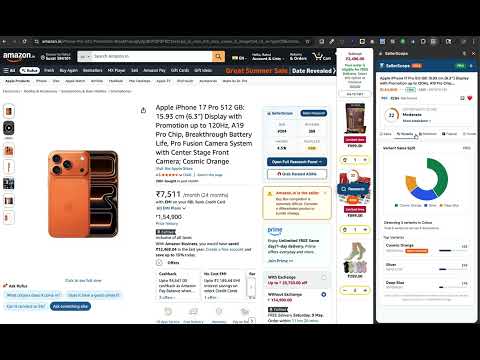
Sales estimates, a margin calculator and competition scores on the product page you open.
SellerScope Global is an Amazon product research Chrome extension. Open a product page and the side panel shows a Best Seller Rank sales estimate, an FBA or FBM fee and margin calculation, and a competition score for that listing. It is for sellers comparing Amazon.in products before they buy inventory. The same panel estimates sales and calculates fees on Amazon.com, Amazon.ca, Amazon.ae and Amazon.co.uk, in the currency on that page. The interface is English. Monthly sales figures are modelled ranges from rank and category. When the page shows Amazon's "bought in past month" badge, that badge is labelled separately from the estimate. SellerScope does not read Seller Central. These numbers are not your orders, and they are not a promise of profit. Sales estimates Monthly units appear as a conservative, mid and optimistic range. Revenue is that range times the observed price. The confidence label depends on the rank and category. If the page has no Best Seller Rank, the panel names the fallback it used. You can export the estimate to CSV. Amazon FBA profit calculator The calculator fills in selling price, category and item weight when the page shows them. You enter product cost, inbound shipping and packaging. It then adds the referral fee, the weight-handling or fulfilment fee, and the closing fee. On Amazon.in, GST on Amazon fees defaults to 18%. Amazon.com prices are before state sales tax. Amazon.ca includes a 5% GST estimate on Amazon fees. Amazon.co.uk and Amazon.ae use that site's fees and VAT. Switch FBA and FBM to compare net profit, ROI and a break-even price. Marketplaces change fees without notice, so confirm a fee that the order depends on in Seller Central. Competition and observed offers On Amazon.in, Analyse scores competition from 1 to 10 using review counts on the first 10 organic results it could read. A higher score means a higher average review count in that sample. It does not use brand share, seller count or listing quality, and it is not a measure of how hard the niche is to enter. An opportunity score from 0 to 100 appears only when inputs such as demand or margin are available, and the panel shows how many inputs it used. Offers and sellers are counted separately. One seller with an FBA offer and an FBM offer is two offers and one seller. Unknown fulfilment stays unknown. The current Buy Box comes from the page you are on. This is the sample SellerScope could see, not every seller and not a stock count. Listing quality and Amazon keyword research The listing score checks title length, bullet points, image count, product video, A+ content and reviews on the open product. It is a content check, not a prediction of search rank. Keyword coverage looks for category phrases in the title, bullets and description. Pro keyword research returns search-volume ranges, related phrases and a difficulty label. You can search a seed keyword, run a reverse ASIN lookup, or compare a keyword gap against another ASIN. The rank tracker stores positions you type in. The AI listing builder drafts a title and bullets from keywords already loaded for that product. Volumes are ranges, not measured Amazon search traffic. Reviews, seasons, suppliers and other stores Pro review insights sort recent reviews into complaints, praise and a sourcing question. The summary can read English, Hindi and Hinglish review text. There is no Hindi menu. Review text is used for that summary and is not stored as a copy of the reviews. Each summary is cached per ASIN. The festival planner charts a category demand index across the year, including Indian selling seasons such as Diwali, and lists sourcing dates from that index. Domestic dates assume a 14-day lead time. International dates assume 45 days. Also sold elsewhere looks up Flipkart, Myntra and Meesho and shows a price when it matches a listing. Find this store elsewhere searches the brand or store name from the Amazon page on those three sites. A matching name does not prove an official store. Pro hyperlocal checks look for the item on Blinkit, Zepto, Swiggy and ONDC. Open the linked page before you treat a price as current. Regional demand ranks places for the Amazon country open in the tab, as a guide for FBA inbound placement. The supplier tab links IndiaMart for Indian suppliers and Alibaba for factories outside India, plus a short verification checklist. Market Scan filters a crowdsourced ASIN catalog by category, price, Best Seller Rank, rating and review count. It is not Amazon's full catalogue. History, watchlist and records you enter BSR and price history are charts of anonymous snapshots saved when SellerScope users open a product. Some dates have no point, and how far back the chart goes depends on the plan. The watchlist keeps Amazon.in products you add and can notify you about price and Best Seller Rank changes for those products. The variants tab lists colour and size ASINs on the current listing. Amazon does not publish sales per variant, so no split is shown. The seller profile shows feedback count and positive percentage when the page includes them. A seller's full catalogue is not available. On an Amazon.in seller-filtered page or brand store, you can capture 1 to 20 product cards visible on screen. That capture is not the seller's inventory, and a brand store does not show who sells each item. P&L adds up sales entries you type: selling price, cost, fees and units. It does not pull settlements from Amazon. Inventory forecasting suggests a restock quantity from those entries, stock quantities you record, and a lead time you set. It does not see a competitor's stock. Search pages and saved research On an Amazon.in search page, the research table is the results captured on that page. Filter, sort, hide rows, compare the products you select, and export a CSV. Analyze Selected runs estimates for up to 20 ASINs from the rows you ticked. Brand comparison summarises brands in the visible sample. A share is a count of products in that sample, not a share of the market. Saved lists sit on your SellerScope account. Add notes and tags, reopen an earlier observation, and download a CSV. Compare two saved samples, or an earlier save and a later save of the same seller filter or store path. Those are the two saves you made. The extension does not keep watching that seller, and a product present in only one save is a sample difference, not proof it was listed or removed. Bulk analysis estimates up to 20 ASINs pasted into the panel. Pro and Team can create API keys for sales estimates, fee calculations, keyword lookups and regional demand. Plans Free: 5 product lookups a day, sales estimates and a basic margin calculator. After sign-in, 1 saved list of up to 20 products. Starter: ₹299 a month or ₹2,499 a year. 100 lookups a day, the full FBA and FBM calculator, competition analysis and BSR trend tools. 5 lists, up to 200 products. Pro: ₹699 a month or ₹5,999 a year. No daily lookup cap. Keywords, reverse ASIN, review insights, listing tools, festival planning, other-store checks and supplier links. 20 lists, up to 2,000 products. Team: ₹1,499 a month or ₹12,999 a year. Everything in Pro, 5 seats, and priority email. 100 lists, up to 10,000 products. Annual prices are the charge for the full year. A 7-day Pro trial needs an email and no card, and each email can start it once. Manage a plan at https://getsellerscope.com/account/ The published terms give 7 days to ask for the first paid charge back. Email support@getsellerscope.com with the Razorpay receipt. Common questions What is SellerScope? A Chrome side panel for Amazon product research on the product page you already have open. Does it show actual Amazon sales? No. Monthly units are a modelled range from Best Seller Rank and category. Does the Amazon seller fee calculator include GST? On Amazon.in, GST on Amazon's fees is included and defaults to 18%. You still add your product cost. Returns, storage and advertising are not filled in for you. Can I research Flipkart or Meesho products? From an Amazon listing, SellerScope can search Flipkart, Myntra and Meesho for a price or a store name. The research panel itself runs on Amazon product and search pages. Is there a free Amazon product research plan? Yes. Free is 5 lookups a day. The 7-day Pro trial does not ask for a card. Limits SellerScope does not report exact unit sales or revenue. It does not read Seller Central or your browsing history. It does not list a brand's or seller's complete inventory, and it does not decide who owns a brand. It is not affiliated with Amazon, Flipkart, Myntra or Meesho. Privacy The extension reads public fields on the marketplace page you open and sends those fields to SellerScope for the panel. Your email is used for the licence and the sign-in link. Card numbers stay with Razorpay. Privacy policy: https://getsellerscope.com/privacy/ Support: support@getsellerscope.com
4.8 out of 55 ratings
Details
- Version6.4.2
- UpdatedOctober 27, 2026
- Offered byjenniwebstudio
- Size903KiB
- Languages2 languages
- DeveloperRAHUL JAYANTIBHAI JALAVADIYA
21, Kasturi bunglows, Nr. Kanha Rasvalley Nr. Golden Chowk, Mota varachha Surat, Gujarat 394101 INEmail
jenniwebstudio@gmail.comPhone
+91 76982 98965 - TraderThis developer has identified itself as a trader per the definition from the European Union and committed to only offer products or services that comply with EU laws.
Privacy

SellerScope Global has disclosed the following information regarding the collection and usage of your data. More detailed information can be found in the developer's privacy policy.
SellerScope Global handles the following:
This developer declares that your data is
- Not being sold to third parties, outside of the approved use cases
- Not being used or transferred for purposes that are unrelated to the item's core functionality
- Not being used or transferred to determine creditworthiness or for lending purposes
Support
For help with questions, suggestions, or problems, visit the developer's support site