

BlurMyScreen
3 ratings
)
Overview
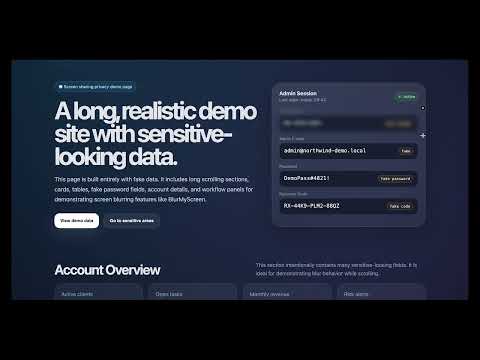
Blur, mosaic, cover or blackout any tab. Regional blur, auto-blur, PIN lock, focus timer & boss screen. 100% local, no data.
# Chrome Web Store listing — BlurMyScreen v1.4.0 ## Short description (max 132 chars — also used in manifest) Blur, mosaic, cover or blackout any tab. Regional blur, auto-blur, PIN lock, focus timer & boss screen. 100% local, no data. ## Full description BlurMyScreen hides your screen content with one click — ideal for video calls, screenshares, working in public, or any moment you need instant privacy. And when you want more than a tool, an optional playful layer turns it into something you'll actually enjoy keeping around. ── Hide anything, instantly ── • Four core styles - Blur: Smooth Gaussian blur — covers everything including HTML5 video and canvas elements. - Mosaic: Fine tile pixelation from a page screenshot. If a screenshot can't be taken it safely falls back to Blur — your screen is never left exposed. - Cover: A solid colour of your choice, at an adjustable opacity. - Black: Instant full blackout. • Regional blur Drag a box over just the part you need hidden — a password field, a chat preview, anything. Regions are anchored to the page itself, so they stay perfectly glued to their spot even during fast scrolling. • Auto-blur Blurs the tab after your mouse sits idle for a set time — step away without thinking about it. It only undoes the blur it applied itself; a blur you turned on manually always stays. • Screen lock with PIN Instantly black out the screen and require a PIN to unlock. The PIN is hashed before it's stored — never saved in plain text, never leaves your device. • Keyboard shortcuts Toggle blur with Ctrl+Shift+U (⌘+Shift+U on Mac). The popup always shows your current shortcut and links straight to Chrome's shortcut settings. • Intuitive intensity & at-a-glance status Pick from Faint to Max on a slider with a live blurred sample; the toolbar icon shows an "ON" badge whenever the current tab is hidden. ── Playful extras (all optional, all off by default) ── Flip one switch in Settings and BlurMyScreen grows a personality — flip it back and it's a plain privacy tool again. Nothing below ever appears until you ask for it. • Flashlight peek While a tab is hidden, hold Alt (⌥ on Mac) to sweep a soft clear spotlight under your cursor — like a torch in a dark room. Release to re-hide instantly. Videos and embeds stay protected even mid-peek. • Focus timer Pomodoro-style cycles: work with a clear screen, then a calm full-screen break page reminds you to step away — complete with a tiny looping pixel scene to watch while you breathe. Closing the break tab means "back to work". Durations are configurable. • Boss screen One shortcut (Ctrl/⌘+Shift+X) swaps the tab for an innocent screen — no words on it, so it works in any language. Default is plain white with a gently wandering "?", or add your own image (your screen's ratio fits best, e.g. 1920×1080; up to 10 MB) and make it anything you like. • Three extra hide styles Frosted glass (blur behind an icy, grainy pane), TV static (opaque animated noise) and Fog (blur under a slowly drifting mist). Each one you enable appears as a style pill in the popup. • Lock screen looks Dress up the PIN lock: clocks in four styles (digital, digital + date, analog, minimal analog), backgrounds (black, midnight, starry night) and a little DVD-style bouncing lock. • Local stats & streaks How often your screen was protected, focus sessions, day streaks — counted on your device, shown only to you, resettable anytime. A small 🔥 chip in the popup celebrates a live streak. • Seasonal touches Snow drifts over your hides in December, bats in late October. The rest of the year, nothing changes at all. All extras respect your system's reduced-motion setting, and none of them ever slows down the moment that matters: hiding your screen is always instant. ── Privacy ── BlurMyScreen collects no data whatsoever. No analytics, no tracking, no remote servers — the extension makes zero network requests. All processing happens locally inside your browser. Preferences, local stats, your optional boss-screen image and your optional PIN (hashed, never plain text) are stored only in chrome.storage.local on your own device and never leave it. Mosaic mode's screenshot is held only in memory while the effect is active, then discarded — never written to disk or sent anywhere. ── Permissions ── Only four minimal permissions — no broad host access, no "<all_urls>": • activeTab + scripting: apply the hide to the tab you invoke it on, and only that tab. • storage: remember your preferences on this device. • alarms: keep the focus timer's clock running reliably (this permission shows no install warning and grants no data access). ---Updates (v1.4.0)--- - New Settings page (the gear in the popup) — home of the optional "Playful extras" layer; the popup itself stays as clean as ever - Flashlight peek: hold Alt to sweep a clear spotlight while hidden - Focus timer with a calm pixel-art break scene (Pomodoro-style cycles) - Boss screen: one shortcut swaps the tab for an innocent, language-free screen — default white with a wandering "?", or your own image - Three new hide styles: Frosted glass, TV static, Fog - Lock screen looks: clocks in 4 styles, backgrounds, and a bouncing lock - Local-only stats and day streaks, resettable anytime - Seasonal touches: snow in December, bats in late October (opt-in) - PIN management moved to Settings; update notices now stay until you've actually read them — and new installs get the tour too - Videos and embeds stay blurred during flashlight peek; smoother, more energy-efficient animations throughout ---Updates (v1.3.0)--- - One-click whole-tab hide is now the main button, with your chosen style - Auto-blur now survives pages that refresh themselves (common on news sites): the timer re-arms automatically, and if the screen was hidden it's hidden again the instant the page finishes loading - Live preview: intensity and colour apply to the page as you drag - Intensity levels renamed Faint → Max, with a live blurred sample in the popup - Regional blur re-engineered: regions are anchored to the page itself, so fast scrolling can no longer reveal what's underneath for a split second - Toolbar icon now shows an "ON" badge on hidden tabs - Mosaic safely falls back to Blur if a screenshot isn't available - Fixed: screen lock could appear off-screen on scrolled pages; repeated region selection could freeze the page; manual blur was cancelled by auto-blur - Smoother, springier controls with subtle icon animations, keyboard-focus outlines, and reduced-motion support ---Updates (v1.2.0)--- - New Black mode for instant blackout, and Cover mode with a custom colour (replaces the old Pixel mode) - Regional blur: hide just one part of the screen — it tracks scroll so it never slips out of place - Auto-blur on idle, with a configurable delay - Optional PIN-protected screen lock (PIN is hashed, not stored in plain text) - Redesigned popup with clearer, more direct controls
5 out of 53 ratings
Details
- Version1.4.0
- UpdatedJuly 16, 2026
- Offered byLittleDev
- Size82.73KiB
- LanguagesEnglish
- Developer
Email
cnygt16@gmail.com - Non-traderThis developer has not identified itself as a trader. For consumers in the European Union, please note that consumer rights do not apply to contracts between you and this developer.
Privacy

This developer declares that your data is
- Not being sold to third parties, outside of the approved use cases
- Not being used or transferred for purposes that are unrelated to the item's core functionality
- Not being used or transferred to determine creditworthiness or for lending purposes